Deleting object versions from a versioning-enabled bucket
You can delete object versions from Amazon S3 buckets whenever you want. You can also define lifecycle configuration rules for objects that have a well-defined lifecycle to request Amazon S3 to expire current object versions or permanently remove noncurrent object versions. When your bucket is version-enabled or versioning is suspended, the lifecycle configuration actions work as follows:
-
The
Expirationaction applies to the current object version. Instead of deleting the current object version, Amazon S3 retains the current version as a noncurrent version by adding a delete marker, which then becomes the current version. -
The
NoncurrentVersionExpirationaction applies to noncurrent object versions, and Amazon S3 permanently removes these object versions. You cannot recover permanently removed objects.
For more information about S3 Lifecycle, see Managing your storage lifecycle and Examples of S3 Lifecycle configuration.
To see how many current and noncurrent object versions that your buckets have, you can use Amazon S3 Storage Lens metrics. S3 Storage Lens is a cloud-storage analytics feature that you can use to gain organization-wide visibility into object-storage usage and activity. For more information, see Using S3 Storage Lens to optimize your storage costs. For a complete list of metrics, see S3 Storage Lens metrics glossary.
Note
Normal Amazon S3 rates apply for every version of an object that is stored and transferred,
including noncurrent object versions. For more information, see Amazon S3 pricing
Delete request use cases
A DELETE request has the following use cases:
-
When versioning is enabled, a simple
DELETEcannot permanently delete an object. (A simpleDELETErequest is a request that doesn't specify a version ID.) Instead, Amazon S3 inserts a delete marker in the bucket, and that marker becomes the current version of the object with a new ID.When you try to
GETan object whose current version is a delete marker, Amazon S3 behaves as though the object has been deleted (even though it has not been erased) and returns a 404 error. For more information, see Working with delete markers.The following figure shows that a simple
DELETEdoes not actually remove the specified object. Instead, Amazon S3 inserts a delete marker.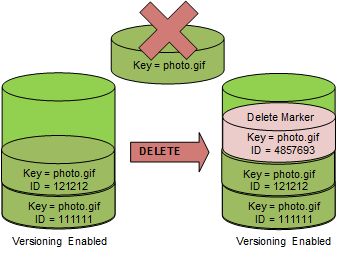
-
To delete versioned objects permanently, you must use
DELETE Object versionId.The following figure shows that deleting a specified object version permanently removes that object.
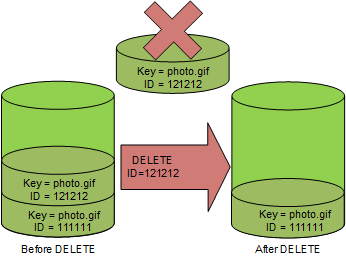
To delete object versions
You can delete object versions in Amazon S3 using the console, AWS SDKs, the REST API, or the AWS Command Line Interface.
Sign in to the AWS Management Console and open the Amazon S3 console at https://console.aws.amazon.com/s3/
. -
In the Buckets list, choose the name of the bucket that contains the object.
-
In the Objects list, choose the name of the object.
-
Choose Versions.
Amazon S3 shows all the versions for the object.
-
Select the check box next to the Version ID for the versions that you want to permanently delete.
-
Choose Delete.
-
In Permanently delete objects?, enter
permanently delete.Warning
When you permanently delete an object version, the action cannot be undone.
-
Choose Delete objects.
Amazon S3 deletes the object version.
For examples of deleting objects using the AWS SDKs for Java, .NET, and PHP, see Deleting Amazon S3 objects. The examples for deleting objects in nonversioned and versioning-enabled buckets are the same. However, for versioning-enabled buckets, Amazon S3 assigns a version number. Otherwise, the version number is null.
For information about using other AWS SDKs, see the AWS Developer Center
To delete a specific version of an object
-
In a
DELETE, specify a version ID.
Example — Deleting a specific version
The following example deletes version UIORUnfnd89493jJFJ
of photo.gif.
DELETE /photo.gif?versionId=UIORUnfnd89493jJFJ HTTP/1.1
Host: bucket.s3.amazonaws.com
Date: Wed, 12 Oct 2009 17:50:00 GMT
Authorization: AWS AKIAIOSFODNN7EXAMPLE:xQE0diMbLRepdf3YB+FIEXAMPLE=
Content-Type: text/plain
Content-Length: 0
The following command deletes an object named test.txt from a bucket named
DOC-EXAMPLE-BUCKET1
aws s3api delete-object --bucketDOC-EXAMPLE-BUCKET1--key test.txt --version-idversionID
For more information about delete-object see delete-object in the
AWS CLI Command Reference.
For more information about deleting object versions, see the following topics:
