Connecting to a DB instance running the MySQL database engine
Before you can connect to a DB instance running the MySQL database engine, you must create a DB instance. For information, see Creating an Amazon RDS DB instance. After Amazon RDS provisions your DB instance, you can use any standard MySQL client application or utility to connect to the instance. In the connection string, you specify the DNS address from the DB instance endpoint as the host parameter, and specify the port number from the DB instance endpoint as the port parameter.
To authenticate to your RDS DB instance, you can use one of the authentication methods for MySQL and AWS Identity and Access Management (IAM) database authentication:
To learn how to authenticate to MySQL using one of the authentication methods for MySQL, see Authentication method
in the MySQL documentation. To learn how to authenticate to MySQL using IAM database authentication, see IAM database authentication for MariaDB, MySQL, and PostgreSQL.
You can connect to a MySQL DB instance by using tools like the MySQL command-line client.
For more information on using the MySQL command-line client, see mysql - the MySQL command-line
client
Most Linux distributions include the MariaDB client instead of the Oracle MySQL client. To install the MySQL command-line client on Amazon Linux 2023, run the following command:
sudo dnf install mariadb105
To install the MySQL command-line client on Amazon Linux 2, run the following command:
sudo yum install mariadb
To install the MySQL command-line client on most DEB-based Linux distributions, run the following command:
apt-get install mariadb-client
To check the version of your MySQL command-line client, run the following command:
mysql --version
To read the MySQL documentation for your current client version, run the following command:
man mysql
To connect to a DB instance from outside of its Amazon VPC, the DB instance must be publicly accessible, access must be granted using the inbound rules of the DB instance's security group, and other requirements must be met. For more information, see Can't connect to Amazon RDS DB instance.
You can use Secure Sockets Layer (SSL) or Transport Layer Security (TLS) encryption on connections to a MySQL DB instance. For information, see Using SSL/TLS with a MySQL DB instance. If you are using AWS Identity and Access Management (IAM) database authentication, make sure to use an SSL/TLS connection. For information, see IAM database authentication for MariaDB, MySQL, and PostgreSQL.
You can also connect to a DB instance from a web server. For more information, see Tutorial: Create a web server and an Amazon RDS DB instance.
Note
For information on connecting to a MariaDB DB instance, see Connecting to a DB instance running the MariaDB database engine.
Topics
Finding the connection information for a MySQL DB instance
The connection information for a DB instance includes its endpoint, port, and a valid
database user, such as the master user. For example, suppose that an endpoint value is
mydb.123456789012.us-east-1.rds.amazonaws.com. In this case, the port
value is 3306, and the database user is admin. Given this
information, you specify the following values in a connection string:
-
For host or host name or DNS name, specify
mydb.123456789012.us-east-1.rds.amazonaws.com. -
For port, specify
3306. -
For user, specify
admin.
To connect to a DB instance, use any client for the MySQL DB engine. For example, you might use the MySQL command-line client or MySQL Workbench.
To find the connection information for a DB instance, you can use the AWS Management Console, the AWS CLI describe-db-instances command, or the Amazon RDS API DescribeDBInstances operation to list its details.
To find the connection information for a DB instance in the AWS Management Console
Sign in to the AWS Management Console and open the Amazon RDS console at https://console.aws.amazon.com/rds/
. -
In the navigation pane, choose Databases to display a list of your DB instances.
-
Choose the name of the MySQL DB instance to display its details.
-
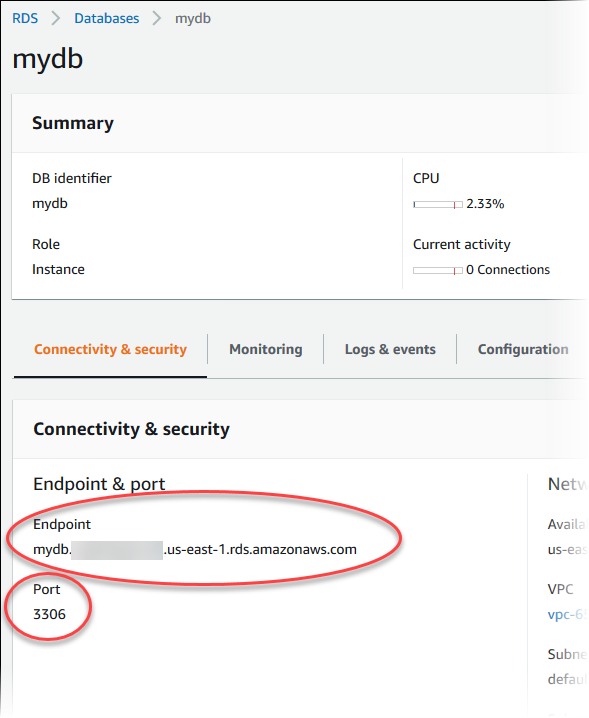
On the Connectivity & security tab, copy the endpoint. Also, note the port number. You need both the endpoint and the port number to connect to the DB instance.
-
If you need to find the master user name, choose the Configuration tab and view the Master username value.
To find the connection information for a MySQL DB instance by using the AWS CLI, call the describe-db-instances command. In the call, query for the DB instance ID, endpoint, port, and master user name.
For Linux, macOS, or Unix:
aws rds describe-db-instances \
  --filters "Name=engine,Values=mysql" \
  --query "*[].[DBInstanceIdentifier,Endpoint.Address,Endpoint.Port,MasterUsername]"
For Windows:
aws rds describe-db-instances ^
  --filters "Name=engine,Values=mysql" ^
  --query "*[].[DBInstanceIdentifier,Endpoint.Address,Endpoint.Port,MasterUsername]"
Your output should be similar to the following.
[
    [
        "mydb1",
        "mydb1.123456789012.us-east-1.rds.amazonaws.com",
        3306,
        "admin"
    ],
    [
        "mydb2",
        "mydb2.123456789012.us-east-1.rds.amazonaws.com",
        3306,
        "admin"
    ]
]
To find the connection information for a DB instance by using the Amazon RDS API, call the DescribeDBInstances operation. In the output, find the values for the endpoint address, endpoint port, and master user name.
Connecting from the MySQL command-line client (unencrypted)
Important
Only use an unencrypted MySQL connection when the client and server are in the same VPC and the network is trusted. For information about using encrypted connections, see Connecting from the MySQL command-line client with SSL/TLS (encrypted).
To connect to a DB instance using the MySQL command-line client, enter the following command at the command prompt. For the -h parameter, substitute the DNS name (endpoint) for your DB instance. For the -P parameter, substitute the port for your DB instance. For the -u parameter, substitute the user name of a valid database user, such as the master user. Enter the master user password when prompted.
mysql -hmysql–instance1.123456789012.us-east-1.rds.amazonaws.com-P 3306 -umymasteruser-p
After you enter the password for the user, you should see output similar to the following.
Welcome to the MySQL monitor.  Commands end with ; or \g.
Your MySQL connection id is 9738
Server version: 8.0.28 Source distribution

Type 'help;' or '\h' for help. Type '\c' to clear the buffer.

mysql>
Connecting from MySQL Workbench
To connect from MySQL Workbench
-
Download and install MySQL Workbench at Download MySQL Workbench
. -
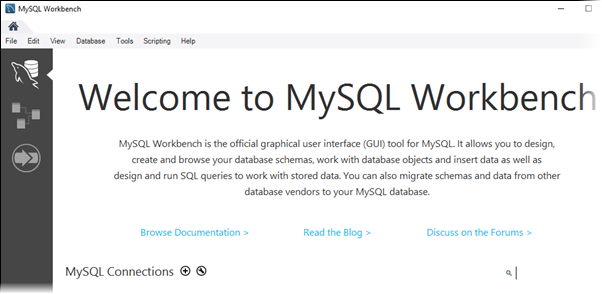
Open MySQL Workbench.
-
From Database, choose Manage Connections.
-
In the Manage Server Connections window, choose New.
-
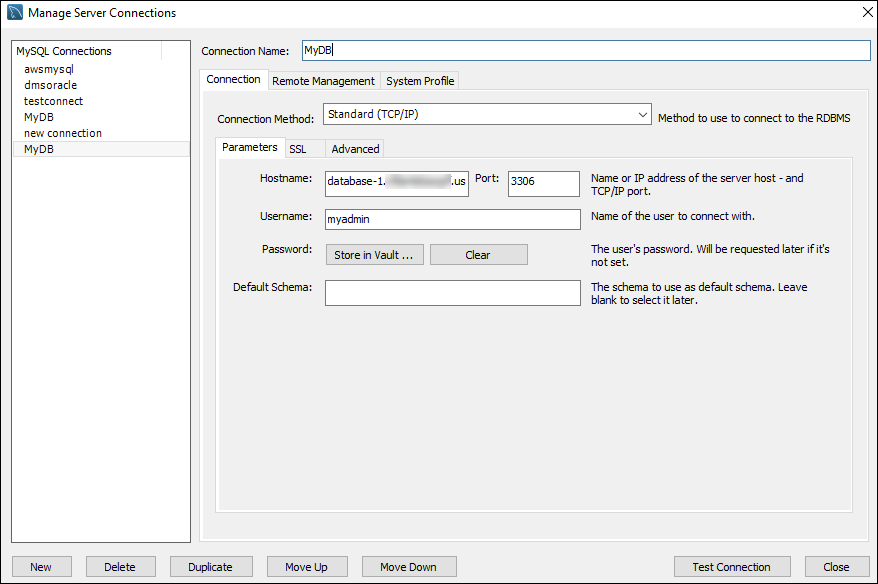
In the Connect to Database window, enter the following information:
-
Stored Connection – Enter a name for the connection, such as
MyDB. -
Hostname – Enter the DB instance endpoint.
-
Port – Enter the port used by the DB instance.
-
Username – Enter the user name of a valid database user, such as the master user.
-
Password – Optionally, choose Store in Vault and then enter and save the password for the user.
The window looks similar to the following:
You can use the features of MySQL Workbench to customize connections. For example, you can use the SSL tab to configure SSL/TLS connections. For information about using MySQL Workbench, see the MySQL Workbench documentation
. Encrypting client connections to MySQL DB instances with SSL/TLS, see Encrypting client connections to MySQL DB instances with SSL/TLS. -
-
Optionally, choose Test Connection to confirm that the connection to the DB instance is successful.
-
Choose Close.
-
From Database, choose Connect to Database.
-
From Stored Connection, choose your connection.
-
Choose OK.
Connecting with the Amazon Web Services JDBC Driver for MySQL
The AWS JDBC Driver for MySQL is a client driver designed for RDS for MySQL. By default, the driver has settings
that are optimized for use with RDS for MySQL. For more information about the driver and complete instructions
for using it, see the AWS JDBC Driver for MySQL GitHub repository
The driver is drop-in compatible with the MySQL Connector/J driver. To install or upgrade your connector,
replace the MySQL connector .jar file (located in the application CLASSPATH) with the AWS JDBC Driver for MySQL .jar file,
and update the connection URL prefix from jdbc:mysql:// to jdbc:mysql:aws://.
The AWS JDBC Driver for MySQL supports IAM database authentication. For more information, see AWS IAM Database Authentication
Troubleshooting connections to your MySQL DB instance
Two common causes of connection failures to a new DB instance are:
-
The DB instance was created using a security group that doesn't authorize connections from the device or Amazon EC2 instance where the MySQL application or utility is running. The DB instance must have a VPC security group that authorizes the connections. For more information, see Amazon VPC VPCs and Amazon RDS.
You can add or edit an inbound rule in the security group. For Source, choose My IP. This allows access to the DB instance from the IP address detected in your browser.
-
The DB instance was created using the default port of 3306, and your company has firewall rules blocking connections to that port from devices in your company network. To fix this failure, recreate the instance with a different port.
For more information on connection issues, see Can't connect to Amazon RDS DB instance.
