DB instance classes
The DB instance class determines the computation and memory capacity of an Amazon RDS DB instance. The DB instance class that you need depends on your processing power and memory requirements.
A DB instance class consists of both the DB instance class type and the size. For example, db.r6g is a memory-optimized DB instance class type powered by AWS Graviton2 processors. Within the db.r6g instance class type, db.r6g.2xlarge is a DB instance class. The size of this class is 2xlarge.
For more information about instance class pricing, see Amazon RDS
pricing
Topics
DB instance class types
Amazon RDS supports DB instance classes for the following use cases:
For more information about Amazon EC2 instance types, see Instance types in the Amazon EC2 documentation.
General-purpose instance class type
The following general-purpose DB instance classes are available:
-
db.m7g – General-purpose DB instance classes powered by AWS Graviton3 processors. These instance classes deliver balanced compute, memory, and networking for a broad range of general-purpose workloads.
You can modify a DB instance to use one of the DB instance classes powered by AWS Graviton3 processors. To do so, complete the same steps as with any other DB instance modification.
-
db.m6g – General-purpose DB instance classes powered by AWS Graviton2 processors. These instances deliver balanced compute, memory, and networking for a broad range of general-purpose workloads. The db.m6gd instance classes have local NVMe-based SSD block-level storage for applications that need high-speed, low latency local storage.
You can modify a DB instance to use one of the DB instance classes powered by AWS Graviton2 processors. To do so, complete the same steps as with any other DB instance modification.
-
db.m6i – General-purpose DB instance classes powered by 3rd Generation Intel Xeon Scalable processors. These instances are SAP Certified and ideal for workloads such as backend servers supporting enterprise applications, gaming servers, caching fleets, and application development environments. The db.m6id and db.m6idn instance classes offer up to 7.6 TB of local NVMe-based SSD storage, whereas db.m6in offers EBS-only storage. The db.m6in and db.m6idn classes offer up to 200 Gbps of network bandwidth.
-
db.m5 –General-purpose DB instance classes that provide a balance of compute, memory, and network resources, and are a good choice for many applications. The db.m5d instance class offers NVMe-based SSD storage that is physically connected to the host server. The db.m5 instance classes provide more computing capacity than the previous db.m4 instance classes. They are powered by the AWS Nitro System, a combination of dedicated hardware and lightweight hypervisor.
-
db.m4 – General-purpose DB instance classes that provide more computing capacity than the previous db.m3 instance classes.
For the RDS for Oracle DB engines, Amazon RDS no longer supports db.m4 DB instance classes. If you had previously created RDS for Oracle db.m4 DB instances, Amazon RDS automatically upgrades those DB instances to equivalent db.m5 DB instance classes.
-
db.m3 – General-purpose DB instance classes that provide more computing capacity than the previous db.m1 instance classes.
For the RDS for MariaDB, RDS for MySQL, and RDS for PostgreSQL DB engines, Amazon RDS has started the end-of-life process for db.m3 DB instance classes using the following schedule, which includes upgrade recommendations. For all RDS DB instances that use db.m3 DB instance classes, we recommend that you upgrade to a higher generation DB instance class as soon as possible.
Action or recommendation Dates You can no longer create RDS DB instances that use db.m3 DB instance classes.
Now
Amazon RDS started automatic upgrades of RDS DB instances that use db.m3 DB instance classes to equivalent db.m5 DB instance classes.
February 1, 2023
Memory-optimized instance class type
The memory-optimized Z family supports the following instance classes:
-
db.z1d – Instance classes optimized for memory-intensive applications. These instance classes offer both high compute capacity and a high memory footprint. High frequency z1d instances deliver a sustained all-core frequency of up to 4.0 GHz.
The memory-optimized X family supports the following instance classes:
-
db.x2g – Instance classes optimized for memory-intensive applications and powered by AWS Graviton2 processors. These instance classes offer low cost per GiB of memory.
You can modify a DB instance to use one of the DB instance classes powered by AWS Graviton2 processors. To do so, complete the same steps as with any other DB instance modification.
-
db.x2i – Instance classes optimized for memory-intensive applications. The db.x2iedn and db.x2idn instance class types are powered by third-generation Intel Xeon Scalable processors (Ice Lake). They include up to 3.8 TB of local NVMe SSD storage, up to 100 Gbps of networking bandwidth, and up to 4 TiB (db.x2iden) or 2 TiB (db.x2idn) of memory. The db.x2iezn type is powered by second-generation Intel Xeon Scalable processors (Cascade Lake) with an all-core turbo frequency of up to 4.5 GHz and up to 1.5 TiB of memory.
-
db.x1 – Instance classes optimized for memory-intensive applications. These instance classes offer one of the lowest price per GiB of RAM among the DB instance classes and up to 1,952 GiB of DRAM-based instance memory. The db.x1e instance class type offers up to 3,904 GiB of DRAM-based instance memory.
The memory-optimized R family supports the following instance class types:
-
db.r7g – Instance classes powered by AWS Graviton3 processors. These instance classes are ideal for running memory-intensive workloads in open-source databases such as MySQL and PostgreSQL.
You can modify a DB instance to use one of the DB instance classes powered by AWS Graviton3 processors. To do so, complete the same steps as with any other DB instance modification.
-
db.r6g – Instance classes powered by AWS Graviton2 processors. These instance classes are ideal for running memory-intensive workloads in open-source databases such as MySQL and PostgreSQL. The db.r6gd type offers local NVMe-based SSD block-level storage for applications that need high-speed, low latency local storage.
You can modify a DB instance to use one of the DB instance classes powered by AWS Graviton2 processors. To do so, complete the same steps as with any other DB instance modification.
-
db.r6i – Instance classes powered by 3rd Generation Intel Xeon Scalable processors. These instance classes are SAP-Certified and are an ideal fit for memory-intensive workloads in open-source databases such as MySQL and PostgreSQL. The db.r6id, db.r6in, and db.r6idn instance classes have a memory-to-vCPU ratio of 8:1 and a maximum memory of 1 TiB. The db.r6id and db.r6idn classes offer up to 7.6 TB of direct-attached NVMe-based SSD storage, whereas db.r6in offers EBS-only storage. The db.r6idn and db.r6in classes offer up to 200 Gbps of network bandwidth.
-
db.r5b – Instance classes that are memory-optimized for throughput-intensive applications. Powered by the AWS Nitro System, db.r5b instances deliver up to 60 Gbps bandwidth and 260,000 IOPS of EBS performance. This is the fastest block storage performance on EC2.
-
db.r5d – Instance classes that are optimized for low latency, very high random I/O performance, and high sequential read throughput.
-
db.r5 – Instance classes optimized for memory-intensive applications. These instance classes offer improved networking performance. They are powered by the AWS Nitro System, a combination of dedicated hardware and lightweight hypervisor.
-
db.r4 – Instance classes that provide improved networking over previous db.r3 instance classes.
For the RDS for Oracle DB engines, Amazon RDS has started the end-of-life process for db.r4 DB instance classes using the following schedule, which includes upgrade recommendations. For RDS for Oracle DB instances that use db.r4 instance classes, we recommend that you upgrade to a higher generation instance class as soon as possible.
Action or recommendation Dates You can no longer create RDS for Oracle DB instances that use db.r4 DB instance classes.
Now
Amazon RDS started automatic upgrades of RDS for Oracle DB instances that use db.r4 DB instance classes to equivalent db.r5 DB instance classes.
April 17, 2023
-
db.r3 – Instance classes that provide memory optimization.
For the RDS for MariaDB, RDS for MySQL, and RDS for PostgreSQL DB engines, Amazon RDS has started the end-of-life process for db.r3 DB instance classes using the following schedule, which includes upgrade recommendations. For all RDS DB instances that use db.r3 DB instance classes, we recommend that you upgrade to a higher generation DB instance class as soon as possible.
Action or recommendation Dates You can no longer create RDS DB instances that use db.r3 DB instance classes.
Now
Amazon RDS started automatic upgrades of RDS DB instances that use db.r3 DB instance classes to equivalent db.r5 DB instance classes.
February 1, 2023
Compute-optimized instance class type
The following compute-optimized instance class types are available:
-
db.c6gd – Instance classes that are ideal for running advanced compute-intensive workloads. Powered by AWS Graviton2 processors, these instance classes offer local NVMe-based SSD block-level storage for applications that need high-speed, low latency local storage.
Note
The c6gd instance classes are supported only for Multi-AZ DB cluster deployments. They're the only instance class supported for Multi-AZ DB clusters that offer the
mediuminstance size. For more information, see Multi-AZ DB cluster deployments.
Burstable-performance instance class types
The following burstable-performance DB instance class types are available:
-
db.t4g – General-purpose instance classes powered by Arm-based AWS Graviton2 processors. These instance classes deliver better price performance than previous burstable-performance DB instance classes for a broad set of burstable general-purpose workloads. Amazon RDS db.t4g instances are configured for Unlimited mode. This means that they can burst beyond the baseline over a 24-hour window for an additional charge.
You can modify a DB instance to use one of the DB instance classes powered by AWS Graviton2 processors. To do so, complete the same steps as with any other DB instance modification.
-
db.t3 – Instance classes that provide a baseline performance level, with the ability to burst to full CPU usage. The db.t3 instances are configured for Unlimited mode. These instance classes provide more computing capacity than the previous db.t2 instance classes. They are powered by the AWS Nitro System, a combination of dedicated hardware and lightweight hypervisor.
-
db.t2 – Instance classes that provide a baseline performance level, with the ability to burst to full CPU usage. The db.t2 instances are configured for Unlimited mode. We recommend using these instance classes only for development and test servers, or other non-production servers.
Note
The DB instance classes that use the AWS Nitro System (db.m5, db.r5, db.t3) are throttled on combined read plus write workload.
For DB instance class hardware specifications, see Hardware specifications for DB instance classes.
Optimized Reads instance class type
The following Optimized Reads instance class types are available:
-
db.r6gd – Instance classes powered by AWS Graviton2 processors. These instance classes are ideal for running memory-intensive workloads and offer local NVMe-based SSD block-level storage for applications that need high-speed, low latency local storage.
-
db.r6id – Instance classes powered by 3rd Generation Intel Xeon Scalable processors. These instance classes are SAP-Certified and are an ideal fit for memory-intensive workloads. They offer a maximum memory of 1 TiB and up to 7.6 TB of direct-attached NVMe-based SSD storage.
Supported DB engines for DB instance classes
The following are DB engine–specific considerations for DB instance classes:
- Db2
-
DB instance class support varies according to the version and edition of Db2. For instance class support by version and edition, see RDS for Db2 instance classes.
- Microsoft SQL Server
-
DB instance class support varies according to the version and edition of SQL Server. For instance class support by version and edition, see DB instance class support for Microsoft SQL Server.
- Oracle
-
DB instance class support varies according to the Oracle Database version and edition. RDS for Oracle supports additional memory-optimized instance classes. These classes have names of the form db.r5.
instance_size.tpcthreads_per_core.memratio. For the vCPU count and memory allocation for each optimized class, see Supported RDS for Oracle instance classes. - RDS Custom
-
For information about the DB instance classes supported in RDS Custom, see DB instance class support for RDS Custom for Oracle and DB instance class support for RDS Custom for SQL Server.
In the following table, you can find details about supported Amazon RDS DB instance classes for each Amazon RDS DB engine. The cell for each engine contains one of the following values:
- Yes
-
The instance class is supported for all versions of the DB engine.
- No
-
The instance class isn't supported for the DB engine.
specific-versions-
The instance class is supported only for the specified database versions of the DB engine.
Amazon RDS periodically deprecates major and minor DB engine versions. Not all AWS Regions might have support for earlier engine versions. For information about current supported versions, see topics for the individual DB engines: MariaDB versions, Microsoft SQL Server versions, MySQL versions, Oracle versions, and PostgreSQL versions.
Topics
Supported DB engines for general-purpose instance classes
The following tables show the supported databases and database versions for the general-purpose instance classes.
db.m7g – general-purpose instance classes powered by AWS Graviton3 processors
| Instance class | Db2 | MariaDB | Microsoft SQL Server | MySQL | Oracle | PostgreSQL |
|---|---|---|---|---|---|---|
| db.m7g.16xlarge | No | MariaDB 10.11 versions, 10.6.10 and higher 10.6 versions, 10.5.17 and higher 10.5 versions, and 10.4.26 and higher 10.4 versions | No | MySQL 8.0.28 and higher | No | All PostgreSQL 16 and 15 versions, 14.5 and higher 14 versions, and 13.4 and higher 13 versions |
| db.m7g.12xlarge | No | MariaDB 10.11 versions, 10.6.10 and higher 10.6 versions, 10.5.17 and higher 10.5 versions, and 10.4.26 and higher 10.4 versions | No | MySQL 8.0.28 and higher | No | All PostgreSQL 16 and 15 versions, 14.5 and higher 14 versions, and 13.4 and higher 13 versions |
| db.m7g.8xlarge | No | MariaDB 10.11 versions, 10.6.10 and higher 10.6 versions, 10.5.17 and higher 10.5 versions, and 10.4.26 and higher 10.4 versions | No | MySQL 8.0.28 and higher | No | All PostgreSQL 16 and 15 versions, 14.5 and higher 14 versions, and 13.4 and higher 13 versions |
| db.m7g.4xlarge | No | MariaDB 10.11 versions, 10.6.10 and higher 10.6 versions, 10.5.17 and higher 10.5 versions, and 10.4.26 and higher 10.4 versions | No | MySQL 8.0.28 and higher | No | All PostgreSQL 16 and 15 versions, 14.5 and higher 14 versions, and 13.4 and higher 13 versions |
| db.m7g.2xlarge | No | MariaDB 10.11 versions, 10.6.10 and higher 10.6 versions, 10.5.17 and higher 10.5 versions, and 10.4.26 and higher 10.4 versions | No | MySQL 8.0.28 and higher | No | All PostgreSQL 16 and 15 versions, 14.5 and higher 14 versions, and 13.4 and higher 13 versions |
| db.m7g.xlarge | No | MariaDB 10.11 versions, 10.6.10 and higher 10.6 versions, 10.5.17 and higher 10.5 versions, and 10.4.26 and higher 10.4 versions | No | MySQL 8.0.28 and higher | No | All PostgreSQL 16 and 15 versions, 14.5 and higher 14 versions, and 13.4 and higher 13 versions |
| db.m7g.large | No | MariaDB 10.11 versions, 10.6.10 and higher 10.6 versions, 10.5.17 and higher 10.5 versions, and 10.4.26 and higher 10.4 versions | No | MySQL 8.0.28 and higher | No | All PostgreSQL 16 and 15 versions, 14.5 and higher 14 versions, and 13.4 and higher 13 versions |
db.m6g – general-purpose instance classes powered by AWS Graviton2 processors
| Instance class | Db2 | MariaDB | Microsoft SQL Server | MySQL | Oracle | PostgreSQL |
|---|---|---|---|---|---|---|
| db.m6g.16xlarge | No | All MariaDB 10.11, 10.6, 10.5, and 10.4 versions | No | MySQL 8.0.23 and higher | No | All PostgreSQL 16, 15, 14, and 13 versions; and 12.7 and higher 12 versions |
| db.m6g.12xlarge | No | All MariaDB 10.11, 10.6, 10.5, and 10.4 versions | No | MySQL 8.0.23 and higher | No | All PostgreSQL 16, 15, 14, and 13 versions; and 12.7 and higher 12 versions |
| db.m6g.8xlarge | No | All MariaDB 10.11, 10.6, 10.5, and 10.4 versions | No | MySQL 8.0.23 and higher | No | All PostgreSQL 16, 15, 14, and 13 versions; and 12.7 and higher 12 versions |
| db.m6g.4xlarge | No | All MariaDB 10.11, 10.6, 10.5, and 10.4 versions | No | MySQL 8.0.23 and higher | No | All PostgreSQL 16, 15, 14, and 13 versions; and 12.7 and higher 12 versions |
| db.m6g.2xlarge | No | All MariaDB 10.11, 10.6, 10.5, and 10.4 versions | No | MySQL 8.0.23 and higher | No | All PostgreSQL 16, 15, 14, and 13 versions; and 12.7 and higher 12 versions |
| db.m6g.xlarge | No | All MariaDB 10.11, 10.6, 10.5, and 10.4 versions | No | MySQL 8.0.23 and higher | No | All PostgreSQL 16, 15, 14, and 13 versions; and 12.7 and higher 12 versions |
| db.m6g.large | No | All MariaDB 10.11, 10.6, 10.5, and 10.4 versions | No | MySQL 8.0.23 and higher | No | All PostgreSQL 16, 15, 14, and 13 versions; and 12.7 and higher 12 versions |
db.m6gd – general-purpose instance classes powered by AWS Graviton2 processors and SSD storage
| Instance class | Db2 | MariaDB | Microsoft SQL Server | MySQL | Oracle | PostgreSQL |
|---|---|---|---|---|---|---|
| db.m6gd.16xlarge | No | MariaDB 10.11 versions, 10.6.7 and higher 10.6 versions, 10.5.16 and higher 10.5 versions, and 10.4.25 and higher 10.4 versions | No | MySQL 8.0.28 and higher | No | All PostgreSQL 16, 15, and 14 versions; 13.7 and higher 13 versions; and 13.4 |
| db.m6gd.12xlarge | No | MariaDB 10.11 versions, 10.6.7 and higher 10.6 versions, 10.5.16 and higher 10.5 versions, and 10.4.25 and higher 10.4 versions | No | MySQL 8.0.28 and higher | No | All PostgreSQL 16, 15, and 14 versions; 13.7 and higher 13 versions; and 13.4 |
| db.m6gd.8xlarge | No | MariaDB 10.11 versions, 10.6.7 and higher 10.6 versions, 10.5.16 and higher 10.5 versions, and 10.4.25 and higher 10.4 versions | No | MySQL 8.0.28 and higher | No | All PostgreSQL 16, 15, and 14 versions; 13.7 and higher 13 versions; and 13.4 |
| db.m6gd.4xlarge | No | MariaDB 10.11 versions, 10.6.7 and higher 10.6 versions, 10.5.16 and higher 10.5 versions, and 10.4.25 and higher 10.4 versions | No | MySQL 8.0.28 and higher | No | All PostgreSQL 16, 15, and 14 versions; 13.7 and higher 13 versions; and 13.4 |
| db.m6gd.2xlarge | No | MariaDB 10.11 versions, 10.6.7 and higher 10.6 versions, 10.5.16 and higher 10.5 versions, and 10.4.25 and higher 10.4 versions | No | MySQL 8.0.28 and higher | No | All PostgreSQL 16, 15, and 14 versions; 13.7 and higher 13 versions; and 13.4 |
| db.m6gd.xlarge | No | MariaDB 10.11 versions, 10.6.7 and higher 10.6 versions, 10.5.16 and higher 10.5 versions, and 10.4.25 and higher 10.4 versions | No | MySQL 8.0.28 and higher | No | All PostgreSQL 16, 15, and 14 versions; 13.7 and higher 13 versions; and 13.4 |
| db.m6gd.large | No | MariaDB 10.11 versions, 10.6.7 and higher 10.6 versions, 10.5.16 and higher 10.5 versions, and 10.4.25 and higher 10.4 versions | No | MySQL 8.0.28 and higher | No | All PostgreSQL 16, 15, and 14 versions; 13.7 and higher 13 versions; and 13.4 |
db.m6id – general-purpose instance classes powered by 3rd generation Intel Xeon Scalable processors and SSD storage
| Instance class | Db2 | MariaDB | Microsoft SQL Server | MySQL | Oracle | PostgreSQL |
|---|---|---|---|---|---|---|
| db.m6id.32xlarge | No |
MariaDB 10.6.10 and higher 10.6 versions, 10.5.16 and higher 10.5 versions, and 10.4.25 and higher 10.4 versions |
No | MySQL version 8.0.28 and higher | No |
All PostgreSQL 16 and 15 versions, 14.5 and higher 14 versions, and 13.7 and higher 13 versions |
| db.m6id.24xlarge | No |
MariaDB 10.6.10 and higher 10.6 versions, 10.5.16 and higher 10.5 versions, and 10.4.25 and higher 10.4 versions |
No | MySQL version 8.0.28 and higher | No |
All PostgreSQL 16 and 15 versions, 14.5 and higher 14 versions, and 13.7 and higher 13 versions |
| db.m6id.16xlarge | No |
MariaDB 10.6.10 and higher 10.6 versions, 10.5.16 and higher 10.5 versions, and 10.4.25 and higher 10.4 versions |
No | MySQL version 8.0.28 and higher | No |
All PostgreSQL 16 and 15 versions, 14.5 and higher 14 versions, and 13.7 and higher 13 versions |
| db.m6id.12xlarge | No |
MariaDB 10.6.10 and higher 10.6 versions, 10.5.16 and higher 10.5 versions, and 10.4.25 and higher 10.4 versions |
No | MySQL version 8.0.28 and higher | No |
All PostgreSQL 16 and 15 versions, 14.5 and higher 14 versions, and 13.7 and higher 13 versions |
| db.m6id.8xlarge | No |
MariaDB 10.6.10 and higher 10.6 versions, 10.5.16 and higher 10.5 versions, and 10.4.25 and higher 10.4 versions |
No | MySQL version 8.0.28 and higher | No |
All PostgreSQL 16 and 15 versions, 14.5 and higher 14 versions, and 13.7 and higher 13 versions |
| db.m6id.4xlarge | No |
MariaDB 10.6.10 and higher 10.6 versions, 10.5.16 and higher 10.5 versions, and 10.4.25 and higher 10.4 versions |
No | MySQL version 8.0.28 and higher | No |
All PostgreSQL 16 and 15 versions, 14.5 and higher 14 versions, and 13.7 and higher 13 versions |
| db.m6id.2xlarge | No |
MariaDB 10.6.10 and higher 10.6 versions, 10.5.16 and higher 10.5 versions, and 10.4.25 and higher 10.4 versions |
No | MySQL version 8.0.28 and higher | No |
All PostgreSQL 16 and 15 versions, 14.5 and higher 14 versions, and 13.7 and higher 13 versions |
| db.m6id.xlarge | No |
MariaDB 10.6.10 and higher 10.6 versions, 10.5.16 and higher 10.5 versions, and 10.4.25 and higher 10.4 versions |
No | MySQL version 8.0.28 and higher | No |
All PostgreSQL 16 and 15 versions, 14.5 and higher 14 versions, and 13.7 and higher 13 versions |
| db.m6id.large | No |
MariaDB 10.6.10 and higher 10.6 versions, 10.5.16 and higher 10.5 versions, and 10.4.25 and higher 10.4 versions |
No | MySQL version 8.0.28 and higher | No |
All PostgreSQL 16 and 15 versions, 14.5 and higher 14 versions, and 13.7 and higher 13 versions |
db.m6idn – general-purpose instance classes with 3rd Generation Intel Xeon Scalable processors, SSD storage, and network optimization
| Instance class | Db2 | MariaDB | Microsoft SQL Server | MySQL | Oracle | PostgreSQL |
|---|---|---|---|---|---|---|
| db.m6idn.32xlarge | No |
MariaDB version 10.6.8 and higher 10.6 versions, 10.5.16 and higher 10.5 versions, and 10.4.25 and higher 10.4 versions |
No | MySQL version 8.0.28 and higher | No |
All PostgreSQL 16 and 15 versions, 14.5 and higher 14 versions, and 13.7 and higher 13 versions |
| db.m6idn.24xlarge | No |
MariaDB version 10.6.8 and higher 10.6 versions, 10.5.16 and higher 10.5 versions, and 10.4.25 and higher 10.4 versions |
No | MySQL version 8.0.28 and higher | No |
All PostgreSQL 16 and 15 versions, 14.5 and higher 14 versions, and 13.7 and higher 13 versions |
| db.m6idn.16xlarge | No |
MariaDB version 10.6.8 and higher 10.6 versions, 10.5.16 and higher 10.5 versions, and 10.4.25 and higher 10.4 versions |
No | MySQL version 8.0.28 and higher | No |
All PostgreSQL 16 and 15 versions, 14.5 and higher 14 versions, and 13.7 and higher 13 versions |
| db.m6idn.12xlarge | No |
MariaDB version 10.6.8 and higher 10.6 versions, 10.5.16 and higher 10.5 versions, and 10.4.25 and higher 10.4 versions |
No | MySQL version 8.0.28 and higher | No |
All PostgreSQL 16 and 15 versions, 14.5 and higher 14 versions, and 13.7 and higher 13 versions |
| db.m6idn.8xlarge | Yes |
MariaDB version 10.6.8 and higher 10.6 versions, 10.5.16 and higher 10.5 versions, and 10.4.25 and higher 10.4 versions |
No | MySQL version 8.0.28 and higher | No |
All PostgreSQL 16 and 15 versions, 14.5 and higher 14 versions, and 13.7 and higher 13 versions |
| db.m6idn.4xlarge | Yes |
MariaDB version 10.6.8 and higher 10.6 versions, 10.5.16 and higher 10.5 versions, and 10.4.25 and higher 10.4 versions |
No | MySQL version 8.0.28 and higher | No |
All PostgreSQL 16 and 15 versions, 14.5 and higher 14 versions, and 13.7 and higher 13 versions |
| db.m6idn.2xlarge | Yes |
MariaDB version 10.6.8 and higher 10.6 versions, 10.5.16 and higher 10.5 versions, and 10.4.25 and higher 10.4 versions |
No | MySQL version 8.0.28 and higher | No |
All PostgreSQL 16 and 15 versions, 14.5 and higher 14 versions, and 13.7 and higher 13 versions |
| db.m6idn.xlarge | Yes |
MariaDB version 10.6.8 and higher 10.6 versions, 10.5.16 and higher 10.5 versions, and 10.4.25 and higher 10.4 versions |
No | MySQL version 8.0.28 and higher | No |
All PostgreSQL 16 and 15 versions, 14.5 and higher 14 versions, and 13.7 and higher 13 versions |
| db.m6idn.large | Yes |
MariaDB version 10.6.8 and higher 10.6 versions, 10.5.16 and higher 10.5 versions, and 10.4.25 and higher 10.4 versions |
No | MySQL version 8.0.28 and higher | No |
All PostgreSQL 16 and 15 versions, 14.5 and higher 14 versions, and 13.7 and higher 13 versions |
db.m6in – general-purpose instance classes powered by 3rd generation Intel Xeon Scalable processors and network optimization
| Instance class | Db2 | MariaDB | Microsoft SQL Server | MySQL | Oracle | PostgreSQL |
|---|---|---|---|---|---|---|
| db.m6in.32xlarge | No |
MariaDB version 10.6.8 and higher 10.6 versions, 10.5.16 and higher 10.5 versions, and 10.4.25 and higher 10.4 versions |
No | MySQL version 8.0.28 and higher | No |
All PostgreSQL 16 and 15 versions, 14.3 and higher 14 versions, 13.7 and higher 13 versions, 12.11 and higher 12 versions, and 11.16 and higher 11 versions |
| db.m6in.24xlarge | No |
MariaDB version 10.6.8 and higher 10.6 versions, 10.5.16 and higher 10.5 versions, and 10.4.25 and higher 10.4 versions |
No | MySQL version 8.0.28 and higher | No |
All PostgreSQL 16 and 15 versions, 14.3 and higher 14 versions, 13.7 and higher 13 versions, 12.11 and higher 12 versions, and 11.16 and higher 11 versions |
| db.m6in.16xlarge | No |
MariaDB version 10.6.8 and higher 10.6 versions, 10.5.16 and higher 10.5 versions, and 10.4.25 and higher 10.4 versions |
No | MySQL version 8.0.28 and higher | No |
All PostgreSQL 16 and 15 versions, 14.3 and higher 14 versions, 13.7 and higher 13 versions, 12.11 and higher 12 versions, and 11.16 and higher 11 versions |
| db.m6in.12xlarge | No |
MariaDB version 10.6.8 and higher 10.6 versions, 10.5.16 and higher 10.5 versions, and 10.4.25 and higher 10.4 versions |
No | MySQL version 8.0.28 and higher | No |
All PostgreSQL 16 and 15 versions, 14.3 and higher 14 versions, 13.7 and higher 13 versions, 12.11 and higher 12 versions, and 11.16 and higher 11 versions |
| db.m6in.8xlarge | Yes |
MariaDB version 10.6.8 and higher 10.6 versions, 10.5.16 and higher 10.5 versions, and 10.4.25 and higher 10.4 versions |
No | MySQL version 8.0.28 and higher | No |
All PostgreSQL 16 and 15 versions, 14.3 and higher 14 versions, 13.7 and higher 13 versions, 12.11 and higher 12 versions, and 11.16 and higher 11 versions |
| db.m6in.4xlarge | Yes |
MariaDB version 10.6.8 and higher 10.6 versions, 10.5.16 and higher 10.5 versions, and 10.4.25 and higher 10.4 versions |
No | MySQL version 8.0.28 and higher | No |
All PostgreSQL 16 and 15 versions, 14.3 and higher 14 versions, 13.7 and higher 13 versions, 12.11 and higher 12 versions, and 11.16 and higher 11 versions |
| db.m6in.2xlarge | Yes |
MariaDB version 10.6.8 and higher 10.6 versions, 10.5.16 and higher 10.5 versions, and 10.4.25 and higher 10.4 versions |
No | MySQL version 8.0.28 and higher | No |
All PostgreSQL 16 and 15 versions, 14.3 and higher 14 versions, 13.7 and higher 13 versions, 12.11 and higher 12 versions, and 11.16 and higher 11 versions |
| db.m6in.xlarge | Yes |
MariaDB version 10.6.8 and higher 10.6 versions, 10.5.16 and higher 10.5 versions, and 10.4.25 and higher 10.4 versions |
No | MySQL version 8.0.28 and higher | No |
All PostgreSQL 16 and 15 versions, 14.3 and higher 14 versions, 13.7 and higher 13 versions, 12.11 and higher 12 versions, and 11.16 and higher 11 versions |
| db.m6in.large | Yes |
MariaDB version 10.6.8 and higher 10.6 versions, 10.5.16 and higher 10.5 versions, and 10.4.25 and higher 10.4 versions |
No | MySQL version 8.0.28 and higher | No |
All PostgreSQL 16 and 15 versions, 14.3 and higher 14 versions, 13.7 and higher 13 versions, 12.11 and higher 12 versions, and 11.16 and higher 11 versions |
db.m6i – general-purpose instance classes powered by 3rd generation Intel Xeon Scalable processors
| Instance class | Db2 | MariaDB | Microsoft SQL Server | MySQL | Oracle | PostgreSQL |
|---|---|---|---|---|---|---|
| db.m6i.32xlarge | Yes | MariaDB 10.11 versions, 10.6.7 and higher 10.6 versions, 10.5.15 and higher 10.5 versions, and 10.4.24 and higher 10.4 versions | Yes | MySQL version 8.0.28 and higher |
Oracle Database 19c |
All PostgreSQL 16, 15, and 14 versions; 13.4, 12.8, and 11.13 and higher 11 versions |
| db.m6i.24xlarge | Yes | MariaDB 10.11 versions, 10.6.7 and higher 10.6 versions, 10.5.15 and higher 10.5 versions, and 10.4.24 and higher 10.4 versions | Yes | MySQL version 8.0.28 and higher |
Oracle Database 19c |
All PostgreSQL 16, 15, and 14 versions; 13.4, 12.8, and 11.13 and higher 11 versions |
| db.m6i.16xlarge | Yes | MariaDB 10.11 versions, 10.6.7 and higher 10.6 versions, 10.5.15 and higher 10.5 versions, and 10.4.24 and higher 10.4 versions | Yes | MySQL version 8.0.28 and higher |
Oracle Database 19c |
All PostgreSQL 16, 15, and 14 versions; 13.4, 12.8, and 11.13 and higher 11 versions |
| db.m6i.12xlarge | Yes | MariaDB 10.11 versions, 10.6.7 and higher 10.6 versions, 10.5.15 and higher 10.5 versions, and 10.4.24 and higher 10.4 versions | Yes | MySQL version 8.0.28 and higher |
Oracle Database 19c |
All PostgreSQL 16, 15, and 14 versions; 13.4, 12.8, and 11.13 and higher 11 versions |
| db.m6i.8xlarge | Yes | MariaDB 10.11 versions, 10.6.7 and higher 10.6 versions, 10.5.15 and higher 10.5 versions, and 10.4.24 and higher 10.4 versions | Yes | MySQL version 8.0.28 and higher |
Oracle Database 19c |
All PostgreSQL 16, 15, and 14 versions; 13.4, 12.8, and 11.13 and higher 11 versions |
| db.m6i.4xlarge | Yes | MariaDB 10.11 versions, 10.6.7 and higher 10.6 versions, 10.5.15 and higher 10.5 versions, and 10.4.24 and higher 10.4 versions | Yes | MySQL version 8.0.28 and higher |
Oracle Database 19c |
All PostgreSQL 16, 15, and 14 versions; 13.4, 12.8, and 11.13 and higher 11 versions |
| db.m6i.2xlarge | Yes | MariaDB 10.11 versions, 10.6.7 and higher 10.6 versions, 10.5.15 and higher 10.5 versions, and 10.4.24 and higher 10.4 versions | Yes | MySQL version 8.0.28 and higher |
Oracle Database 19c |
All PostgreSQL 16, 15, and 14 versions; 13.4, 12.8, and 11.13 and higher 11 versions |
| db.m6i.xlarge | Yes | MariaDB 10.11 versions, 10.6.7 and higher 10.6 versions, 10.5.15 and higher 10.5 versions, and 10.4.24 and higher 10.4 versions | Yes | MySQL version 8.0.28 and higher |
Oracle Database 19c |
All PostgreSQL 16, 15, and 14 versions; 13.4, 12.8, and 11.13 and higher 11 versions |
| db.m6i.large | Yes | MariaDB 10.11 versions, 10.6.7 and higher 10.6 versions, 10.5.15 and higher 10.5 versions, and 10.4.24 and higher 10.4 versions | Yes | MySQL version 8.0.28 and higher |
Oracle Database 19c |
All PostgreSQL 16, 15, and 14 versions; 13.4, 12.8, and 11.13 and higher 11 versions |
db.m5d – general-purpose instance classes powered by Intel Xeon Platinum processors and SSD storage
| Instance class | Db2 | MariaDB | Microsoft SQL Server | MySQL | Oracle | PostgreSQL |
|---|---|---|---|---|---|---|
| db.m5d.24xlarge | No |
MariaDB 10.11 versions, 10.6.7 and higher 10.6 versions, 10.5.16 and higher 10.5 versions, and 10.4.25 and higher 10.4 versions |
Yes | MySQL 8.0.28 and higher | Yes | All PostgreSQL 16 and 15 versions, 14.5 and higher 14 versions, 13.7 and higher 13 versions, and 13.4 |
| db.m5d.16xlarge | No |
MariaDB 10.11 versions, 10.6.7 and higher 10.6 versions, 10.5.16 and higher 10.5 versions, and 10.4.25 and higher 10.4 versions |
Yes | MySQL 8.0.28 and higher | Yes | All PostgreSQL 16 and 15 versions, 14.5 and higher 14 versions, 13.7 and higher 13 versions, and 13.4 |
| db.m5d.12xlarge | No |
MariaDB 10.11 versions, 10.6.7 and higher 10.6 versions, 10.5.16 and higher 10.5 versions, and 10.4.25 and higher 10.4 versions |
Yes | MySQL 8.0.28 and higher | Yes | All PostgreSQL 16 and 15 versions, 14.5 and higher 14 versions, 13.7 and higher 13 versions, and 13.4 |
| db.m5d.8xlarge | No |
MariaDB 10.11 versions, 10.6.7 and higher 10.6 versions, 10.5.16 and higher 10.5 versions, and 10.4.25 and higher 10.4 versions |
Yes | MySQL 8.0.28 and higher | Yes | All PostgreSQL 16 and 15 versions, 14.5 and higher 14 versions, 13.7 and higher 13 versions, and 13.4 |
| db.m5d.4xlarge | No |
MariaDB 10.11 versions, 10.6.7 and higher 10.6 versions, 10.5.16 and higher 10.5 versions, and 10.4.25 and higher 10.4 versions |
Yes | MySQL 8.0.28 and higher | Yes | All PostgreSQL 16 and 15 versions, 14.5 and higher 14 versions, 13.7 and higher 13 versions, and 13.4 |
| db.m5d.2xlarge | No |
MariaDB 10.11 versions, 10.6.7 and higher 10.6 versions, 10.5.16 and higher 10.5 versions, and 10.4.25 and higher 10.4 versions |
Yes | MySQL 8.0.28 and higher | Yes | All PostgreSQL 16 and 15 versions, 14.5 and higher 14 versions, 13.7 and higher 13 versions, and 13.4 |
| db.m5d.xlarge | No |
MariaDB 10.11 versions, 10.6.7 and higher 10.6 versions, 10.5.16 and higher 10.5 versions, and 10.4.25 and higher 10.4 versions |
Yes | MySQL 8.0.28 and higher | Yes | All PostgreSQL 16 and 15 versions, 14.5 and higher 14 versions, 13.7 and higher 13 versions, and 13.4 |
| db.m5d.large | No |
MariaDB 10.11 versions, 10.6.7 and higher 10.6 versions, 10.5.16 and higher 10.5 versions, and 10.4.25 and higher 10.4 versions |
Yes | MySQL 8.0.28 and higher | Yes | All PostgreSQL 16 and 15 versions, 14.5 and higher 14 versions, 13.7 and higher 13 versions, and 13.4 |
db.m5 – general-purpose instance classes 2.5 GHz Intel Xeon Platinum processors
| Instance class | Db2 | MariaDB | Microsoft SQL Server | MySQL | Oracle | PostgreSQL |
|---|---|---|---|---|---|---|
| db.m5.24xlarge | No | Yes | Yes | Yes | Yes |
All PostgreSQL 16, 15, 14, 13, 12, and 11 versions; 10.17 and higher 10 versions; and 9.6.22 and higher 9 versions |
| db.m5.16xlarge | No | Yes | Yes | Yes | Yes |
All PostgreSQL 16, 15, 14, 13, 12, and 11 versions; 10.17 and higher 10 versions; and 9.6.22 and higher 9 versions |
| db.m5.12xlarge | No | Yes | Yes | Yes | Yes |
All PostgreSQL 16, 15, 14, 13, 12, and 11 versions; 10.17 and higher 10 versions; and 9.6.22 and higher 9 versions |
| db.m5.8xlarge | No | Yes | Yes | Yes | Yes |
All PostgreSQL 16, 15, 14, 13, 12, and 11 versions; 10.17 and higher 10 versions; and 9.6.22 and higher 9 versions |
| db.m5.4xlarge | No | Yes | Yes | Yes | Yes |
All PostgreSQL 16, 15, 14, 13, 12, and 11 versions; 10.17 and higher 10 versions; and 9.6.22 and higher 9 versions |
| db.m5.2xlarge | No | Yes | Yes | Yes | Yes |
All PostgreSQL 16, 15, 14, 13, 12, and 11 versions; 10.17 and higher 10 versions; and 9.6.22 and higher 9 versions |
| db.m5.xlarge | No | Yes | Yes | Yes | Yes |
All PostgreSQL 16, 15, 14, 13, 12, and 11 versions; 10.17 and higher 10 versions; and 9.6.22 and higher 9 versions |
| db.m5.large | No | Yes | Yes | Yes | Yes |
All PostgreSQL 16, 15, 14, 13, 12, and 11 versions; 10.17 and higher 10 versions; and 9.6.22 and higher 9 versions |
db.m4 – general-purpose instance classes with Intel Xeon processors
| Instance class | Db2 | MariaDB | Microsoft SQL Server | MySQL | Oracle | PostgreSQL |
|---|---|---|---|---|---|---|
| db.m4.16xlarge | No | All MariaDB 10.6, 10.5, 10.4, and 10.3 versions |
Yes |
MySQL 8.0, 5.7 |
Deprecated |
Lower than PostgreSQL 13 |
| db.m4.10xlarge | No | All MariaDB 10.6, 10.5, 10.4, and 10.3 versions |
Yes |
Yes | Deprecated | Lower than PostgreSQL 13 |
| db.m4.4xlarge | No | All MariaDB 10.6, 10.5, 10.4, and 10.3 versions |
Yes |
Yes | Deprecated | Lower than PostgreSQL 13 |
| db.m4.2xlarge | No | All MariaDB 10.6, 10.5, 10.4, and 10.3 versions |
Yes |
Yes | Deprecated | Lower than PostgreSQL 13 |
| db.m4.xlarge | No | All MariaDB 10.6, 10.5, 10.4, and 10.3 versions |
Yes |
Yes | Deprecated | Lower than PostgreSQL 13 |
| db.m4.large | No | All MariaDB 10.6, 10.5, 10.4, and 10.3 versions |
Yes |
Yes | Deprecated | Lower than PostgreSQL 13 |
db.m3 – general-purpose instance classes
| Instance class | Db2 | MariaDB | Microsoft SQL Server | MySQL | Oracle | PostgreSQL |
|---|---|---|---|---|---|---|
| db.m3.2xlarge | No | No |
Yes |
Yes |
Deprecated |
Deprecated |
| db.m3.xlarge | No | No |
Yes |
Yes |
Deprecated |
Deprecated |
| db.m3.large | No | No |
Yes |
Yes |
Deprecated |
Deprecated |
| db.m3.medium | No | No |
Yes |
Yes |
Deprecated |
Deprecated |
Supported DB engines for memory-optimized instance classes
The following tables show the supported databases and database versions for the memory-optimized instance classes.
db.z1d – memory-optimized instance classes
| Instance class | Db2 | MariaDB | Microsoft SQL Server | MySQL | Oracle | PostgreSQL |
|---|---|---|---|---|---|---|
| db.z1d.12xlarge | No | No | Yes | No |
Yes |
No |
| db.z1d.6xlarge | No | No | Yes | No |
Yes |
No |
| db.z1d.3xlarge | No | No | Yes | No |
Yes |
No |
| db.z1d.2xlarge | No | No | Yes | No |
Yes |
No |
| db.z1d.xlarge | No | No | Yes | No |
Yes |
No |
| db.z1d.large | No | No | Yes | No |
Yes |
No |
db.x2g – memory-optimized instance classes powered by AWS Graviton2 processors
| Instance class | Db2 | MariaDB | Microsoft SQL Server | MySQL | Oracle | PostgreSQL |
|---|---|---|---|---|---|---|
| db.x2g.16xlarge | No | All MariaDB 10.11, 10.6, 10.5, and 10.4 versions | No | MySQL 8.0.25 and higher | No | All PostgreSQL 16, 15, 14, and 13 versions; and 12.7 and higher 12 versions |
| db.x2g.12xlarge | No | All MariaDB 10.11, 10.6, 10.5, and 10.4 versions | No | MySQL 8.0.25 and higher | No | All PostgreSQL 16, 15, 14, and 13 versions; and 12.7 and higher 12 versions |
| db.x2g.8xlarge | No | All MariaDB 10.11, 10.6, 10.5, and 10.4 versions | No | MySQL 8.0.25 and higher | No | All PostgreSQL 16, 15, 14, and 13 versions; and 12.7 and higher 12 versions |
| db.x2g.4xlarge | No | All MariaDB 10.11, 10.6, 10.5, and 10.4 versions | No | MySQL 8.0.25 and higher | No | All PostgreSQL 16, 15, 14, and 13 versions; and 12.7 and higher 12 versions |
| db.x2g.2xlarge | No | All MariaDB 10.11, 10.6, 10.5, and 10.4 versions | No | MySQL 8.0.25 and higher | No | All PostgreSQL 16, 15, 14, and 13 versions; and 12.7 and higher 12 versions |
| db.x2g.xlarge | No | All MariaDB 10.11, 10.6, 10.5, and 10.4 versions | No | MySQL 8.0.25 and higher | No | All PostgreSQL 16, 15, 14, and 13 versions; and 12.7 and higher 12 versions |
| db.x2g.large | No | All MariaDB 10.11, 10.6, 10.5, and 10.4 versions | No | MySQL 8.0.25 and higher | No | All PostgreSQL 16, 15, 14, and 13 versions; and 12.7 and higher 12 versions |
db.x2idn – memory-optimized instance classes powered by 3rd generation Intel Xeon Scalable processors
| Instance class | Db2 | MariaDB | Microsoft SQL Server | MySQL | Oracle | PostgreSQL |
|---|---|---|---|---|---|---|
| db.x2idn.32xlarge | No | All MariaDB 10.11 versions, 10.6.7 and higher 10.6 versions, 10.5.16 and higher 10.5 versions, and 10.4.25 and higher 10.4 versions | No | MySQL 8.0.28 and higher | Enterprise Edition only | PostgreSQL 15 versions, 14.6, and 13.9 |
| db.x2idn.24xlarge | No | All MariaDB 10.11 versions, 10.6.7 and higher 10.6 versions, 10.5.16 and higher 10.5 versions, and 10.4.25 and higher 10.4 versions | No | MySQL 8.0.28 and higher | Enterprise Edition only | PostgreSQL 15 versions, 14.6, and 13.9 |
| db.x2idn.16xlarge | No | All MariaDB 10.11 versions, 10.6.7 and higher 10.6 versions, 10.5.16 and higher 10.5 versions, and 10.4.25 and higher 10.4 versions | No | MySQL 8.0.28 and higher | Enterprise Edition only | PostgreSQL 15 versions, 14.6, and 13.9 |
db.x2iedn – memory-optimized instance classes with local NVMe-based SSDs, powered by 3rd generation Intel Xeon Scalable processors
| Instance class | Db2 | MariaDB | Microsoft SQL Server | MySQL | Oracle | PostgreSQL |
|---|---|---|---|---|---|---|
| db.x2iedn.32xlarge | Yes | All MariaDB 10.11 versions, 10.6.7 and higher 10.6 versions, 10.5.16 and higher 10.5 versions, and 10.4.25 and higher 10.4 versions | Enterprise and Standard Editions only, SQL Server 2014 12.00 and higher | MySQL 8.0.28 and higher | Enterprise Edition only | All PostgreSQL 16 and 15 versions, 14.5 and higher 14 versions, 13.7 and higher 13 versions, and 13.4 |
| db.x2iedn.24xlarge | Yes | All MariaDB 10.11 versions, 10.6.7 and higher 10.6 versions, 10.5.16 and higher 10.5 versions, and 10.4.25 and higher 10.4 versions | Enterprise and Standard Editions only, SQL Server 2014 12.00 and higher | MySQL 8.0.28 and higher | Enterprise Edition only | All PostgreSQL 16 and 15 versions, 14.5 and higher 14 versions, 13.7 and higher 13 versions, and 13.4 |
| db.x2iedn.16xlarge | Yes | All MariaDB 10.11 versions, 10.6.7 and higher 10.6 versions, 10.5.16 and higher 10.5 versions, and 10.4.25 and higher 10.4 versions | Enterprise and Standard Editions only, SQL Server 2014 12.00 and higher | MySQL 8.0.28 and higher | Enterprise Edition only | All PostgreSQL 16 and 15 versions, 14.5 and higher 14 versions, 13.7 and higher 13 versions, and 13.4 |
| db.x2iedn.8xlarge | Yes | All MariaDB 10.11 versions, 10.6.7 and higher 10.6 versions, 10.5.16 and higher 10.5 versions, and 10.4.25 and higher 10.4 versions | Enterprise and Standard Editions only, SQL Server 2014 12.00 and higher | MySQL 8.0.28 and higher | Enterprise Edition only | All PostgreSQL 16 and 15 versions, 14.5 and higher 14 versions, 13.7 and higher 13 versions, and 13.4 |
| db.x2iedn.4xlarge | Yes | All MariaDB 10.11 versions, 10.6.7 and higher 10.6 versions, 10.5.16 and higher 10.5 versions, and 10.4.25 and higher 10.4 versions | Enterprise and Standard Editions only, SQL Server 2014 12.00 and higher | MySQL 8.0.28 and higher | Enterprise Edition and Standard Edition 2 (SE2) | All PostgreSQL 16 and 15 versions, 14.5 and higher 14 versions, 13.7 and higher 13 versions, and 13.4 |
| db.x2iedn.2xlarge | Yes | All MariaDB 10.11 versions, 10.6.7 and higher 10.6 versions, 10.5.16 and higher 10.5 versions, and 10.4.25 and higher 10.4 versions | Enterprise and Standard Editions only, SQL Server 2014 12.00 and higher | MySQL 8.0.28 and higher | Enterprise Edition and Standard Edition 2 (SE2) | All PostgreSQL 16 and 15 versions, 14.5 and higher 14 versions, 13.7 and higher 13 versions, and 13.4 |
| db.x2iedn.xlarge | Yes | All MariaDB 10.11 versions, 10.6.7 and higher 10.6 versions, 10.5.16 and higher 10.5 versions, and 10.4.25 and higher 10.4 versions | Enterprise and Standard Editions only, SQL Server 2014 12.00 and higher | MySQL 8.0.28 and higher | Enterprise Edition and Standard Edition 2 (SE2) | All PostgreSQL 16 and 15 versions, 14.5 and higher 14 versions, 13.7 and higher 13 versions, and 13.4 |
db.x2iezn – memory-optimized instance classes powered by 2nd generation Intel Xeon Scalable processors
| Instance class | Db2 | MariaDB | Microsoft SQL Server | MySQL | Oracle | PostgreSQL |
|---|---|---|---|---|---|---|
| db.x2iezn.8xlarge | No | No | No | No | Enterprise Edition only | No |
| db.x2iezn.6xlarge | No | No | No | No | Enterprise Edition only | No |
| db.x2iezn.4xlarge | No | No | No | No | Enterprise Edition and Standard Edition 2 (SE2) | No |
| db.x2iezn.2xlarge | No | No | No | No | Enterprise Edition and Standard Edition 2 (SE2) | No |
db.x1e – memory-optimized instance classes
| Instance class | Db2 | MariaDB | Microsoft SQL Server | MySQL | Oracle | PostgreSQL |
|---|---|---|---|---|---|---|
| db.x1e.32xlarge | No | No | Yes | No | Yes | No |
| db.x1e.16xlarge | No | No | Yes | No | Yes | No |
| db.x1e.8xlarge | No | No | Yes | No | Yes | No |
| db.x1e.4xlarge | No | No | Yes | No | Yes | No |
| db.x1e.2xlarge | No | No | Yes | No | Yes | No |
| db.x1e.xlarge | No | No | Yes | No | Yes | No |
db.x1 – memory-optimized instance classes
| Instance class | Db2 | MariaDB | Microsoft SQL Server | MySQL | Oracle | PostgreSQL |
|---|---|---|---|---|---|---|
| db.x1.32xlarge | No | No | Yes | No | Yes | No |
| db.x1.16xlarge | No | No | Yes | No | Yes | No |
db.r7g – memory-optimized instance classes powered by AWS Graviton3 processors
| Instance class | Db2 | MariaDB | Microsoft SQL Server | MySQL | Oracle | PostgreSQL |
|---|---|---|---|---|---|---|
| db.r7g.16xlarge | No | MariaDB 10.11 versions, 10.6.10 and higher 10.6 versions, 10.5.17 and higher 10.5 versions, and 10.4.26 and higher 10.4 versions | No | MySQL 8.0.28 and higher | No | All PostgreSQL 16 and 15 versions, 14.5 and higher 14 versions, and 13.4 and higher 13 versions |
| db.r7g.12xlarge | No | MariaDB 10.11 versions, 10.6.10 and higher 10.6 versions, 10.5.17 and higher 10.5 versions, and 10.4.26 and higher 10.4 versions | No | MySQL 8.0.28 and higher | No | All PostgreSQL 16 and 15 versions, 14.5 and higher 14 versions, and 13.4 and higher 13 versions |
| db.r7g.8xlarge | No | MariaDB 10.11 versions, 10.6.10 and higher 10.6 versions, 10.5.17 and higher 10.5 versions, and 10.4.26 and higher 10.4 versions | No | MySQL 8.0.28 and higher | No | All PostgreSQL 16 and 15 versions, 14.5 and higher 14 versions, and 13.4 and higher 13 versions |
| db.r7g.4xlarge | No | MariaDB 10.11 versions, 10.6.10 and higher 10.6 versions, 10.5.17 and higher 10.5 versions, and 10.4.26 and higher 10.4 versions | No | MySQL 8.0.28 and higher | No | All PostgreSQL 16 and 15 versions, 14.5 and higher 14 versions, and 13.4 and higher 13 versions |
| db.r7g.2xlarge | No | MariaDB 10.11 versions, 10.6.10 and higher 10.6 versions, 10.5.17 and higher 10.5 versions, and 10.4.26 and higher 10.4 versions | No | MySQL 8.0.28 and higher | No | All PostgreSQL 16 and 15 versions, 14.5 and higher 14 versions, and 13.4 and higher 13 versions |
| db.r7g.xlarge | No | MariaDB 10.11 versions, 10.6.10 and higher 10.6 versions, 10.5.17 and higher 10.5 versions, and 10.4.26 and higher 10.4 versions | No | MySQL 8.0.28 and higher | No | All PostgreSQL 16 and 15 versions, 14.5 and higher 14 versions, and 13.4 and higher 13 versions |
| db.r7g.large | No | MariaDB 10.11 versions, 10.6.10 and higher 10.6 versions, 10.5.17 and higher 10.5 versions, and 10.4.26 and higher 10.4 versions | No | MySQL 8.0.28 and higher | No | All PostgreSQL 16 and 15 versions, 14.5 and higher 14 versions, and 13.4 and higher 13 versions |
db.r6g – memory-optimized instance classes powered by AWS Graviton2 processors
| Instance class | Db2 | MariaDB | Microsoft SQL Server | MySQL | Oracle | PostgreSQL |
|---|---|---|---|---|---|---|
| db.r6g.16xlarge | No | All MariaDB 10.11, 10.6, 10.5, and 10.4 versions | No | MySQL 8.0.23 and higher | No | All PostgreSQL 16, 15, 14, and 13 versions; and 12.7 and higher 12 versions |
| db.r6g.12xlarge | No | All MariaDB 10.11, 10.6, 10.5, and 10.4 versions | No | MySQL 8.0.23 and higher | No | All PostgreSQL 16, 15, 14, and 13 versions; and 12.7 and higher 12 versions |
| db.r6g.8xlarge | No | All MariaDB 10.11, 10.6, 10.5, and 10.4 versions | No | MySQL 8.0.23 and higher | No | All PostgreSQL 16, 15, 14, and 13 versions; and 12.7 and higher 12 versions |
| db.r6g.4xlarge | No | All MariaDB 10.11, 10.6, 10.5, and 10.4 versions | No | MySQL 8.0.23 and higher | No | All PostgreSQL 16, 15, 14, and 13 versions; and 12.7 and higher 12 versions |
| db.r6g.2xlarge | No | All MariaDB 10.11, 10.6, 10.5, and 10.4 versions | No | MySQL 8.0.23 and higher | No | All PostgreSQL 16, 15, 14, and 13 versions; and 12.7 and higher 12 versions |
| db.r6g.xlarge | No | All MariaDB 10.11, 10.6, 10.5, and 10.4 versions | No | MySQL 8.0.23 and higher | No | All PostgreSQL 16, 15, 14, and 13 versions; and 12.7 and higher 12 versions |
| db.r6g.large | No | All MariaDB 10.11, 10.6, 10.5, and 10.4 versions | No | MySQL 8.0.23 and higher | No | All PostgreSQL 16, 15, 14, and 13 versions; and 12.7 and higher 12 versions |
db.r6gd – memory-optimized instance classes powered by AWS Graviton2 processors
| Instance class | Db2 | MariaDB | Microsoft SQL Server | MySQL | Oracle | PostgreSQL |
|---|---|---|---|---|---|---|
| db.r6gd.16xlarge | No | MariaDB 10.11 versions, 10.6.7 and higher 10.6 versions, 10.5.16 and higher 10.5 versions, and 10.4.25 and higher 10.4 versions | No | MySQL 8.0.28 and higher | No | All PostgreSQL 16 and 15 versions, 14.5 and higher 14 versions, 13.7 and higher 13 versions, and 13.4 |
| db.r6gd.12xlarge | No | MariaDB 10.11 versions, 10.6.7 and higher 10.6 versions, 10.5.16 and higher 10.5 versions, and 10.4.25 and higher 10.4 versions | No | MySQL 8.0.28 and higher | No | All PostgreSQL 16 and 15 versions, 14.5 and higher 14 versions, 13.7 and higher 13 versions, and 13.4 |
| db.r6gd.8xlarge | No | MariaDB 10.11 versions, 10.6.7 and higher 10.6 versions, 10.5.16 and higher 10.5 versions, and 10.4.25 and higher 10.4 versions | No | MySQL 8.0.28 and higher | No | All PostgreSQL 16 and 15 versions, 14.5 and higher 14 versions, 13.7 and higher 13 versions, and 13.4 |
| db.r6gd.4xlarge | No | MariaDB 10.11 versions, 10.6.7 and higher 10.6 versions, 10.5.16 and higher 10.5 versions, and 10.4.25 and higher 10.4 versions | No | MySQL 8.0.28 and higher | No | All PostgreSQL 16 and 15 versions, 14.5 and higher 14 versions, 13.7 and higher 13 versions, and 13.4 |
| db.r6gd.2xlarge | No | MariaDB 10.11 versions, 10.6.7 and higher 10.6 versions, 10.5.16 and higher 10.5 versions, and 10.4.25 and higher 10.4 versions | No | MySQL 8.0.28 and higher | No | All PostgreSQL 16 and 15 versions, 14.5 and higher 14 versions, 13.7 and higher 13 versions, and 13.4 |
| db.r6gd.xlarge | No | MariaDB 10.11 versions, 10.6.7 and higher 10.6 versions, 10.5.16 and higher 10.5 versions, and 10.4.25 and higher 10.4 versions | No | MySQL 8.0.28 and higher | No | All PostgreSQL 16 and 15 versions, 14.5 and higher 14 versions, 13.7 and higher 13 versions, and 13.4 |
| db.r6gd.large | No | MariaDB 10.11 versions, 10.6.7 and higher 10.6 versions, 10.5.16 and higher 10.5 versions, and 10.4.25 and higher 10.4 versions | No | MySQL 8.0.28 and higher | No | All PostgreSQL 16 and 15 versions, 14.5 and higher 14 versions, 13.7 and higher 13 versions, and 13.4 |
db.r6id – memory-optimized instance classes powered by 3rd generation Intel Xeon Scalable processors
| Instance class | Db2 | MariaDB | Microsoft SQL Server | MySQL | Oracle | PostgreSQL |
|---|---|---|---|---|---|---|
| db.r6id.32xlarge | No |
MariaDB 10.6.10 and higher 10.6 versions, 10.5.16 and higher 10.5 versions, and 10.4.25 and higher 10.4 versions |
No | MySQL version 8.0.28 and higher | No |
All PostgreSQL 16 and 15 versions, 14.5 and higher 14 versions, and 13.7 and higher 13 versions |
| db.r6id.24xlarge | No |
MariaDB 10.6.10 and higher 10.6 versions, 10.5.16 and higher 10.5 versions, and 10.4.25 and higher 10.4 versions |
No | MySQL version 8.0.28 and higher | No |
All PostgreSQL 16 and 15 versions, 14.5 and higher 14 versions, and 13.7 and higher 13 versions |
| db.r6id.16xlarge | No |
MariaDB 10.6.10 and higher 10.6 versions, 10.5.16 and higher 10.5 versions, and 10.4.25 and higher 10.4 versions |
No | MySQL version 8.0.28 and higher | No |
All PostgreSQL 16 and 15 versions, 14.5 and higher 14 versions, and 13.7 and higher 13 versions |
| db.r6id.12xlarge | No |
MariaDB 10.6.10 and higher 10.6 versions, 10.5.16 and higher 10.5 versions, and 10.4.25 and higher 10.4 versions |
No | MySQL version 8.0.28 and higher | No |
All PostgreSQL 16 and 15 versions, 14.5 and higher 14 versions, and 13.7 and higher 13 versions |
| db.r6id.8xlarge | No |
MariaDB 10.6.10 and higher 10.6 versions, 10.5.16 and higher 10.5 versions, and 10.4.25 and higher 10.4 versions |
No | MySQL version 8.0.28 and higher | No |
All PostgreSQL 16 and 15 versions, 14.5 and higher 14 versions, and 13.7 and higher 13 versions |
| db.r6id.4xlarge | No |
MariaDB 10.6.10 and higher 10.6 versions, 10.5.16 and higher 10.5 versions, and 10.4.25 and higher 10.4 versions |
No | MySQL version 8.0.28 and higher | No |
All PostgreSQL 16 and 15 versions, 14.5 and higher 14 versions, and 13.7 and higher 13 versions |
| db.r6id.2xlarge | No |
MariaDB 10.6.10 and higher 10.6 versions, 10.5.16 and higher 10.5 versions, and 10.4.25 and higher 10.4 versions |
No | MySQL version 8.0.28 and higher | No |
All PostgreSQL 16 and 15 versions, 14.5 and higher 14 versions, and 13.7 and higher 13 versions |
| db.r6id.xlarge | No |
MariaDB 10.6.10 and higher 10.6 versions, 10.5.16 and higher 10.5 versions, and 10.4.25 and higher 10.4 versions |
No | MySQL version 8.0.28 and higher | No |
All PostgreSQL 16 and 15 versions, 14.5 and higher 14 versions, and 13.7 and higher 13 versions |
| db.r6id.large | No |
MariaDB 10.6.10 and higher 10.6 versions, 10.5.16 and higher 10.5 versions, and 10.4.25 and higher 10.4 versions |
No | MySQL version 8.0.28 and higher | No |
All PostgreSQL 16 and 15 versions, 14.5 and higher 14 versions, and 13.7 and higher 13 versions |
db.r6idn – memory-optimized instance classes powered by 3rd generation Intel Xeon Scalable processors
| Instance class | Db2 | MariaDB | Microsoft SQL Server | MySQL | Oracle | PostgreSQL |
|---|---|---|---|---|---|---|
| db.r6idn.32xlarge | Yes |
MariaDB version 10.6.8 and higher 10.6 versions, 10.5.16 and higher 10.5 versions, and 10.4.25 and higher 10.4 versions |
No | MySQL version 8.0.28 and higher | No |
All PostgreSQL 16 and 15 versions, 14.5 and higher 14 versions, and 13.7 and higher 13 versions |
| db.r6idn.24xlarge | Yes |
MariaDB version 10.6.8 and higher 10.6 versions, 10.5.16 and higher 10.5 versions, and 10.4.25 and higher 10.4 versions |
No | MySQL version 8.0.28 and higher | No |
All PostgreSQL 16 and 15 versions, 14.5 and higher 14 versions, and 13.7 and higher 13 versions |
| db.r6idn.16xlarge | Yes |
MariaDB version 10.6.8 and higher 10.6 versions, 10.5.16 and higher 10.5 versions, and 10.4.25 and higher 10.4 versions |
No | MySQL version 8.0.28 and higher | No |
All PostgreSQL 16 and 15 versions, 14.5 and higher 14 versions, and 13.7 and higher 13 versions |
| db.r6idn.12xlarge | Yes |
MariaDB version 10.6.8 and higher 10.6 versions, 10.5.16 and higher 10.5 versions, and 10.4.25 and higher 10.4 versions |
No | MySQL version 8.0.28 and higher | No |
All PostgreSQL 16 and 15 versions, 14.5 and higher 14 versions, and 13.7 and higher 13 versions |
| db.r6idn.8xlarge | Yes |
MariaDB version 10.6.8 and higher 10.6 versions, 10.5.16 and higher 10.5 versions, and 10.4.25 and higher 10.4 versions |
No | MySQL version 8.0.28 and higher | No |
All PostgreSQL 16 and 15 versions, 14.5 and higher 14 versions, and 13.7 and higher 13 versions |
| db.r6idn.4xlarge | Yes |
MariaDB version 10.6.8 and higher 10.6 versions, 10.5.16 and higher 10.5 versions, and 10.4.25 and higher 10.4 versions |
No | MySQL version 8.0.28 and higher | No |
All PostgreSQL 16 and 15 versions, 14.5 and higher 14 versions, and 13.7 and higher 13 versions |
| db.r6idn.2xlarge | Yes |
MariaDB version 10.6.8 and higher 10.6 versions, 10.5.16 and higher 10.5 versions, and 10.4.25 and higher 10.4 versions |
No | MySQL version 8.0.28 and higher | No |
All PostgreSQL 16 and 15 versions, 14.5 and higher 14 versions, and 13.7 and higher 13 versions |
| db.r6idn.xlarge | Yes |
MariaDB version 10.6.8 and higher 10.6 versions, 10.5.16 and higher 10.5 versions, and 10.4.25 and higher 10.4 versions |
No | MySQL version 8.0.28 and higher | No |
All PostgreSQL 16 and 15 versions, 14.5 and higher 14 versions, and 13.7 and higher 13 versions |
db.r6in – memory-optimized instance classes powered by 3rd generation Intel Xeon Scalable processors
| Instance class | Db2 | MariaDB | Microsoft SQL Server | MySQL | Oracle | PostgreSQL |
|---|---|---|---|---|---|---|
| db.r6in.32xlarge | Yes |
MariaDB version 10.6.8 and higher 10.6 versions, 10.5.16 and higher 10.5 versions, and 10.4.25 and higher 10.4 versions |
No | MySQL version 8.0.28 and higher | No |
All PostgreSQL 16 and 15 versions, 14.3 and higher 14 versions, 13.7 and higher 13 versions, 12.11 and higher 12 versions, and 11.16 and higher 11 versions |
| db.r6in.24xlarge | Yes |
MariaDB version 10.6.8 and higher 10.6 versions, 10.5.16 and higher 10.5 versions, and 10.4.25 and higher 10.4 versions |
No | MySQL version 8.0.28 and higher | No |
All PostgreSQL 16 and 15 versions, 14.3 and higher 14 versions, 13.7 and higher 13 versions, 12.11 and higher 12 versions, and 11.16 and higher 11 versions |
| db.r6in.16xlarge | Yes |
MariaDB version 10.6.8 and higher 10.6 versions, 10.5.16 and higher 10.5 versions, and 10.4.25 and higher 10.4 versions |
No | MySQL version 8.0.28 and higher | No |
All PostgreSQL 16 and 15 versions, 14.3 and higher 14 versions, 13.7 and higher 13 versions, 12.11 and higher 12 versions, and 11.16 and higher 11 versions |
| db.r6in.12xlarge | Yes |
MariaDB version 10.6.8 and higher 10.6 versions, 10.5.16 and higher 10.5 versions, and 10.4.25 and higher 10.4 versions |
No | MySQL version 8.0.28 and higher | No |
All PostgreSQL 16 and 15 versions, 14.3 and higher 14 versions, 13.7 and higher 13 versions, 12.11 and higher 12 versions, and 11.16 and higher 11 versions |
| db.r6in.8xlarge | Yes |
MariaDB version 10.6.8 and higher 10.6 versions, 10.5.16 and higher 10.5 versions, and 10.4.25 and higher 10.4 versions |
No | MySQL version 8.0.28 and higher | No |
All PostgreSQL 16 and 15 versions, 14.3 and higher 14 versions, 13.7 and higher 13 versions, 12.11 and higher 12 versions, and 11.16 and higher 11 versions |
| db.r6in.4xlarge | Yes |
MariaDB version 10.6.8 and higher 10.6 versions, 10.5.16 and higher 10.5 versions, and 10.4.25 and higher 10.4 versions |
No | MySQL version 8.0.28 and higher | No |
All PostgreSQL 16 and 15 versions, 14.3 and higher 14 versions, 13.7 and higher 13 versions, 12.11 and higher 12 versions, and 11.16 and higher 11 versions |
| db.r6in.2xlarge | Yes |
MariaDB version 10.6.8 and higher 10.6 versions, 10.5.16 and higher 10.5 versions, and 10.4.25 and higher 10.4 versions |
No | MySQL version 8.0.28 and higher | No |
All PostgreSQL 16 and 15 versions, 14.3 and higher 14 versions, 13.7 and higher 13 versions, 12.11 and higher 12 versions, and 11.16 and higher 11 versions |
| db.r6in.xlarge | Yes |
MariaDB version 10.6.8 and higher 10.6 versions, 10.5.16 and higher 10.5 versions, and 10.4.25 and higher 10.4 versions |
No | MySQL version 8.0.28 and higher | No |
All PostgreSQL 16 and 15 versions, 14.3 and higher 14 versions, 13.7 and higher 13 versions, 12.11 and higher 12 versions, and 11.16 and higher 11 versions |
| db.r6in.large | Yes |
MariaDB version 10.6.8 and higher 10.6 versions, 10.5.16 and higher 10.5 versions, and 10.4.25 and higher 10.4 versions |
No | MySQL version 8.0.28 and higher | No |
All PostgreSQL 16 and 15 versions, 14.3 and higher 14 versions, 13.7 and higher 13 versions, 12.11 and higher 12 versions, and 11.16 and higher 11 versions |
db.r6i – memory-optimized instance classes
| Instance class | Db2 | MariaDB | Microsoft SQL Server | MySQL | Oracle | PostgreSQL |
|---|---|---|---|---|---|---|
| db.r6i.32xlarge | Yes | MariaDB 10.11 versions, 10.6.7 and higher 10.6 versions, 10.5.15 and higher 10.5 versions, and 10.4.24 and higher 10.4 versions | Yes | MySQL version 8.0.28 and higher |
Yes |
All PostgreSQL 16, 15, and 14 versions, 13.4 and higher 13 versions, 12.8 and higher 12 versions, 11.13 and higher 11 versions, and 10.21 and higher 10 versions |
| db.r6i.24xlarge | Yes | MariaDB 10.11 versions, 10.6.7 and higher 10.6 versions, 10.5.15 and higher 10.5 versions, and 10.4.24 and higher 10.4 versions | Yes | MySQL version 8.0.28 and higher |
Yes |
All PostgreSQL 16, 15, and 14 versions, 13.4 and higher 13 versions, 12.8 and higher 12 versions, 11.13 and higher 11 versions, and 10.21 and higher 10 versions |
| db.r6i.16xlarge | Yes | MariaDB 10.11 versions, 10.6.7 and higher 10.6 versions, 10.5.15 and higher 10.5 versions, and 10.4.24 and higher 10.4 versions | Yes | MySQL version 8.0.28 and higher |
Yes |
All PostgreSQL 16, 15, and 14 versions, 13.4 and higher 13 versions, 12.8 and higher 12 versions, 11.13 and higher 11 versions, and 10.21 and higher 10 versions |
| db.r6i.12xlarge | Yes | MariaDB 10.11 versions, 10.6.7 and higher 10.6 versions, 10.5.15 and higher 10.5 versions, and 10.4.24 and higher 10.4 versions | Yes | MySQL version 8.0.28 and higher |
Yes |
All PostgreSQL 16, 15, and 14 versions, 13.4 and higher 13 versions, 12.8 and higher 12 versions, 11.13 and higher 11 versions, and 10.21 and higher 10 versions |
| db.r6i.8xlarge | Yes | MariaDB 10.11 versions, 10.6.7 and higher 10.6 versions, 10.5.15 and higher 10.5 versions, and 10.4.24 and higher 10.4 versions | Yes | MySQL version 8.0.28 and higher |
Yes |
All PostgreSQL 16, 15, and 14 versions, 13.4 and higher 13 versions, 12.8 and higher 12 versions, 11.13 and higher 11 versions, and 10.21 and higher 10 versions |
| db.r6i.4xlarge | Yes | MariaDB 10.11 versions, 10.6.7 and higher 10.6 versions, 10.5.15 and higher 10.5 versions, and 10.4.24 and higher 10.4 versions | Yes | MySQL version 8.0.28 and higher |
Yes |
All PostgreSQL 16, 15, and 14 versions, 13.4 and higher 13 versions, 12.8 and higher 12 versions, 11.13 and higher 11 versions, and 10.21 and higher 10 versions |
| db.r6i.2xlarge | Yes | MariaDB 10.11 versions, 10.6.7 and higher 10.6 versions, 10.5.15 and higher 10.5 versions, and 10.4.24 and higher 10.4 versions | Yes | MySQL version 8.0.28 and higher |
Yes |
All PostgreSQL 16, 15, and 14 versions, 13.4 and higher 13 versions, 12.8 and higher 12 versions, 11.13 and higher 11 versions, and 10.21 and higher 10 versions |
| db.r6i.xlarge | Yes | MariaDB 10.11 versions, 10.6.7 and higher 10.6 versions, 10.5.15 and higher 10.5 versions, and 10.4.24 and higher 10.4 versions | Yes | MySQL version 8.0.28 and higher |
Yes |
All PostgreSQL 16, 15, and 14 versions, 13.4 and higher 13 versions, 12.8 and higher 12 versions, 11.13 and higher 11 versions, and 10.21 and higher 10 versions |
| db.r6i.large | Yes | MariaDB 10.11 versions, 10.6.7 and higher 10.6 versions, 10.5.15 and higher 10.5 versions, and 10.4.24 and higher 10.4 versions | Yes | MySQL version 8.0.28 and higher |
Yes |
All PostgreSQL 16, 15, and 14 versions, 13.4 and higher 13 versions, 12.8 and higher 12 versions, 11.13 and higher 11 versions, and 10.21 and higher 10 versions |
db.r5d – memory-optimized instance classes
| Instance class | Db2 | MariaDB | Microsoft SQL Server | MySQL | Oracle | PostgreSQL |
|---|---|---|---|---|---|---|
| db.r5d.24xlarge | No |
MariaDB 10.11 versions, 10.6.7 and higher 10.6 versions, 10.5.16 and higher 10.5 versions, and 10.4.25 and higher 10.4 versions |
Yes | MySQL 8.0.28 and higher | Yes | All PostgreSQL 16 and 15 versions, 14.5 and higher 14 versions, 13.7 and higher 13 versions, and 13.4 |
| db.r5d.16xlarge | No |
MariaDB 10.11 versions, 10.6.7 and higher 10.6 versions, 10.5.16 and higher 10.5 versions, and 10.4.25 and higher 10.4 versions |
Yes | MySQL 8.0.28 and higher | Yes | All PostgreSQL 16 and 15 versions, 14.5 and higher 14 versions, 13.7 and higher 13 versions, and 13.4 |
| db.r5d.12xlarge | No |
MariaDB 10.11 versions, 10.6.7 and higher 10.6 versions, 10.5.16 and higher 10.5 versions, and 10.4.25 and higher 10.4 versions |
Yes | MySQL 8.0.28 and higher | Yes | All PostgreSQL 16 and 15 versions, 14.5 and higher 14 versions, 13.7 and higher 13 versions, and 13.4 |
| db.r5d.8xlarge | No |
MariaDB 10.11 versions, 10.6.7 and higher 10.6 versions, 10.5.16 and higher 10.5 versions, and 10.4.25 and higher 10.4 versions |
Yes | MySQL 8.0.28 and higher | Yes | All PostgreSQL 16 and 15 versions, 14.5 and higher 14 versions, 13.7 and higher 13 versions, and 13.4 |
| db.r5d.4xlarge | No |
MariaDB 10.11 versions, 10.6.7 and higher 10.6 versions, 10.5.16 and higher 10.5 versions, and 10.4.25 and higher 10.4 versions |
Yes | MySQL 8.0.28 and higher | Yes | All PostgreSQL 16 and 15 versions, 14.5 and higher 14 versions, 13.7 and higher 13 versions, and 13.4 |
| db.r5d.2xlarge | No |
MariaDB 10.11 versions, 10.6.7 and higher 10.6 versions, 10.5.16 and higher 10.5 versions, and 10.4.25 and higher 10.4 versions |
Yes | MySQL 8.0.28 and higher | Yes | All PostgreSQL 16 and 15 versions, 14.5 and higher 14 versions, 13.7 and higher 13 versions, and 13.4 |
| db.r5d.xlarge | No |
MariaDB 10.11 versions, 10.6.7 and higher 10.6 versions, 10.5.16 and higher 10.5 versions, and 10.4.25 and higher 10.4 versions |
Yes | MySQL 8.0.28 and higher | Yes | All PostgreSQL 16 and 15 versions, 14.5 and higher 14 versions, 13.7 and higher 13 versions, and 13.4 |
| db.r5d.large | No |
MariaDB 10.11 versions, 10.6.7 and higher 10.6 versions, 10.5.16 and higher 10.5 versions, and 10.4.25 and higher 10.4 versions |
Yes | MySQL 8.0.28 and higher | Yes | All PostgreSQL 16 and 15 versions, 14.5 and higher 14 versions, 13.7 and higher 13 versions, and 13.4 |
db.r5b – memory-optimized instance classes preconfigured for high memory, storage, and I/O
| Instance class | Db2 | MariaDB | Microsoft SQL Server | MySQL | Oracle | PostgreSQL |
|---|---|---|---|---|---|---|
| db.r5b.8xlarge.tpc2.mem3x | No | No | No | No | Yes | No |
| db.r5b.6xlarge.tpc2.mem4x | No | No | No | No | Yes | No |
| db.r5b.4xlarge.tpc2.mem4x | No | No | No | No | Yes | No |
| db.r5b.4xlarge.tpc2.mem3x | No | No | No | No | Yes | No |
| db.r5b.4xlarge.tpc2.mem2x | No | No | No | No | Yes | No |
| db.r5b.2xlarge.tpc2.mem8x | No | No | No | No | Yes | No |
| db.r5b.2xlarge.tpc2.mem4x | No | No | No | No | Yes | No |
| db.r5b.2xlarge.tpc1.mem2x | No | No | No | No | Yes | No |
| db.r5b.xlarge.tpc2.mem4x | No | No | No | No | Yes | No |
| db.r5b.xlarge.tpc2.mem2x | No | No | No | No | Yes | No |
| db.r5b.large.tpc1.mem2x | No | No | No | No | Yes | No |
db.r5b – memory-optimized instance classes
| Instance class | Db2 | MariaDB | Microsoft SQL Server | MySQL | Oracle | PostgreSQL |
|---|---|---|---|---|---|---|
| db.r5b.24xlarge | No | MariaDB 10.11 versions, 10.6.5 and higher 10.6 versions, 10.5.12 and higher 10.5 versions, 10.4.24 and higher 10.4 versions, and 10.3.34 and higher 10.3 versions | Yes | MySQL 8.0.25 and higher | Yes | All PostgreSQL 16, 15, 14, and 13 versions; and 12.7 and higher 12 versions |
| db.r5b.16xlarge | No | MariaDB 10.11 versions, 10.6.5 and higher 10.6 versions, 10.5.12 and higher 10.5 versions, 10.4.24 and higher 10.4 versions, and 10.3.34 and higher 10.3 versions | Yes | MySQL 8.0.25 and higher | Yes | All PostgreSQL 16, 15, 14, and 13 versions; and 12.7 and higher 12 versions |
| db.r5b.12xlarge | No | MariaDB 10.11 versions, 10.6.5 and higher 10.6 versions, 10.5.12 and higher 10.5 versions, 10.4.24 and higher 10.4 versions, and 10.3.34 and higher 10.3 versions | Yes | MySQL 8.0.25 and higher | Yes | All PostgreSQL 16, 15, 14, and 13 versions; and 12.7 and higher 12 versions |
| db.r5b.8xlarge | No | MariaDB 10.11 versions, 10.6.5 and higher 10.6 versions, 10.5.12 and higher 10.5 versions, 10.4.24 and higher 10.4 versions, and 10.3.34 and higher 10.3 versions | Yes | MySQL 8.0.25 and higher | >Yes | All PostgreSQL 16, 15, 14, and 13 versions; and 12.7 and higher 12 versions |
| db.r5b.4xlarge | No | MariaDB 10.11 versions, 10.6.5 and higher 10.6 versions, 10.5.12 and higher 10.5 versions, 10.4.24 and higher 10.4 versions, and 10.3.34 and higher 10.3 versions | Yes | MySQL 8.0.25 and higher | Yes | All PostgreSQL 16, 15, 14, and 13 versions; and 12.7 and higher 12 versions |
| db.r5b.2xlarge | No | MariaDB 10.11 versions, 10.6.5 and higher 10.6 versions, 10.5.12 and higher 10.5 versions, 10.4.24 and higher 10.4 versions, and 10.3.34 and higher 10.3 versions | Yes | MySQL 8.0.25 and higher | Yes | All PostgreSQL 16, 15, 14, and 13 versions; and 12.7 and higher 12 versions |
| db.r5b.xlarge | No | MariaDB 10.11 versions, 10.6.5 and higher 10.6 versions, 10.5.12 and higher 10.5 versions, 10.4.24 and higher 10.4 versions, and 10.3.34 and higher 10.3 versions | Yes | MySQL 8.0.25 and higher | Yes | All PostgreSQL 16, 15, 14, and 13 versions; and 12.7 and higher 12 versions |
| db.r5b.large | No | MariaDB 10.11 versions, 10.6.5 and higher 10.6 versions, 10.5.12 and higher 10.5 versions, 10.4.24 and higher 10.4 versions, and 10.3.34 and higher 10.3 versions | Yes | MySQL 8.0.25 and higher | Yes | All PostgreSQL 16, 15, 14, and 13 versions; and 12.7 and higher 12 versions |
db.r5 – memory-optimized instance classes preconfigured for high memory, storage, and I/O
| Instance class | Db2 | MariaDB | Microsoft SQL Server | MySQL | Oracle | PostgreSQL |
|---|---|---|---|---|---|---|
| db.r5.12xlarge.tpc2.mem2x | No | No | No | No | Yes | No |
| db.r5.8xlarge.tpc2.mem3x | No | No | No | No | Yes | No |
| db.r5.6xlarge.tpc2.mem4x | No | No | No | No | Yes | No |
| db.r5.4xlarge.tpc2.mem4x | No | No | No | No | Yes | No |
| db.r5.4xlarge.tpc2.mem3x | No | No | No | No | Yes | No |
| db.r5.4xlarge.tpc2.mem2x | No | No | No | No | Yes | No |
| db.r5.2xlarge.tpc2.mem8x | No | No | No | No | Yes | No |
| db.r5.2xlarge.tpc2.mem4x | No | No | No | No | Yes | No |
| db.r5.2xlarge.tpc1.mem2x | No | No | No | No | Yes | No |
| db.r5.xlarge.tpc2.mem4x | No | No | No | No | Yes | No |
| db.r5.xlarge.tpc2.mem2x | No | No | No | No | Yes | No |
| db.r5.large.tpc1.mem2x | No | No | No | No | Yes | No |
db.r5 – memory-optimized instance classes
| Instance class | Db2 | MariaDB | Microsoft SQL Server | MySQL | Oracle | PostgreSQL |
|---|---|---|---|---|---|---|
| db.r5.24xlarge | No | Yes | Yes | Yes |
Yes |
All PostgreSQL 16, 15, 14, 13, 12, and 11 versions; 10.17 and higher 10 versions; and 9.6.22 and higher 9 versions |
| db.r5.16xlarge | No | Yes | Yes | Yes | Yes |
All PostgreSQL 16, 15, 14, 13, 12, and 11 versions; 10.17 and higher 10 versions; and 9.6.22 and higher 9 versions |
| db.r5.12xlarge | No | Yes | Yes | Yes |
Yes |
All PostgreSQL 16, 15, 14, 13, 12, and 11 versions; 10.17 and higher 10 versions; and 9.6.22 and higher 9 versions |
| db.r5.8xlarge | No | Yes | Yes | Yes |
Yes |
All PostgreSQL 16, 15, 14, 13, 12, and 11 versions; 10.17 and higher 10 versions; and 9.6.22 and higher 9 versions |
| db.r5.4xlarge | No | Yes | Yes | Yes |
Yes |
All PostgreSQL 16, 15, 14, 13, 12, and 11 versions; 10.17 and higher 10 versions; and 9.6.22 and higher 9 versions |
| db.r5.2xlarge | No | Yes | Yes | Yes |
Yes |
All PostgreSQL 16, 15, 14, 13, 12, and 11 versions; 10.17 and higher 10 versions; and 9.6.22 and higher 9 versions |
| db.r5.xlarge | No | Yes | Yes | Yes |
Yes |
All PostgreSQL 16, 15, 14, 13, 12, and 11 versions; 10.17 and higher 10 versions; and 9.6.22 and higher 9 versions |
| db.r5.large | No | Yes | Yes | Yes |
Yes |
All PostgreSQL 16, 15, 14, 13, 12, and 11 versions; 10.17 and higher 10 versions; and 9.6.22 and higher 9 versions |
db.r4 – memory-optimized instance classes
| Instance class | Db2 | MariaDB | Microsoft SQL Server | MySQL | Oracle | PostgreSQL |
|---|---|---|---|---|---|---|
| db.r4.16xlarge | No | All MariaDB 10.6, 10.5, 10.4, and 10.3 versions |
Yes |
All MySQL 8.0, 5.7 | Deprecated | Lower than PostgreSQL 13 |
| db.r4.8xlarge | No | All MariaDB 10.6, 10.5, 10.4, and 10.3 versions |
Yes |
All MySQL 8.0, 5.7 | Deprecated | Lower than PostgreSQL 13 |
| db.r4.4xlarge | No | All MariaDB 10.6, 10.5, 10.4, and 10.3 versions |
Yes |
All MySQL 8.0, 5.7 | Deprecated | Lower than PostgreSQL 13 |
| db.r4.2xlarge | No | All MariaDB 10.6, 10.5, 10.4, and 10.3 versions |
Yes |
All MySQL 8.0, 5.7 | Deprecated | Lower than PostgreSQL 13 |
| db.r4.xlarge | No | All MariaDB 10.6, 10.5, 10.4, and 10.3 versions |
Yes |
All MySQL 8.0, 5.7 | Deprecated | Lower than PostgreSQL 13 |
| db.r4.large | No | All MariaDB 10.6, 10.5, 10.4, and 10.3 versions |
Yes |
All MySQL 8.0, 5.7 | Deprecated | Lower than PostgreSQL 13 |
db.r3 – memory-optimized instance classes
| Instance class | Db2 | MariaDB | Microsoft SQL Server | MySQL | Oracle | PostgreSQL |
|---|---|---|---|---|---|---|
| db.r3.8xlarge** | No | All MariaDB 10.6, 10.5, 10.4, and 10.3 versions |
Yes |
Yes |
Deprecated |
Deprecated |
| db.r3.4xlarge | No | All MariaDB 10.6, 10.5, 10.4, and 10.3 versions |
Yes |
Yes |
Deprecated |
Deprecated |
| db.r3.2xlarge | No | All MariaDB 10.6, 10.5, 10.4, and 10.3 versions |
Yes |
Yes |
Deprecated |
Deprecated |
| db.r3.xlarge | No | All MariaDB 10.6, 10.5, 10.4, and 10.3 versions |
Yes |
Yes |
Deprecated |
Deprecated |
| db.r3.large | No | All MariaDB 10.6, 10.5, 10.4, and 10.3 versions |
Yes |
Yes |
Deprecated |
Deprecated |
Supported DB engines for compute-optimized instance classes
The following tables show the supported databases and database versions for the compute-optimized instance classes.
db.c6gd – compute-optimized instance classes (for Multi-AZ DB cluster deployments only)
| Instance class | Db2 | MariaDB | Microsoft SQL Server | MySQL | Oracle | PostgreSQL |
|---|---|---|---|---|---|---|
| db.c6gd.16xlarge | No | No | No | MySQL 8.0.28 and higher | No | All PostgreSQL 16 and 15 versions; 14.5 and higher 14 versions; 13.4 and 13.7 and higher 13 versions |
| db.c6gd.12xlarge | No | No | No | MySQL 8.0.28 and higher | No | All PostgreSQL 16 and 15 versions; 14.5 and higher 14 versions; 13.4 and 13.7 and higher 13 versions |
| db.c6gd.8xlarge | No | No | No | MySQL 8.0.28 and higher | No | All PostgreSQL 16 and 15 versions; 14.5 and higher 14 versions; 13.4 and 13.7 and higher 13 versions |
| db.c6gd.4xlarge | No | No | No | MySQL 8.0.28 and higher | No | All PostgreSQL 16 and 15 versions; 14.5 and higher 14 versions; 13.4 and 13.7 and higher 13 versions |
| db.c6gd.2xlarge | No | No | No | MySQL 8.0.28 and higher | No | All PostgreSQL 16 and 15 versions; 14.5 and higher 14 versions; 13.4 and 13.7 and higher 13 versions |
| db.c6gd.xlarge | No | No | No | MySQL 8.0.28 and higher | No | All PostgreSQL 16 and 15 versions; 14.5 and higher 14 versions; 13.4 and 13.7 and higher 13 versions |
| db.c6gd.large | No | No | No | MySQL 8.0.28 and higher | No | All PostgreSQL 16 and 15 versions; 14.5 and higher 14 versions; 13.4 and 13.7 and higher 13 versions |
| db.c6gd.medium | No | No | No | MySQL 8.0.28 and higher | No | All PostgreSQL 16 and 15 versions; 14.5 and higher 14 versions; 13.4 and 13.7 and higher 13 versions |
Supported DB engines for burstable-performance instance classes
The following tables show the supported databases and database versions for the burstable-performance instance classes.
db.t4g – burstable-performance instance classes powered by AWS Graviton2 processors
| Instance class | Db2 | MariaDB | Microsoft SQL Server | MySQL | Oracle | PostgreSQL |
|---|---|---|---|---|---|---|
| db.t4g – burstable-performance instance classes powered by AWS Graviton2 processors | ||||||
| db.t4g.2xlarge | No | All MariaDB 10.11, 10.6, 10.5, and 10.4 versions | No | MySQL 8.0.25 and higher | No | All PostgreSQL 16, 15, 14, and 13 versions; and 12.7 and higher 12 versions |
| db.t4g.xlarge | No | All MariaDB 10.11, 10.6, 10.5, and 10.4 versions | No | MySQL 8.0.25 and higher | No | All PostgreSQL 16, 15, 14, and 13 versions; and 12.7 and higher 12 versions |
| db.t4g.large | No | All MariaDB 10.11, 10.6, 10.5, and 10.4 versions | No | MySQL 8.0.25 and higher | No | All PostgreSQL 16, 15, 14, and 13 versions; and 12.7 and higher 12 versions |
| db.t4g.medium | No | All MariaDB 10.11, 10.6, 10.5, and 10.4 versions | No | MySQL 8.0.25 and higher | No | All PostgreSQL 16, 15, 14, and 13 versions; and 12.7 and higher 12 versions |
| db.t4g.small | No | All MariaDB 10.11, 10.6, 10.5, and 10.4 versions | No | MySQL 8.0.25 and higher | No | All PostgreSQL 16, 15, 14, and 13 versions; and 12.7 and higher 12 versions |
| db.t4g.micro | No | All MariaDB 10.11, 10.6, 10.5, and 10.4 versions | No | MySQL 8.0.25 and higher | No | All PostgreSQL 16, 15, 14, and 13 versions; and 12.7 and higher 12 versions |
db.t3 – burstable-performance instance classes
| Instance class | Db2 | MariaDB | Microsoft SQL Server | MySQL | Oracle | PostgreSQL |
|---|---|---|---|---|---|---|
| db.t3.2xlarge | Yes | Yes | Yes | Yes | Yes | All PostgreSQL 16, 15, 14, 13, 12, 11, and 10 versions; and 9.6.22 and higher 9 versions |
| db.t3.xlarge | Yes | Yes | Yes | Yes |
Yes |
All PostgreSQL 16, 15, 14, 13, 12, 11, and 10 versions; and 9.6.22 and higher 9 versions |
| db.t3.large | Yes | Yes | Yes | Yes | Yes | All PostgreSQL 16, 15, 14, 13, 12, 11, and 10 versions; and 9.6.22 and higher 9 versions |
| db.t3.medium | Yes | Yes | Yes | Yes |
Yes |
All PostgreSQL 16, 15, 14, 13, 12, 11, and 10 versions; and 9.6.22 and higher 9 versions |
| db.t3.small | Yes | Yes | Yes | Yes | Yes | All PostgreSQL 16, 15, 14, 13, 12, 11, and 10 versions; and 9.6.22 and higher 9 versions |
| db.t3.micro | No | Yes | No | Yes | Only on Oracle Database 12c Release 1 (12.1.0.2), which is deprecated | All PostgreSQL 16, 15, 14, 13, 12, 11, and 10 versions; and 9.6.22 and higher 9 versions |
db.t2 – burstable-performance instance classes
| Instance class | Db2 | MariaDB | Microsoft SQL Server | MySQL | Oracle | PostgreSQL |
|---|---|---|---|---|---|---|
| db.t2.2xlarge | No | Deprecated | No | Deprecated |
Deprecated |
Lower than PostgreSQL 13 |
| db.t2.xlarge | No | Deprecated | No | Deprecated |
Deprecated |
Lower than PostgreSQL 13 |
| db.t2.large | No | Deprecated |
Yes |
Deprecated |
Deprecated |
Lower than PostgreSQL 13 |
| db.t2.medium | No | Deprecated |
Yes |
Deprecated |
Deprecated |
Lower than PostgreSQL 13 |
| db.t2.small | No | Deprecated |
Yes |
Deprecated |
Deprecated |
Lower than PostgreSQL 13 |
| db.t2.micro | No | Deprecated |
Yes |
Deprecated |
Deprecated |
Lower than PostgreSQL 13 |
Supported DB engines for Optimized Reads instance classes
The following tables show the supported databases and database versions for the Optimized Reads instance classes.
db.r6gd – memory-optimized instance classes that support Optimized Reads and are powered by AWS Graviton2 processors
| Instance class | Db2 | MariaDB | Microsoft SQL Server | MySQL | Oracle | PostgreSQL |
|---|---|---|---|---|---|---|
| db.r6gd.16xlarge | No | MariaDB 10.11 versions, 10.6.7 and higher 10.6 versions, 10.5.16 and higher 10.5 versions, and 10.4.25 and higher 10.4 versions | No | MySQL 8.0.28 and higher | No | All PostgreSQL 16 and 15 versions, 14.5 and higher 14 versions, 13.7 and higher 13 versions, and 13.4 |
| db.r6gd.12xlarge | No | MariaDB 10.11 versions, 10.6.7 and higher 10.6 versions, 10.5.16 and higher 10.5 versions, and 10.4.25 and higher 10.4 versions | No | MySQL 8.0.28 and higher | No | All PostgreSQL 16 and 15 versions, 14.5 and higher 14 versions, 13.7 and higher 13 versions, and 13.4 |
| db.r6gd.8xlarge | No | MariaDB 10.11 versions, 10.6.7 and higher 10.6 versions, 10.5.16 and higher 10.5 versions, and 10.4.25 and higher 10.4 versions | No | MySQL 8.0.28 and higher | No | All PostgreSQL 16 and 15 versions, 14.5 and higher 14 versions, 13.7 and higher 13 versions, and 13.4 |
| db.r6gd.4xlarge | No | MariaDB 10.11 versions, 10.6.7 and higher 10.6 versions, 10.5.16 and higher 10.5 versions, and 10.4.25 and higher 10.4 versions | No | MySQL 8.0.28 and higher | No | All PostgreSQL 16 and 15 versions, 14.5 and higher 14 versions, 13.7 and higher 13 versions, and 13.4 |
| db.r6gd.2xlarge | No | MariaDB 10.11 versions, 10.6.7 and higher 10.6 versions, 10.5.16 and higher 10.5 versions, and 10.4.25 and higher 10.4 versions | No | MySQL 8.0.28 and higher | No | All PostgreSQL 16 and 15 versions, 14.5 and higher 14 versions, 13.7 and higher 13 versions, and 13.4 |
| db.r6gd.xlarge | No | MariaDB 10.11 versions, 10.6.7 and higher 10.6 versions, 10.5.16 and higher 10.5 versions, and 10.4.25 and higher 10.4 versions | No | MySQL 8.0.28 and higher | No | All PostgreSQL 16 and 15 versions, 14.5 and higher 14 versions, 13.7 and higher 13 versions, and 13.4 |
| db.r6gd.large | No | MariaDB 10.11 versions, 10.6.7 and higher 10.6 versions, 10.5.16 and higher 10.5 versions, and 10.4.25 and higher 10.4 versions | No | MySQL 8.0.28 and higher | No | All PostgreSQL 16 and 15 versions, 14.5 and higher 14 versions, 13.7 and higher 13 versions, and 13.4 |
db.r6id – memory-optimized instance classes that support Optimized Reads and are powered by 3rd generation Intel Xeon Scalable processors
| Instance class | Db2 | MariaDB | Microsoft SQL Server | MySQL | Oracle | PostgreSQL |
|---|---|---|---|---|---|---|
| db.r6id.32xlarge | No |
MariaDB 10.6.10 and higher 10.6 versions, 10.5.16 and higher 10.5 versions, and 10.4.25 and higher 10.4 versions |
No | MySQL version 8.0.28 and higher | No |
All PostgreSQL 16 and 15 versions, 14.5 and higher 14 versions, and 13.7 and higher 13 versions |
| db.r6id.24xlarge | No |
MariaDB 10.6.10 and higher 10.6 versions, 10.5.16 and higher 10.5 versions, and 10.4.25 and higher 10.4 versions |
No | MySQL version 8.0.28 and higher | No |
All PostgreSQL 16 and 15 versions, 14.5 and higher 14 versions, and 13.7 and higher 13 versions |
| db.r6id.16xlarge | No |
MariaDB 10.6.10 and higher 10.6 versions, 10.5.16 and higher 10.5 versions, and 10.4.25 and higher 10.4 versions |
No | MySQL version 8.0.28 and higher | No |
All PostgreSQL 16 and 15 versions, 14.5 and higher 14 versions, and 13.7 and higher 13 versions |
| db.r6id.12xlarge | No |
MariaDB 10.6.10 and higher 10.6 versions, 10.5.16 and higher 10.5 versions, and 10.4.25 and higher 10.4 versions |
No | MySQL version 8.0.28 and higher | No |
All PostgreSQL 16 and 15 versions, 14.5 and higher 14 versions, and 13.7 and higher 13 versions |
| db.r6id.8xlarge | No |
MariaDB 10.6.10 and higher 10.6 versions, 10.5.16 and higher 10.5 versions, and 10.4.25 and higher 10.4 versions |
No | MySQL version 8.0.28 and higher | No |
All PostgreSQL 16 and 15 versions, 14.5 and higher 14 versions, and 13.7 and higher 13 versions |
| db.r6id.4xlarge | No |
MariaDB 10.6.10 and higher 10.6 versions, 10.5.16 and higher 10.5 versions, and 10.4.25 and higher 10.4 versions |
No | MySQL version 8.0.28 and higher | No |
All PostgreSQL 16 and 15 versions, 14.5 and higher 14 versions, and 13.7 and higher 13 versions |
| db.r6id.2xlarge | No |
MariaDB 10.6.10 and higher 10.6 versions, 10.5.16 and higher 10.5 versions, and 10.4.25 and higher 10.4 versions |
No | MySQL version 8.0.28 and higher | No |
All PostgreSQL 16 and 15 versions, 14.5 and higher 14 versions, and 13.7 and higher 13 versions |
| db.r6id.xlarge | No |
MariaDB 10.6.10 and higher 10.6 versions, 10.5.16 and higher 10.5 versions, and 10.4.25 and higher 10.4 versions |
No | MySQL version 8.0.28 and higher | No |
All PostgreSQL 16 and 15 versions, 14.5 and higher 14 versions, and 13.7 and higher 13 versions |
| db.r6id.large | No |
MariaDB 10.6.10 and higher 10.6 versions, 10.5.16 and higher 10.5 versions, and 10.4.25 and higher 10.4 versions |
No | MySQL version 8.0.28 and higher | No |
All PostgreSQL 16 and 15 versions, 14.5 and higher 14 versions, and 13.7 and higher 13 versions |
Determining DB instance class support in AWS Regions
To determine the DB instance classes supported by each DB engine in a specific
AWS Region, you can take one of several approaches. You can use the AWS Management Console, the Amazon RDS Pricing
Note
When you perform operations with the AWS Management Console, it automatically shows the supported DB instance classes for a specific DB engine, DB engine version, and AWS Region. Examples of the operations that you can perform include creating and modifying a DB instance.
Contents
Using the Amazon RDS pricing page to determine DB instance class support in AWS Regions
You can use the Amazon RDS Pricing
To use the pricing page to determine the DB instance classes supported by each engine in a Region
-
Go to Amazon RDS Pricing
. -
In the AWS Pricing Calculator for Amazon RDS section, choose Create your custom estimate now.
-
In Choose a Region, choose an AWS Region.
-
In Find a Service, enter
Amazon RDS. -
Choose Configure for your configuration option and DB engine.
-
Use the section for compatible instances to view the supported DB instance classes.
-
(Optional) Choose other options in the calculator, and then choose Save and view summary or Save and add service.
Using the AWS CLI to determine DB instance class support in AWS Regions
You can use the AWS CLI to determine which DB instance classes are supported for specific DB engines and DB engine versions in an AWS Region. The following table shows the valid DB engine values.
| Engine names | Engine values in CLI commands | More information about versions |
|---|---|---|
|
Db2 |
|
|
|
MariaDB |
|
|
|
Microsoft SQL Server |
|
|
|
MySQL |
|
|
|
Oracle |
|
|
|
PostgreSQL |
|
For information about AWS Region names, see AWS Regions.
The following examples demonstrate how to determine DB instance class support in an AWS Region using the describe-orderable-db-instance-options AWS CLI command.
Note
To limit the output, these examples show results only for the General Purpose SSD
(gp2) storage type. If necessary, you can change the storage type
to General Purpose SSD (gp3), Provisioned IOPS (io1), or
magnetic (standard) in the commands.
Topics
Listing the DB instance classes that are supported by a specific DB engine version in an AWS Region
To list the DB instance classes that are supported by a specific DB engine version in an AWS Region, run the following command.
For Linux, macOS, or Unix:
aws rds describe-orderable-db-instance-options --engineengine--engine-versionversion\ --query "*[].{DBInstanceClass:DBInstanceClass,StorageType:StorageType}|[?StorageType=='gp2']|[].{DBInstanceClass:DBInstanceClass}" \ --output text \ --regionregion
For Windows:
aws rds describe-orderable-db-instance-options --engineengine--engine-versionversion^ --query "*[].{DBInstanceClass:DBInstanceClass,StorageType:StorageType}|[?StorageType=='gp2']|[].{DBInstanceClass:DBInstanceClass}" ^ --output text ^ --regionregion
For example, the following command lists the supported DB instance classes for version 13.6 of the RDS for PostgreSQL DB engine in US East (N. Virginia).
For Linux, macOS, or Unix:
aws rds describe-orderable-db-instance-options --engine postgres --engine-version 15.4 \
    --query "*[].{DBInstanceClass:DBInstanceClass,StorageType:StorageType}|[?StorageType=='gp2']|[].{DBInstanceClass:DBInstanceClass}" \
    --output text \
    --region us-east-1
For Windows:
aws rds describe-orderable-db-instance-options --engine postgres --engine-version 15.4 ^
    --query "*[].{DBInstanceClass:DBInstanceClass,StorageType:StorageType}|[?StorageType=='gp2']|[].{DBInstanceClass:DBInstanceClass}" ^
    --output text ^
    --region us-east-1
Listing the DB engine versions that support a specific DB instance class in an AWS Region
To list the DB engine versions that support a specific DB instance class in an AWS Region, run the following command.
For Linux, macOS, or Unix:
aws rds describe-orderable-db-instance-options --engineengine--db-instance-classDB_instance_class\ --query "*[].{EngineVersion:EngineVersion,StorageType:StorageType}|[?StorageType=='gp2']|[].{EngineVersion:EngineVersion}" \ --output text \ --regionregion
For Windows:
aws rds describe-orderable-db-instance-options --engineengine--db-instance-classDB_instance_class^ --query "*[].{EngineVersion:EngineVersion,StorageType:StorageType}|[?StorageType=='gp2']|[].{EngineVersion:EngineVersion}" ^ --output text ^ --regionregion
For example, the following command lists the DB engine versions of the RDS for PostgreSQL DB engine that support the db.r5.large DB instance class in US East (N. Virginia).
For Linux, macOS, or Unix:
aws rds describe-orderable-db-instance-options --engine postgres --db-instance-class db.m7g.large \
    --query "*[].{EngineVersion:EngineVersion,StorageType:StorageType}|[?StorageType=='gp2']|[].{EngineVersion:EngineVersion}" \
    --output text \
    --region us-east-1
For Windows:
aws rds describe-orderable-db-instance-options --engine postgres --db-instance-class db.m7g.large ^
    --query "*[].{EngineVersion:EngineVersion,StorageType:StorageType}|[?StorageType=='gp2']|[].{EngineVersion:EngineVersion}" ^
    --output text ^
    --region us-east-1
Changing your DB instance class
You can change the CPU and memory available to a DB instance by changing its DB instance class. To change the DB instance class, modify your DB instance by following the instructions in Modifying an Amazon RDS DB instance.
Configuring the processor for a DB instance class in RDS for Oracle
Amazon RDS DB instance classes support Intel Hyper-Threading Technology, which enables multiple threads to run concurrently on a single Intel Xeon CPU core. Each thread is represented as a virtual CPU (vCPU) on the DB instance. A DB instance has a default number of CPU cores, which varies according to DB instance class. For example, a db.m4.xlarge DB instance class has two CPU cores and two threads per core by default—four vCPUs in total.
Note
Each vCPU is a hyperthread of an Intel Xeon CPU core.
Topics
Overview of processor configuration for RDS for Oracle
When you use RDS for Oracle, you can usually find a DB instance class that has a combination of memory and number of vCPUs to suit your workloads. However, you can also specify the following processor features to optimize youri RDS for Oracle DB instance for specific workloads or business needs:
-
Number of CPU cores – You can customize the number of CPU cores for the DB instance. You might do this to potentially optimize the licensing costs of your software with a DB instance that has sufficient amounts of RAM for memory-intensive workloads but fewer CPU cores.
-
Threads per core – You can disable Intel Hyper-Threading Technology by specifying a single thread per CPU core. You might do this for certain workloads, such as high-performance computing (HPC) workloads.
You can control the number of CPU cores and threads for each core separately. You can set one or both in a request. After a setting is associated with a DB instance, the setting persists until you change it.
The processor settings for a DB instance are associated with snapshots of the DB instance. When a snapshot is restored, its restored DB instance uses the processor feature settings used when the snapshot was taken.
If you modify the DB instance class for a DB instance with nondefault processor settings, either specify default processor settings or explicitly specify processor settings at modification. This requirement ensures that you are aware of the third-party licensing costs that might be incurred when you modify the DB instance.
There is no additional or reduced charge for specifying processor features on an RDS for Oracle DB instance. You're charged the same as for DB instances that are launched with default CPU configurations.
DB instance classes that support processor configuration
You can configure the number of CPU cores and threads per core only when the following conditions are met:
-
You're configuring an RDS for Oracle DB instance. For information about the DB instance classes supported by different Oracle Database editions, see RDS for Oracle instance classes.
-
Your DB instance is using the Bring Your Own License (BYOL) licensing option of RDS for Oracle. For more information about Oracle licensing options, see RDS for Oracle licensing options.
-
Your DB instance doesn't belong to one of the db.r5 or db.r5b instance classes that have predefined processor configurations. These instance classes have names in the form db.r5.
instance_size.tpcthreads_per_core.memratioor db.r5b.instance_size.tpcthreads_per_core.memratio. For example, db.r5b.xlarge.tpc2.mem4x is preconfigured with 2 threads per core (tpc2) and 4x as much memory as the standard db.r5b.xlarge instance class. You can't configure the processor features of these optimized instance classes. For more information, see Supported RDS for Oracle instance classes.
In the following table, you can find the DB instance classes that support setting a number of CPU cores and CPU threads per core. You can also find the default value and the valid values for the number of CPU cores and CPU threads per core for each DB instance class.
| DB instance class | Default vCPUs | Default CPU cores | Default threads per core | Valid number of CPU cores | Valid number of threads per core |
|---|---|---|---|---|---|
| db.m6i – memory-optimized instance classes | |||||
|
db.m6i.large |
2 |
1 |
2 |
1 |
1, 2 |
|
db.m6i.xlarge |
4 |
2 |
2 |
2 |
1, 2 |
|
db.m6i.2xlarge |
8 |
4 |
2 |
2, 4 |
1, 2 |
|
db.m6i.4xlarge |
16 |
8 |
2 |
2, 4, 6, 8 |
1, 2 |
|
db.m6i.4xlarge |
16 |
8 |
2 |
2, 4, 6, 8 |
1, 2 |
|
db.m6i.8xlarge |
32 |
16 |
2 |
2, 4, 6, 8, 10, 12, 14, 16 |
1, 2 |
|
db.m6i.12xlarge |
48 |
24 |
2 |
2, 4, 6, 8, 10, 12, 14, 16, 18, 20, 22, 24 |
1, 2 |
|
db.m6i.16xlarge |
64 |
32 |
2 |
2, 4, 6, 8, 10, 12, 14, 16, 18, 20, 22, 24, 26, 28, 30, 32 |
1, 2 |
|
db.m6i.24xlarge |
96 |
48 |
2 |
2, 4, 6, 8, 10, 12, 14, 16, 18, 20, 22, 24, 26, 28, 30, 32, 34, 36, 38, 40, 42, 44, 46, 48 |
1, 2 |
|
db.m6i.32xlarge |
128 |
64 |
2 |
2, 4, 6, 8, 10, 12, 14, 16, 18, 20, 22, 24, 26, 28, 30, 32, 34, 36, 38, 40, 42, 44, 46, 48, 50, 52, 54, 56, 58, 60, 62, 64 |
1, 2 |
| db.m5 – general-purpose instance classes | |||||
|
db.m5.large |
2 |
1 |
2 |
1 |
1, 2 |
|
db.m5.xlarge |
4 |
2 |
2 |
2 |
1, 2 |
|
db.m5.2xlarge |
8 |
4 |
2 |
2, 4 |
1, 2 |
|
db.m5.4xlarge |
16 |
8 |
2 |
2, 4, 6, 8 |
1, 2 |
|
db.m5.8xlarge |
32 |
16 |
2 |
2, 4, 6, 8, 10, 12, 14, 16 |
1, 2 |
|
db.m5.12xlarge |
48 |
24 |
2 |
2, 4, 6, 8, 10, 12, 14, 16, 18, 20, 22, 24 |
1, 2 |
|
db.m5.16xlarge |
64 |
32 |
2 |
2, 4, 6, 8, 10, 12, 14, 16, 18, 20, 22, 24, 26, 28, 30, 32 |
1, 2 |
|
db.m5.24xlarge |
96 |
48 |
2 |
4, 6, 8, 10, 12, 14, 16, 18, 20, 22, 24, 26, 28, 30, 32, 34, 36, 38, 40, 42, 44, 46, 48 |
1, 2 |
| db.m5d – general-purpose instance classes | |||||
|
db.m5d.large |
2 |
1 |
2 |
1 |
1, 2 |
|
db.m5d.xlarge |
4 |
2 |
2 |
2 |
1, 2 |
|
db.m5d.2xlarge |
8 |
4 |
2 |
2, 4 |
1, 2 |
|
db.m5d.4xlarge |
16 |
8 |
2 |
2, 4, 6, 8 |
1, 2 |
|
db.m5d.8xlarge |
32 |
16 |
2 |
2, 4, 6, 8, 10, 12, 14, 16 |
1, 2 |
|
db.m5d.12xlarge |
48 |
24 |
2 |
2, 4, 6, 8, 10, 12, 14, 16, 18, 20, 22, 24 |
1, 2 |
|
db.m5d.16xlarge |
64 |
32 |
2 |
2, 4, 6, 8, 10, 12, 14, 16, 18, 20, 22, 24, 26, 28, 30, 32 |
1, 2 |
|
db.m5d.24xlarge |
96 |
48 |
2 |
4, 6, 8, 10, 12, 14, 16, 18, 20, 22, 24, 26, 28, 30, 32, 34, 36, 38, 40, 42, 44, 46, 48 |
1, 2 |
| db.m4 – general-purpose instance classes | |||||
|
db.m4.10xlarge |
40 |
20 |
2 |
2, 4, 6, 8, 10, 12, 14, 16, 18, 20 |
1, 2 |
|
db.m4.16xlarge |
64 |
32 |
2 |
2, 4, 6, 8, 10, 12, 14, 16, 18, 20, 22, 24, 26, 28, 30, 32 |
1, 2 |
| db.r6i – memory-optimized instance classes | |||||
|
db.r6i.large |
2 |
1 |
2 |
1 |
1, 2 |
|
db.r6i.xlarge |
4 |
2 |
2 |
1, 2 |
1, 2 |
|
db.r6i.2xlarge |
8 |
4 |
2 |
2, 4 |
1, 2 |
|
db.r6i.4xlarge |
16 |
8 |
2 |
2, 4, 6, 8 |
1, 2 |
|
db.r6i.8xlarge |
32 |
16 |
2 |
2, 4, 6, 8, 10, 12, 14, 16 |
1, 2 |
|
db.r6i.12xlarge |
48 |
24 |
2 |
2, 4, 6, 8, 10, 12, 14, 16, 18, 20, 22, 24 |
1, 2 |
|
db.r6i.16xlarge |
64 |
32 |
2 |
2, 4, 6, 8, 10, 12, 14, 16, 18, 20, 22, 24, 26, 28, 30, 32 |
1, 2 |
|
db.r6i.24xlarge |
96 |
48 |
2 |
2, 4, 6, 8, 10, 12, 14, 16, 18, 20, 22, 24, 26, 28, 30, 32, 34, 36, 38, 40, 42, 44, 46, 48 |
1, 2 |
|
db.r6i.32xlarge |
128 |
64 |
2 |
2, 4, 6, 8, 10, 12, 14, 16, 18, 20, 22, 24, 26, 28, 30, 32, 34, 36, 38, 40, 42, 44, 46, 48, 50, 52, 54, 56, 58, 60, 62, 64 |
1, 2 |
| db.r5 – memory-optimized instance classes | |||||
|
db.r5.large |
2 |
1 |
2 |
1 |
1, 2 |
|
db.r5.xlarge |
4 |
2 |
2 |
2 |
1, 2 |
|
db.r5.2xlarge |
8 |
4 |
2 |
2, 4 |
1, 2 |
|
db.r5.4xlarge |
16 |
8 |
2 |
2, 4, 6, 8 |
1, 2 |
|
db.r5.8xlarge |
32 |
16 |
2 |
2, 4, 6, 8, 10, 12, 14, 16 |
1, 2 |
|
db.r5.12xlarge |
48 |
24 |
2 |
2, 4, 6, 8, 10, 12, 14, 16, 18, 20, 22, 24 |
1, 2 |
|
db.r5.16xlarge |
64 |
32 |
2 |
2, 4, 6, 8, 10, 12, 14, 16, 18, 20, 22, 24, 26, 28, 30, 32 |
1, 2 |
|
db.r5.24xlarge |
96 |
48 |
2 |
4, 6, 8, 10, 12, 14, 16, 18, 20, 22, 24, 26, 28, 30, 32, 34, 36, 38, 40, 42, 44, 46, 48 |
1, 2 |
| db.r5 – memory-optimized instance classes | |||||
|
db.r5b.large |
2 |
1 |
2 |
1 |
1, 2 |
|
db.r5b.xlarge |
4 |
2 |
2 |
2 |
1, 2 |
|
db.r5b.2xlarge |
8 |
4 |
2 |
2, 4 |
1, 2 |
|
db.r5b.4xlarge |
16 |
8 |
2 |
2, 4, 6, 8 |
1, 2 |
|
db.r5b.8xlarge |
32 |
16 |
2 |
2, 4, 6, 8, 10, 12, 14, 16 |
1, 2 |
|
db.r5b.12xlarge |
48 |
24 |
2 |
2, 4, 6, 8, 10, 12, 14, 16, 18, 20, 22, 24 |
1, 2 |
|
db.r5b.16xlarge |
64 |
32 |
2 |
2, 4, 6, 8, 10, 12, 14, 16, 18, 20, 22, 24, 26, 28, 30, 32 |
1, 2 |
|
db.r5b.24xlarge |
96 |
48 |
2 |
4, 6, 8, 10, 12, 14, 16, 18, 20, 22, 24, 26, 28, 30, 32, 34, 36, 38, 40, 42, 44, 46, 48 |
1, 2 |
| db.r5d – memory-optimized instance classes | |||||
|
db.r5d.large |
2 |
1 |
2 |
1 |
1, 2 |
|
db.r5d.xlarge |
4 |
2 |
2 |
2 |
1, 2 |
|
db.r5d.2xlarge |
8 |
4 |
2 |
2, 4 |
1, 2 |
|
db.r5d.4xlarge |
16 |
8 |
2 |
2, 4, 6, 8 |
1, 2 |
|
db.r5d.8xlarge |
32 |
16 |
2 |
2, 4, 6, 8, 10, 12, 14, 16 |
1, 2 |
|
db.r5d.12xlarge |
48 |
24 |
2 |
2, 4, 6, 8, 10, 12, 14, 16, 18, 20, 22, 24 |
1, 2 |
|
db.r5d.16xlarge |
64 |
32 |
2 |
2, 4, 6, 8, 10, 12, 14, 16, 18, 20, 22, 24, 26, 28, 30, 32 |
1, 2 |
|
db.r5d.24xlarge |
96 |
48 |
2 |
4, 6, 8, 10, 12, 14, 16, 18, 20, 22, 24, 26, 28, 30, 32, 34, 36, 38, 40, 42, 44, 46, 48 |
1, 2 |
| db.r4 – memory-optimized instance classes | |||||
|
db.r4.large |
2 |
1 |
2 |
1 |
1, 2 |
|
db.r4.xlarge |
4 |
2 |
2 |
1, 2 |
1, 2 |
|
db.r4.2xlarge |
8 |
4 |
2 |
1, 2, 3, 4 |
1, 2 |
|
db.r4.4xlarge |
16 |
8 |
2 |
1, 2, 3, 4, 5, 6, 7, 8 |
1, 2 |
|
db.r4.8xlarge |
32 |
16 |
2 |
1, 2, 3, 4, 5, 6, 7, 8, 9, 10, 11, 12, 13, 14, 15, 16 |
1, 2 |
|
db.r4.16xlarge |
64 |
32 |
2 |
2, 4, 6, 8, 10, 12, 14, 16, 18, 20, 22, 24, 26, 28, 30, 32 |
1, 2 |
| db.r3 – memory-optimized instance classes | |||||
|
db.r3.large |
2 |
1 |
2 |
1 |
1, 2 |
|
db.r3.xlarge |
4 |
2 |
2 |
1, 2 |
1, 2 |
|
db.r3.2xlarge |
8 |
4 |
2 |
1, 2, 3, 4 |
1, 2 |
|
db.r3.4xlarge |
16 |
8 |
2 |
1, 2, 3, 4, 5, 6, 7, 8 |
1, 2 |
|
db.r3.8xlarge |
32 |
16 |
2 |
2, 4, 6, 8, 10, 12, 14, 16 |
1, 2 |
| db.x2idn – memory-optimized instance classes | |||||
|
db.x2idn.16xlarge |
64 |
32 |
2 |
2, 4, 6, 8, 10, 12, 14, 16, 18, 20, 22, 24, 26, 28, 30, 32 |
1, 2 |
|
db.x2idn.24xlarge |
96 |
48 |
2 |
2, 4, 6, 8, 10, 12, 14, 16, 18, 20, 22, 24, 26, 28, 30, 32, 34, 36, 38, 40, 42, 44, 46, 48 |
1, 2 |
|
db.x2idn.32xlarge |
128 |
64 |
2 |
2, 4, 6, 8, 10, 12, 14, 16, 18, 20, 22, 24, 26, 28, 30, 32, 34, 36, 38, 40, 42, 44, 46, 48, 50, 52, 54, 56, 58, 60, 62, 64 |
1, 2 |
| db.x2iedn – memory-optimized instance classes | |||||
|
db.x2iedn.xlarge |
4 |
2 |
2 |
1, 2 |
1, 2 |
|
db.x2iedn.2xlarge |
8 |
4 |
2 |
2, 4 |
1, 2 |
|
db.x2iedn.4xlarge |
16 |
8 |
2 |
2, 4, 6, 8 |
1, 2 |
|
db.x2iedn.8xlarge |
32 |
16 |
2 |
2, 4, 6, 8, 10, 12, 14, 16 |
1, 2 |
|
db.x2iedn.16xlarge |
64 |
32 |
2 |
2, 4, 6, 8, 10, 12, 14, 16, 18, 20, 22, 24, 26, 28, 30, 32 |
1, 2 |
|
db.x2iedn.24xlarge |
96 |
48 |
2 |
2, 4, 6, 8, 10, 12, 14, 16, 18, 20, 22, 24, 26, 28, 30, 32, 34, 36, 38, 40, 42, 44, 46, 48 |
1, 2 |
|
db.x2iedn.32xlarge |
128 |
64 |
2 |
2, 4, 6, 8, 10, 12, 14, 16, 18, 20, 22, 24, 26, 28, 30, 32, 34, 36, 38, 40, 42, 44, 46, 48, 50, 52, 54, 56, 58, 60, 62, 64 |
1, 2 |
| db.x2iezn – memory-optimized instance classes | |||||
|
db.x2iezn.2xlarge |
8 |
4 |
2 |
2, 4 |
1, 2 |
|
db.x2iezn.4xlarge |
16 |
8 |
2 |
2, 4, 6, 8 |
1, 2 |
|
db.x2iezn.6xlarge |
24 |
12 |
2 |
2, 4, 6, 8, 10, 12 |
1, 2 |
|
db.x2iezn.8xlarge |
32 |
16 |
2 |
2, 4, 6, 8, 10, 12, 14, 16 |
1, 2 |
|
db.x2iezn.12xlarge |
48 |
24 |
2 |
2, 4, 6, 8, 10, 12, 14, 16, 18, 20, 22, 24 |
1, 2 |
| db.x1 – memory-optimized instance classes | |||||
|
db.x1.16xlarge |
64 |
32 |
2 |
2, 4, 6, 8, 10, 12, 14, 16, 18, 20, 22, 24, 26, 28, 30, 32 |
1, 2 |
|
db.x1.32xlarge |
128 |
64 |
2 |
4, 8, 12, 16, 20, 24, 28, 32, 36, 40, 44, 48, 52, 56, 60, 64 |
1, 2 |
| db.x1e – memory-optimized instance classes | |||||
|
db.x1e.xlarge |
4 |
2 |
2 |
1, 2 |
1, 2 |
|
db.x1e.2xlarge |
8 |
4 |
2 |
1, 2, 3, 4 |
1, 2 |
|
db.x1e.4xlarge |
16 |
8 |
2 |
1, 2, 3, 4, 5, 6, 7, 8 |
1, 2 |
|
db.x1e.8xlarge |
32 |
16 |
2 |
1, 2, 3, 4, 5, 6, 7, 8, 9, 10, 11, 12, 13, 14, 15, 16 |
1, 2 |
|
db.x1e.16xlarge |
64 |
32 |
2 |
2, 4, 6, 8, 10, 12, 14, 16, 18, 20, 22, 24, 26, 28, 30, 32 |
1, 2 |
|
db.x1e.32xlarge |
128 |
64 |
2 |
4, 8, 12, 16, 20, 24, 28, 32, 36, 40, 44, 48, 52, 56, 60, 64 |
1, 2 |
| db.z1d – memory-optimized instance classes | |||||
|
db.z1d.large |
2 |
1 |
2 |
1 |
1, 2 |
|
db.z1d.xlarge |
4 |
2 |
2 |
2 |
1, 2 |
|
db.z1d.2xlarge |
8 |
4 |
2 |
2, 4 |
1, 2 |
|
db.z1d.3xlarge |
12 |
6 |
2 |
2, 4, 6 |
1, 2 |
|
db.z1d.6xlarge |
24 |
12 |
2 |
2, 4, 6, 8, 10, 12 |
1, 2 |
|
db.z1d.12xlarge |
48 |
24 |
2 |
4, 6, 8, 10, 12, 14, 16, 18, 20, 22, 24 |
1, 2 |
Note
You can use AWS CloudTrail to monitor and audit changes to the process configuration of Amazon RDS for Oracle DB instances. For more information about using CloudTrail, see Monitoring Amazon RDS API calls in AWS CloudTrail.
Setting the CPU cores and threads per CPU core for a DB instance class
You can configure the number of CPU cores and threads per core for the DB instance class when you perform the following operations:
Note
When you modify a DB instance to configure the number of CPU cores or threads per core, there is a brief DB instance outage.
You can set the CPU cores and the threads per CPU core for a DB instance class using the AWS Management Console, the AWS CLI, or the RDS API.
When you are creating, modifying, or restoring a DB instance, you set the DB instance class in the AWS Management Console. The Instance specifications section shows options for the processor. The following image shows the processor features options.
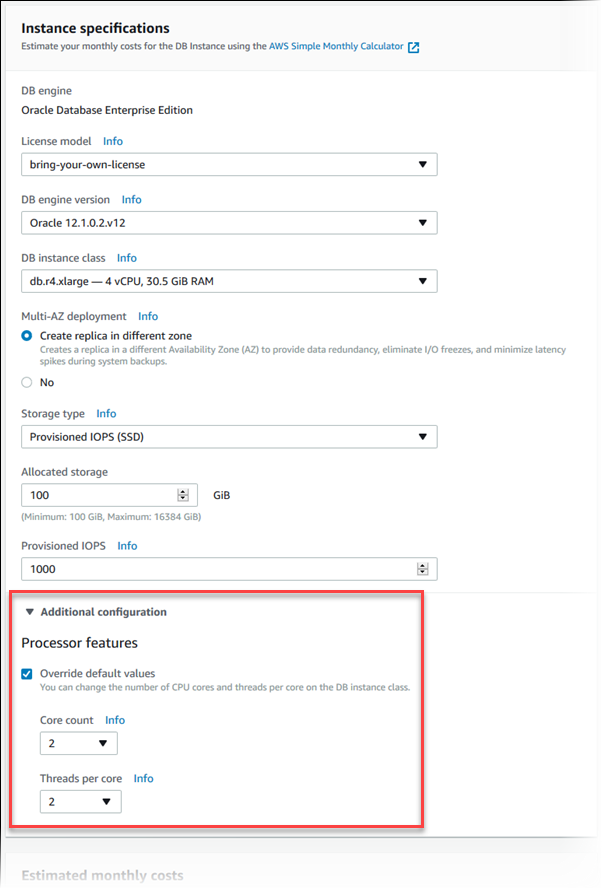
Set the following options to the appropriate values for your DB instance class under Processor features:
-
Core count – Set the number of CPU cores using this option. The value must be equal to or less than the maximum number of CPU cores for the DB instance class.
-
Threads per core – Specify 2 to enable multiple threads per core, or specify 1 to disable multiple threads per core.
When you modify or restore a DB instance, you can also set the CPU cores and the threads per CPU core to the defaults for the instance class.
When you view the details for a DB instance in the console, you can view the processor information for its DB instance class on the Configuration tab. The following image shows a DB instance class with one CPU core and multiple threads per core enabled.
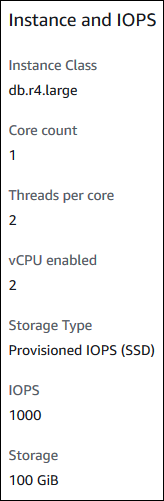
For Oracle DB instances, the processor information only appears for Bring Your Own License (BYOL) DB instances.
You can set the processor features for a DB instance when you run one of the following AWS CLI commands:
To configure the processor of a DB instance class for a DB instance by using the AWS CLI,
include the --processor-features option in the command.
Specify the number of CPU cores with the coreCount feature name, and specify whether multiple threads per core are
enabled with the threadsPerCore feature name.
The option has the following syntax.
--processor-features "Name=coreCount,Value=<value>" "Name=threadsPerCore,Value=<value>"
The following are examples that configure the processor:
Examples
- Setting the number of CPU cores for a DB instance
- Setting the number of CPU cores and disabling multiple threads for a DB instance
- Viewing the valid processor values for a DB instance class
- Returning to default processor settings for a DB instance
- Returning to the default number of CPU cores for a DB instance
- Returning to the default number of threads per core for a DB instance
Setting the number of CPU cores for a DB instance
The following example modifies mydbinstance by setting the number of
CPU cores to 4. The changes are applied immediately by using
--apply-immediately. If you want to apply the changes during
the next scheduled maintenance window, omit the --apply-immediately
option.
For Linux, macOS, or Unix:
aws rds modify-db-instance \ --db-instance-identifiermydbinstance\ --processor-features "Name=coreCount,Value=4" \--apply-immediately
For Windows:
aws rds modify-db-instance ^ --db-instance-identifiermydbinstance^ --processor-features "Name=coreCount,Value=4" ^--apply-immediately
Setting the number of CPU cores and disabling multiple threads for a DB instance
The following example modifies mydbinstance by setting the number of
CPU cores to 4 and disabling multiple threads per core. The changes
are applied immediately by using --apply-immediately. If you want
to apply the changes during the next scheduled maintenance window, omit the
--apply-immediately option.
For Linux, macOS, or Unix:
aws rds modify-db-instance \ --db-instance-identifiermydbinstance\ --processor-features "Name=coreCount,Value=4" "Name=threadsPerCore,Value=1" \--apply-immediately
For Windows:
aws rds modify-db-instance ^ --db-instance-identifiermydbinstance^ --processor-features "Name=coreCount,Value=4" "Name=threadsPerCore,Value=1" ^--apply-immediately
Viewing the valid processor values for a DB instance class
You can view the valid processor values for a particular DB instance class by running the
describe-orderable-db-instance-options command
and specifying the instance class for the --db-instance-class option. For example, the output for the
following command shows the processor options for the db.r3.large instance class.
aws rds describe-orderable-db-instance-options --engine oracle-ee --db-instance-class db.r3.large
Following is sample output for the command in JSON format.
    {
                "SupportsIops": true,
                "MaxIopsPerGib": 50.0,
                "LicenseModel": "bring-your-own-license",
                "DBInstanceClass": "db.r3.large",
                "SupportsIAMDatabaseAuthentication": false,
                "MinStorageSize": 100,
                "AvailabilityZones": [
                    {
                        "Name": "us-west-2a"
                    },
                    {
                        "Name": "us-west-2b"
                    },
                    {
                        "Name": "us-west-2c"
                    }
                ],
                "EngineVersion": "12.1.0.2.v2",
                "MaxStorageSize": 32768,
                "MinIopsPerGib": 1.0,
                "MaxIopsPerDbInstance": 40000,
                "ReadReplicaCapable": false,
                "AvailableProcessorFeatures": [
                    {
                        "Name": "coreCount",
                        "DefaultValue": "1",
                        "AllowedValues": "1"
                    },
                    {
                        "Name": "threadsPerCore",
                        "DefaultValue": "2",
                        "AllowedValues": "1,2"
                    }
                ],
                "SupportsEnhancedMonitoring": true,
                "SupportsPerformanceInsights": false,
                "MinIopsPerDbInstance": 1000,
                "StorageType": "io1",
                "Vpc": false,
                "SupportsStorageEncryption": true,
                "Engine": "oracle-ee",
                "MultiAZCapable": true
    }
In addition, you can run the following commands for DB instance class processor information:
-
describe-db-instances – Shows the processor information for the specified DB instance.
-
describe-db-snapshots – Shows the processor information for the specified DB snapshot.
-
describe-valid-db-instance-modifications – Shows the valid modifications to the processor for the specified DB instance.
In the output of the preceding commands, the values for the processor features are not null only if the following conditions are met:
-
You are using an RDS for Oracle DB instance.
-
Your RDS for Oracle DB instance supports changing processor values.
-
The current CPU core and thread settings are set to nondefault values.
If the preceding conditions aren't met, you can get the instance type using describe-db-instances. You can get the processor information for this instance type by running the EC2 operation describe-instance-types.
Returning to default processor settings for a DB instance
The following example modifies mydbinstance by returning its DB instance
class to the default processor values for it. The changes are applied
immediately by using --apply-immediately. If you want to
apply the changes during the next scheduled maintenance window, omit the
--apply-immediately option.
For Linux, macOS, or Unix:
aws rds modify-db-instance \ --db-instance-identifiermydbinstance\ --use-default-processor-features \--apply-immediately
For Windows:
aws rds modify-db-instance ^ --db-instance-identifiermydbinstance^ --use-default-processor-features ^--apply-immediately
Returning to the default number of CPU cores for a DB instance
The following example modifies mydbinstance by returning its DB instance
class to the default number of CPU cores for it. The threads per core
setting isn't changed. The changes are applied immediately by using
--apply-immediately. If you want to apply the changes
during the next scheduled maintenance window, omit the
--apply-immediately option.
For Linux, macOS, or Unix:
aws rds modify-db-instance \ --db-instance-identifiermydbinstance\ --processor-features "Name=coreCount,Value=DEFAULT" \--apply-immediately
For Windows:
aws rds modify-db-instance ^ --db-instance-identifiermydbinstance^ --processor-features "Name=coreCount,Value=DEFAULT" ^--apply-immediately
Returning to the default number of threads per core for a DB instance
The following example modifies mydbinstance by returning its DB instance
class to the default number of threads per core for it. The number of
CPU cores setting isn't changed. The changes are applied
immediately by using --apply-immediately. If you want to
apply the changes during the next scheduled maintenance window, omit the
--apply-immediately option.
For Linux, macOS, or Unix:
aws rds modify-db-instance \ --db-instance-identifiermydbinstance\ --processor-features "Name=threadsPerCore,Value=DEFAULT" \--apply-immediately
For Windows:
aws rds modify-db-instance ^ --db-instance-identifiermydbinstance^ --processor-features "Name=threadsPerCore,Value=DEFAULT" ^--apply-immediately
You can set the processor features for a DB instance when you call one of the following Amazon RDS API operations:
To configure the processor features of a DB instance class for a DB instance by using
the Amazon RDS API, include the ProcessFeatures parameter in the
call.
The parameter has the following syntax.
ProcessFeatures "Name=coreCount,Value=<value>" "Name=threadsPerCore,Value=<value>"
Specify the number of CPU cores with the coreCount feature name, and specify whether multiple threads per core are
enabled with the threadsPerCore feature name.
You can view the valid processor values for a particular DB instance class by running the
DescribeOrderableDBInstanceOptions operation and specifying the
instance class for the DBInstanceClass parameter. You can also use
the following operations:
-
DescribeDBInstances – Shows the processor information for the specified DB instance.
-
DescribeDBSnapshots – Shows the processor information for the specified DB snapshot.
-
DescribeValidDBInstanceModifications – Shows the valid modifications to the processor for the specified DB instance.
In the output of the preceding operations, the values for the processor features are not null only if the following conditions are met:
-
You are using an RDS for Oracle DB instance.
-
Your RDS for Oracle DB instance supports changing processor values.
-
The current CPU core and thread settings are set to nondefault values.
If the preceding conditions aren't met, you can get the instance type using DescribeDBInstances. You can get the processor information for this instance type by running the EC2 operation DescribeInstanceTypes.
Hardware specifications for DB instance classes
The following terminology is used to describe hardware specifications for DB instance classes:
- vCPU
-
The number of virtual central processing units (CPUs). A virtual CPU is a unit of capacity that you can use to compare DB instance classes. Instead of purchasing or leasing a particular processor to use for several months or years, you are renting capacity by the hour. Our goal is to make a consistent and specific amount of CPU capacity available, within the limits of the actual underlying hardware.
- ECU
-
The relative measure of the integer processing power of an Amazon EC2 instance. To make it easy for developers to compare CPU capacity between different instance classes, we have defined an Amazon EC2 Compute Unit. The amount of CPU that is allocated to a particular instance is expressed in terms of these EC2 Compute Units. One ECU currently provides CPU capacity equivalent to a 1.0–1.2 GHz 2007 Opteron or 2007 Xeon processor.
- Memory (GiB)
-
The RAM, in gibibytes, allocated to the DB instance. There is often a consistent ratio between memory and vCPU. As an example, take the db.r4 instance class, which has a memory to vCPU ratio similar to the db.r5 instance class. However, for most use cases the db.r5 instance class provides better, more consistent performance than the db.r4 instance class.
- EBS-optimized
-
The DB instance uses an optimized configuration stack and provides additional, dedicated capacity for I/O. This optimization provides the best performance by minimizing contention between I/O and other traffic from your instance. For more information about Amazon EBS–optimized instances, see Amazon EBS–Optimized instances in the Amazon EC2 User Guide for Linux Instances.
EBS-optimized instances have a baseline and maximum IOPS rate. The maximum IOPS rate is enforced at the DB instance level. A set of EBS volumes that combine to have an IOPS rate that is higher than the maximum can't exceed the instance-level threshold. For example, if the maximum IOPS for a particular DB instance class is 40,000, and you attach four 64,000 IOPS EBS volumes, the maximum IOPS is 40,000 rather than 256,000. For the IOPS maximum specific to each EC2 instance type, see Supported instance types in the Amazon EC2 User Guide for Linux Instances.
- Max. EBS bandwidth (Mbps)
-
The maximum EBS bandwidth in megabits per second. Divide by 8 to get the expected throughput in megabytes per second.
Important
General Purpose SSD (gp2) volumes for Amazon RDS DB instances have a throughput limit of 250 MiB/s in most cases. However, the throughput limit can vary depending on volume size. For more information, see Amazon EBS volume types in the Amazon EC2 User Guide for Linux Instances.
- Network bandwidth
-
The network speed relative to other DB instance classes.
In the following table, you can find hardware details about the Amazon RDS DB instance classes.
For information about Amazon RDS DB engine support for each DB instance class, see Supported DB engines for DB instance classes.
| Instance class | vCPU | ECU | Memory (GiB) | Instance storage (GiB) | Max. EBS bandwidth (Mbps) | Network bandwidth (Gbps) |
|---|---|---|---|---|---|---|
| db.m7g – general-purpose instance classes with AWS Graviton3 processors | ||||||
| db.m7g.16xlarge | 64 | — | 256 | EBS-optimized only | 20,000 | 30 |
| db.m7g.12xlarge | 48 | — | 192 | EBS-optimized only | 15,000 | 22.5 |
| db.m7g.8xlarge | 32 | — | 128 | EBS-optimized only | 10,000 | 15 |
| db.m7g.4xlarge | 16 | — | 64 | EBS-optimized only | Up to 10,000 | Up to 15 |
| db.m7g.2xlarge* | 8 | — | 32 | EBS-optimized only | Up to 10,000 | Up to 15 |
| db.m7g.xlarge* | 4 | — | 16 | EBS-optimized only | Up to 10,000 | Up to 12.5 |
| db.m7g.large* | 2 | — | 8 | EBS-optimized only | Up to 10,000 | Up to 12.5 |
| db.m6g – general-purpose instance classes with AWS Graviton2 processors | ||||||
| db.m6g.16xlarge | 64 | — | 256 | EBS-optimized only | 19,000 | 25 |
| db.m6g.12xlarge | 48 | — | 192 | EBS-optimized only | 13,500 | 20 |
| db.m6g.8xlarge | 32 | — | 128 | EBS-optimized only | 9,500 | 12 |
| db.m6g.4xlarge | 16 | — | 64 | EBS-optimized only | 6,800 | Up to 10 |
| db.m6g.2xlarge* | 8 | — | 32 | EBS-optimized only | Up to 4,750 | Up to 10 |
| db.m6g.xlarge* | 4 | — | 16 | EBS-optimized only | Up to 4,750 | Up to 10 |
| db.m6g.large* | 2 | — | 8 | EBS-optimized only | Up to 4,750 | Up to 10 |
| db.m6gd – general-purpose instance classes with AWS Graviton2 processors and SSD storage | ||||||
| db.m6gd.16xlarge | 64 | — | 256 | 2 x 1900 NVMe SSD | 19,000 | 25 |
| db.m6gd.12xlarge | 48 | — | 192 | 2 x 1425 NVMe SSD | 13,500 | 20 |
| db.m6gd.8xlarge | 32 | — | 128 | 1 x 1900 NVMe SSD | 9,000 | 12 |
| db.m6gd.4xlarge | 16 | — | 64 | 1 x 950 NVMe SSD | 4,750 | Up to 10 |
| db.m6gd.2xlarge | 8 | — | 32 | 1 x 474 NVMe SSD | Up to 4,750 | Up to 10 |
| db.m6gd.xlarge | 4 | — | 16 | 1 x 237 NVMe SSD | Up to 4,750 | Up to 10 |
| db.m6gd.large | 2 | — | 8 | 1 x 118 NVMe SSD | Up to 4,750 | Up to 10 |
| db.m6id – general-purpose instance classes with 3rd Generation Intel Xeon Scalable processors and SSD storage | ||||||
| db.m6id.32xlarge | 128 | — | 512 | 4 x 1900 NVMe SSD | 40,000 | 50 |
| db.m6id.24xlarge | 96 | — | 384 | 4 x 1425 NVMe SSD | 30,000 | 37.5 |
| db.m6id.16xlarge | 64 | — | 256 | 2 x 1900 NVMe SSD | 20,000 | 25 |
| db.m6id.12xlarge | 48 | — | 192 | 2 x 1425 NVMe SSD | 15,000 | 18.75 |
| db.m6id.8xlarge | 32 | — | 128 | 1 x 1900 NVMe SSD | 10,000 | 12.5 |
| db.m6id.4xlarge* | 16 | — | 64 | 1 x 950 NVMe SSD | Up to 10,000 | Up to 12.5 |
| db.m6id.2xlarge* | 8 | — | 32 | 1 x 474 NVMe SSD | Up to 10,000 | Up to 12.5 |
| db.m6id.xlarge* | 4 | — | 16 | 1 x 237 NVMe SSD | Up to 10,000 | Up to 12.5 |
| db.m6id.large* | 2 | — | 8 | 1 x 118 NVMe SSD | Up to 10,000 | Up to 12.5 |
| db.m6idn – general-purpose instance classes with 3rd Generation Intel Xeon Scalable processors, SSD storage, and network optimization | ||||||
| db.m6idn.32xlarge | 128 | — | 512 | 4 x 1900 NVMe SSD | 80,000 | 200 |
| db.m6idn.24xlarge | 96 | — | 384 | 4 x 1425 NVMe SSD | 60,000 | 150 |
| db.m6idn.16xlarge | 64 | — | 256 | 2 x 1900 NVMe SSD | 40,000 | 100 |
| db.m6idn.12xlarge | 48 | — | 192 | 2 x 1425 NVMe SSD | 30,000 | 75 |
| db.m6idn.8xlarge | 32 | — | 128 | 1 x 1900 NVMe SSD | 20,000 | 50 |
| db.m6idn.4xlarge* | 16 | — | 64 | 1 x 950 NVMe SSD | Up to 20,000 | Up to 50 |
| db.m6idn.2xlarge* | 8 | — | 32 | 1 x 474 NVMe SSD | Up to 20,000 | Up to 40 |
| db.m6idn.xlarge* | 4 | — | 16 | 1 x 237 NVMe SSD | Up to 20,000 | Up to 30 |
| db.m6idn.large* | 2 | — | 8 | 1 x 118 NVMe SSD | Up to 20,000 | Up to 25 |
| db.m6in – general-purpose instance classes with 3rd Generation Intel Xeon Scalable processors and network optimization | ||||||
| db.m6in.32xlarge | 128 | — | 512 | EBS-optimized only | 80,000 | 200 |
| db.m6in.24xlarge | 96 | — | 384 | EBS-optimized only | 60,000 | 150 |
| db.m6in.16xlarge | 64 | — | 256 | EBS-optimized only | 40,000 | 100 |
| db.m6in.12xlarge | 48 | — | 192 | EBS-optimized only | 30,000 | 75 |
| db.m6in.8xlarge | 32 | — | 128 | EBS-optimized only | 20,000 | 50 |
| db.m6in.4xlarge* | 16 | — | 64 | EBS-optimized only | Up to 20,000 | Up to 50 |
| db.m6in.2xlarge* | 8 | — | 32 | EBS-optimized only | Up to 20,000 | Up to 40 |
| db.m6in.xlarge* | 4 | — | 16 | EBS-optimized only | Up to 20,000 | Up to 30 |
| db.m6in.large* | 2 | — | 8 | EBS-optimized only | Up to 20,000 | Up to 25 |
| db.m6i – general-purpose instance classes with 3rd Generation Intel Xeon Scalable processors | ||||||
| db.m6i.32xlarge | 128 | — | 512 | EBS-optimized only | 40,000 | 50 |
| db.m6i.24xlarge | 96 | — | 384 | EBS-optimized only | 30,000 | 37.5 |
| db.m6i.16xlarge | 64 | — | 256 | EBS-optimized only | 20,000 | 25 |
| db.m6i.12xlarge | 48 | — | 192 | EBS-optimized only | 15,000 | 18.75 |
| db.m6i.8xlarge | 32 | — | 128 | EBS-optimized only | 10,000 | 12.5 |
| db.m6i.4xlarge* | 16 | — | 64 | EBS-optimized only | Up to 10,000 | Up to 12.5 |
| db.m6i.2xlarge* | 8 | — | 32 | EBS-optimized only | Up to 10,000 | Up to 12.5 |
| db.m6i.xlarge* | 4 | — | 16 | EBS-optimized only | Up to 10,000 | Up to 12.5 |
| db.m6i.large* | 2 | — | 8 | EBS-optimized only | Up to 10,000 | Up to 12.5 |
| db.m5d – general-purpose instance classes with Intel Xeon Platinum processors and SSD storage | ||||||
| db.m5d.24xlarge | 96 | 345 | 384 | 4 x 900 NVMe SSD | 19,000 | 25 |
| db.m5d.16xlarge | 64 | 262 | 256 | 4 x 600 NVMe SSD | 13,600 | 20 |
| db.m5d.12xlarge | 48 | 173 | 192 | 2 x 900 NVMe SSD | 9,500 | 10 |
| db.m5d.8xlarge | 32 | 131 | 128 | 2 x 600 NVMe SSD | 6,800 | 10 |
| db.m5d.4xlarge | 16 | 61 | 64 | 2 x 300 NVMe SSD | 4,750 | Up to 10 |
| db.m5d.2xlarge* | 8 | 31 | 32 | 1 x 300 NVMe SSD | Up to 4,750 | Up to 10 |
| db.m5d.xlarge* | 4 | 15 | 16 | 1 x 150 NVMe SSD | Up to 4,750 | Up to 10 |
| db.m5d.large* | 2 | 10 | 8 | 1 x 75 NVMe SSD | Up to 4,750 | Up to 10 |
| db.m5 – general-purpose instance classes with Intel Xeon Platinum processors | ||||||
| db.m5.24xlarge | 96 | 345 | 384 | EBS-optimized only | 19,000 | 25 |
| db.m5.16xlarge | 64 | 262 | 256 | EBS-optimized only | 13,600 | 20 |
| db.m5.12xlarge | 48 | 173 | 192 | EBS-optimized only | 9,500 | 10 |
| db.m5.8xlarge | 32 | 131 | 128 | EBS-optimized only | 6,800 | 10 |
| db.m5.4xlarge | 16 | 61 | 64 | EBS-optimized only | 4,750 | Up to 10 |
| db.m5.2xlarge* | 8 | 31 | 32 | EBS-optimized only | Up to 4,750 | Up to 10 |
| db.m5.xlarge* | 4 | 15 | 16 | EBS-optimized only | Up to 4,750 | Up to 10 |
| db.m5.large* | 2 | 10 | 8 | EBS-optimized only | Up to 4,750 | Up to 10 |
| db.m4 – general-purpose instance classes with Intel Xeon Scalable Processors | ||||||
| db.m4.16xlarge | 64 | 188 | 256 | EBS-optimized only | 10,000 | 25 |
| db.m4.10xlarge | 40 | 124.5 | 160 | EBS-optimized only | 4,000 | 10 |
| db.m4.4xlarge | 16 | 53.5 | 64 | EBS-optimized only | 2,000 | High |
| db.m4.2xlarge | 8 | 25.5 | 32 | EBS-optimized only | 1,000 | High |
| db.m4.xlarge | 4 | 13 | 16 | EBS-optimized only | 750 | High |
| db.m4.large | 2 | 6.5 | 8 | EBS-optimized only | 450 | Moderate |
| db.m3 – general-purpose instance classes | ||||||
| db.m3.2xlarge | 8 | 26 | 30 | EBS-optimized only | 1,000 | High |
| db.m3.xlarge | 4 | 13 | 15 | EBS-optimized only | 500 | High |
| db.m3.large | 2 | 6.5 | 7.5 | EBS only | — | Moderate |
| db.m3.medium | 1 | 3 | 3.75 | EBS only | — | Moderate |
| db.m1 – general-purpose instance classes | ||||||
| db.m1.xlarge | 4 | 4 | 15 | EBS-optimized only | 450 | High |
| db.m1.large | 2 | 2 | 7.5 | EBS-optimized only | 450 | Moderate |
| db.m1.medium | 1 | 1 | 3.75 | EBS only | — | Moderate |
| db.m1.small | 1 | 1 | 1.7 | EBS only | — | Very Low |
| db.x2iezn – memory-optimized instance classes | ||||||
| db.x2iezn.12xlarge | >48 | — | 1,536 | EBS-optimized only | 19,000 | 100 |
| db.x2iezn.8xlarge | 32 | — | 1,024 | EBS-optimized only | 12,000 | 75 |
| db.x2iezn.6xlarge | 24 | — | 768 | EBS-optimized only | Up to 9,500 | 50 |
| db.x2iezn.4xlarge | 16 | — | 512 | EBS-optimized only | Up to 4,750 | Up to 25 |
| db.x2iezn.2xlarge | 8 | — | 256 | EBS-optimized only | Up to 3,170 | Up to 25 |
| db.x2iedn – memory-optimized instance classes with SSD storage and network optimization | ||||||
| db.x2iedn.32xlarge | 128 | — | 4,096 | 2 x 1900 NVMe SSD | 80,000 | 100 |
| db.x2iedn.24xlarge | 96 | — | 3,072 | 2 x 1425 NVMe SSD | 60,000 | 75 |
| db.x2iedn.16xlarge | 64 | — | 2,048 | 1 x 1900 NVMe SSD | 40,000 | 50 |
| db.x2iedn.8xlarge | 32 | — | 1,024 | 1 x 950 NVMe SSD | 20,000 | 25 |
| db.x2iedn.4xlarge | 16 | — | 512 | 1 x 475 NVMe SSD | Up to 20,000 | Up to 25 |
| db.x2iedn.2xlarge | 8 | — | 256 | 1 x 237 NVMe SSD | Up to 20,000 | Up to 25 |
| db.x2iedn.xlarge | 4 | — | 128 | 1 x 118 NVMe SSD | Up to 20,000 | Up to 25 |
| db.x2idn – memory-optimized instance classes with SSD storage and network optimization | ||||||
| db.x2idn.32xlarge | 128 | — | 2,048 | 2 x 1900 NVMe SSD | 80,000 | 100 |
| db.x2idn.24xlarge | 96 | — | 1,536 | 2 x 1425 NVMe SSD | 60,000 | 75 |
| db.x2idn.16xlarge |
64 |
— | 1,024 | 1 x 1900 NVMe SSD | 40,000 | 50 |
| db.x2g – memory-optimized instance classes | ||||||
| db.x2g.16xlarge | 64 | — | 1024 | EBS-optimized only | 19,000 | 25 |
| db.x2g.12xlarge | 48 | — | 768 | EBS-optimized only | 14,250 | 20 |
| db.x2g.8xlarge | 32 | — | 512 | EBS-optimized only | 9,500 | 12 |
| db.x2g.4xlarge | 16 | — | 256 | EBS-optimized only | 4,750 | Up to 10 |
| db.x2g.2xlarge | 8 | — | 128 | EBS-optimized only | Up to 4,750 | Up to 10 |
| db.x2g.xlarge | 4 | — | 64 | EBS-optimized only | Up to 4,750 | Up to 10 |
| db.x2g.large | 2 | — | 32 | EBS-optimized only | Up to 4,750 | Up to 10 |
| db.z1d – memory-optimized instance classes with SSD storage | ||||||
| db.z1d.12xlarge | 48 | 271 | 384 | 2 x 900 NVMe SSD | 14,000 | 25 |
| db.z1d.6xlarge | 24 | 134 | 192 | 1 x 900 NVMe SSD | 7,000 | 10 |
| db.z1d.3xlarge | 12 | 75 | 96 | 1 x 450 NVMe SSD | 3,500 | Up to 10 |
| db.z1d.2xlarge | 8 | 53 | 64 |
1 x 300 NVMe SSD |
2,333 | Up to 10 |
| db.z1d.xlarge* | 4 | 28 | 32 | 1 x 150 NVMe SSD | Up to 2,333 | Up to 10 |
| db.z1d.large* | 2 | 15 | 16 | 1 x 75 NVMe SSD | Up to 2,333 | Up to 10 |
| db.x1e – memory-optimized instance classes | ||||||
| db.x1e.32xlarge | 128 | 340 | 3,904 | EBS-optimized only | 14,000 | 25 |
| db.x1e.16xlarge | 64 | 179 | 1,952 | EBS-optimized only | 7,000 | 10 |
| db.x1e.8xlarge | 32 | 91 | 976 | EBS-optimized only | 3,500 | Up to 10 |
| db.x1e.4xlarge | 16 | 47 | 488 | EBS-optimized only | 1,750 | Up to 10 |
| db.x1e.2xlarge | 8 | 23 | 244 | EBS-optimized only | 1,000 | Up to 10 |
| db.x1e.xlarge | 4 | 12 | 122 | EBS-optimized only | 500 | Up to 10 |
| db.x1 – memory-optimized instance classes | ||||||
| db.x1.32xlarge | 128 | 349 | 1,952 | EBS-optimized only | 14,000 | 25 |
| db.x1.16xlarge | 64 | 174.5 | 976 | EBS-optimized only | 7,000 | 10 |
| db.r7g – memory-optimized instance classes with AWS Graviton3 processors | ||||||
| db.r7g.16xlarge | 64 | — | 512 | EBS-optimized only | 20,000 | 30 |
| db.r7g.12xlarge | 48 | — | 384 | EBS-optimized only | 15,000 | 22.5 |
| db.r7g.8xlarge | 32 | — | 256 | EBS-optimized only | 10,000 | 15 |
| db.r7g.4xlarge | 16 | — | 128 | EBS-optimized only | Up to 10,000 | Up to 15 |
| db.r7g.2xlarge* | 8 | — | 64 | EBS-optimized only | Up to 10,000 | Up to 15 |
| db.r7g.xlarge* | 4 | — | 32 | EBS-optimized only | Up to 10,000 | Up to 12.5 |
| db.r7g.large* | 2 | — | 16 | EBS-optimized only | Up to 10,000 | Up to 12.5 |
| db.r6g – memory-optimized instance classes with AWS Graviton2 processors | ||||||
| db.r6g.16xlarge | 64 | — | 512 | EBS-optimized only | 19,000 | 25 |
| db.r6g.12xlarge | 48 | — | 384 | EBS-optimized only | 13,500 | 20 |
| db.r6g.8xlarge | 32 | — | 256 | EBS-optimized only | 9,000 | 12 |
| db.r6g.4xlarge | 16 | — | 128 | EBS-optimized only | 4,750 | Up to 10 |
| db.r6g.2xlarge* | 8 | — | 64 | EBS-optimized only | Up to 4,750 | Up to 10 |
| db.r6g.xlarge* | 4 | — | 32 | EBS-optimized only | Up to 4,750 | Up to 10 |
| db.r6g.large* | 2 | — | 16 | EBS-optimized only | Up to 4,750 | Up to 10 |
| db.r6gd – memory-optimized instance classes with AWS Graviton2 processors and SSD storage | ||||||
| db.r6gd.16xlarge | 64 | — | 512 | 2 x 1900 NVMe SSD | 19,000 | 25 |
| db.r6gd.12xlarge | 48 | — | 384 | 2 x 1425 NVMe SSD | 13,500 | 20 |
| db.r6gd.8xlarge | 32 | — | 256 | 1 x 1900 NVMe SSD | 9,000 | 12 |
| db.r6gd.4xlarge | 16 | — | 128 | 1 x 950 NVMe SSD | 4,750 | Up to 10 |
| db.r6gd.2xlarge | 8 | — | 64 | 1 x 474 NVMe SSD | Up to 4,750 | Up to 10 |
| db.r6gd.xlarge | 4 | — | 32 | 1 x 237 NVMe SSD | Up to 4,750 | Up to 10 |
| db.r6gd.large | 2 | — | 16 | 1 x 118 NVMe SSD | Up to 4,750 | Up to 10 |
| db.r6id – general-purpose instance classes with 3rd Generation Intel Xeon Scalable processors and SSD storage | ||||||
| db.r6id.32xlarge | 128 | — | 1,024 | 4x1900 NVMe SSD | 40,000 | 50 |
| db.r6id.24xlarge | 96 | — | 768 | 4x1425 NVMe SSD | 30,000 | 37.5 |
| db.r6id.16xlarge | 64 | — | 512 | 2x1900 NVMe SSD | 20,000 | 25 |
| db.r6id.12xlarge | 48 | — | 384 | 2x1425 NVMe SSD | 15,000 | 18.75 |
| db.r6id.8xlarge | 32 | — | 256 | 1x1900 NVMe SSD | 10,000 | 12.5 |
| db.r6id.4xlarge* | 16 | — | 128 | 1x950 NVMe SSD | Up to 10,000 | Up to 12.5 |
| db.r6id.2xlarge* | 8 | — | 64 | 1x474 NVMe SSD | Up to 10,000 | Up to 12.5 |
| db.r6id.xlarge* | 4 | — | 32 | 1x237 NVMe SSD | Up to 10,000 | Up to 12.5 |
| db.r6id.large* | 2 | — | 16 | 1x118 NVMe SSD | Up to 10,000 | Up to 12.5 |
| db.r6idn – memory-optimized instance classes with 3rd Generation Intel Xeon Scalable processors, SSD storage, and network optimization | ||||||
| db.r6idn.32xlarge | 128 | — | 1,024 | 4x1900 NVMe SSD | 80,000 | 200 |
| db.r6idn.24xlarge | 96 | — | 768 | 4x1425 NVMe SSD | 60,000 | 150 |
| db.r6idn.16xlarge | 64 | — | 512 | 2x1900 NVMe SSD | 40,000 | 100 |
| db.r6idn.12xlarge | 48 | — | 384 | 2x1425 NVMe SSD | 30,000 | 75 |
| db.r6idn.8xlarge | 32 | — | 256 | 1x1900 NVMe SSD | 20,000 | 50 |
| db.r6idn.4xlarge* | 16 | — | 128 | 1x950 NVMe SSD | Up to 20,000 | Up to 50 |
| db.r6idn.2xlarge* | 8 | — | 64 | 1x474 NVMe SSD | Up to 20,000 | Up to 40 |
| db.r6idn.xlarge* | 4 | — | 32 | 1x237 NVMe SSD | Up to 20,000 | Up to 30 |
| db.r6idn.large* | 2 | — | 16 | 1x118 NVMe SSD | Up to 20,000 | Up to 25 |
| db.r6in – memory-optimized instance classes with 3rd Generation Intel Xeon Scalable processors and network optimization | ||||||
| db.r6in.32xlarge | 128 | — | 1,024 | EBS-optimized only | 80,000 | 200 |
| db.r6in.24xlarge | 96 | — | 768 | EBS-optimized only | 60,000 | 150 |
| db.r6in.16xlarge | 64 | — | 512 | EBS-optimized only | 40,000 | 100 |
| db.r6in.12xlarge | 48 | — | 384 | EBS-optimized only | 30,000 | 75 |
| db.r6in.8xlarge | 32 | — | 256 | EBS-optimized only | 20,000 | 50 |
| db.r6in.4xlarge* | 16 | — | 128 | EBS-optimized only | Up to 20,000 | Up to 50 |
| db.r6in.2xlarge* | 8 | — | 64 | EBS-optimized only | Up to 20,000 | Up to 40 |
| db.r6in.xlarge* | 4 | — | 32 | EBS-optimized only | Up to 20,000 | Up to 30 |
| db.r6in.large* | 2 | — | 16 | EBS-optimized only | Up to 20,000 | Up to 25 |
| db.r6id – general-purpose instance classes with 3rd Generation Intel Xeon Scalable processors and SSD storage | ||||||
| db.r6id.32xlarge | 128 | — | 1,024 | 4x1900 NVMe SSD | 40,000 | 50 |
| db.r6id.24xlarge | 96 | — | 768 | 4x1425 NVMe SSD | 30,000 | 37.5 |
| db.r6id.16xlarge | 64 | — | 512 | 2x1900 NVMe SSD | 20,000 | 25 |
| db.r6id.12xlarge | 48 | — | 384 | 2x1425 NVMe SSD | 15,000 | 18.75 |
| db.r6id.8xlarge | 32 | — | 256 | 1x1900 NVMe SSD | 10,000 | 12.5 |
| db.r6id.4xlarge* | 16 | — | 128 | 1x950 NVMe SSD | Up to 10,000 | Up to 12.5 |
| db.r6id.2xlarge* | 8 | — | 64 | 1x474 NVMe SSD | Up to 10,000 | Up to 12.5 |
| db.r6id.xlarge* | 4 | — | 32 | 1x237 NVMe SSD | Up to 10,000 | Up to 12.5 |
| db.r6id.large* | 2 | — | 16 | 1x118 NVMe SSD | Up to 10,000 | Up to 12.5 |
| db.r6i – memory-optimized instance classes with 3rd Generation Intel Xeon Scalable processors | ||||||
| db.r6i.32xlarge | 128 | — | 1,024 | EBS-optimized only | 40,000 | 50 |
| db.r6i.24xlarge | 96 | — | 768 | EBS-optimized only | 30,000 | 37.5 |
| db.r6i.16xlarge | 64 | — | 512 | EBS-optimized only | 20,000 | 25 |
| db.r6i.12xlarge | 48 | — | 384 | EBS-optimized only | 15,000 | 18.75 |
| db.r6i.8xlarge | 32 | — | 256 | EBS-optimized only | 10,000 | 12.5 |
| db.r6i.4xlarge* | 16 | — | 128 | EBS-optimized only | Up to 10,000 | Up to 12.5 |
| db.r6i.2xlarge* | 8 | — | 64 | EBS-optimized only | Up to 10,000 | Up to 12.5 |
| db.r6i.xlarge* | 4 | — | 32 | EBS-optimized only | Up to 10,000 | Up to 12.5 |
| db.r6i.large* | 2 | — | 16 | EBS-optimized only | Up to 10,000 | Up to 12.5 |
| db.r5d – memory-optimized instance classes with Intel Xeon Platinum processors and SSD storage | ||||||
| db.r5d.24xlarge | 96 | 347 | 768 | 4 x 900 NVMe SSD | 19,000 | 25 |
| db.r5d.16xlarge | 64 | 264 | 512 | 4 x 600 NVMe SSD | 13,600 | 20 |
| db.r5d.12xlarge | 48 | 173 | 384 | 2 x 900 NVMe SSD | 9,500 | 10 |
| db.r5d.8xlarge | 32 | 132 | 256 | 2 x 600 NVMe SSD | 6,800 | 10 |
| db.r5d.4xlarge | 16 | 71 | 128 | 2 x 300 NVMe SSD | 4,750 | Up to 10 |
| db.r5d.2xlarge* | 8 | 38 | 64 | 1 x 300 NVMe SSD | Up to 4,750 | Up to 10 |
| db.r5d.xlarge* | 4 | 19 | 32 | 1 x 150 NVMe SSD | Up to 4,750 | Up to 10 |
| db.r5d.large* | 2 | 10 | 16 | 1 x 75 NVMe SSD | Up to 4,750 | Up to 10 |
| db.r5b – memory-optimized instance classes with Intel Xeon Platinum processors and EBS optimization | ||||||
| db.r5b.24xlarge | 96 | 347 | 768 | EBS-optimized only | 60,000 | 25 |
| db.r5b.16xlarge | 64 | 264 | 512 | EBS-optimized only | 40,000 | 20 |
| db.r5b.12xlarge | 48 | 173 | 384 | EBS-optimized only | 30,000 | 10 |
| db.r5b.8xlarge | 32 | 132 | 256 | EBS-optimized only | 20,000 | 10 |
| db.r5b.4xlarge | 16 | 71 | 128 | EBS-optimized only | 10,000 | Up to 10 |
| db.r5b.2xlarge* | 8 | 38 | 64 | EBS-optimized only | Up to 10,000 | Up to 10 |
| db.r5b.xlarge* | 4 | 19 | 32 | EBS-optimized only | Up to 10,000 | Up to 10 |
| db.r5b.large* | 2 | 10 | 16 | EBS-optimized only | Up to 10,000 | Up to 10 |
| db.r5b – Oracle memory-optimized instance classes preconfigured for high memory, storage, and I/O | ||||||
| db.r5b.8xlarge.tpc2.mem3x | 32 | — | 768 | EBS-optimized only | 60,000 | 25 |
| db.r5b.6xlarge.tpc2.mem4x | 24 | — | 768 | EBS-optimized only | 60,000 | 25 |
| db.r5b.4xlarge.tpc2.mem4x | 16 | — | 512 | EBS-optimized only | 40,000 | 20 |
| db.r5b.4xlarge.tpc2.mem3x | 16 | — | 384 | EBS-optimized only | 30,000 | 10 |
| db.r5b.4xlarge.tpc2.mem2x | 16 | — | 256 | EBS-optimized only | 20,000 | 10 |
| db.r5b.2xlarge.tpc2.mem8x | 8 | — | 512 | EBS-optimized only | 40,000 | 20 |
| db.r5b.2xlarge.tpc2.mem4x | 8 | — | 256 | EBS-optimized only | 20,000 | 10 |
| db.r5b.2xlarge.tpc1.mem2x | 8 | — | 128 | EBS-optimized only | 10,000 | Up to 10 |
| db.r5b.xlarge.tpc2.mem4x | 4 | — | 128 | EBS-optimized only | 10,000 | Up to 10 |
| db.r5b.xlarge.tpc2.mem2x | 4 | — | 64 | EBS-optimized only | Up to 10,000 | Up to 10 |
| db.r5b.large.tpc1.mem2x | 2 | — | 32 | EBS-optimized only | Up to 10,000 | Up to 10 |
| db.r5 – memory-optimized instance classes with Intel Xeon Platinum processors | ||||||
| db.r5.24xlarge | 96 | 347 | 768 | EBS-optimized only | 19,000 | 25 |
| db.r5.16xlarge | 64 | 264 | 512 | EBS-optimized only | 13,600 | 20 |
| db.r5.12xlarge | 48 | 173 | 384 | EBS-optimized only | 9,500 | 12 |
| db.r5.8xlarge | 32 | 132 | 256 | EBS-optimized only | 6,800 | 10 |
| db.r5.4xlarge | 16 | 71 | 128 | EBS-optimized only | 4,750 | Up to 10 |
| db.r5.2xlarge* | 8 | 38 | 64 | EBS-optimized only | Up to 4,750 | Up to 10 |
| db.r5.xlarge* | 4 | 19 | 32 | EBS-optimized only | Up to 4,750 | Up to 10 |
| db.r5.large* | 2 | 10 | 16 | EBS-optimized only | Up to 4,750 | Up to 10 |
| db.r5 – Oracle memory-optimized instance classes preconfigured for high memory, storage, and I/O | ||||||
| db.r5.12xlarge.tpc2.mem2x | 48 | — | 768 | EBS-optimized only | 19,000 | 25 |
| db.r5.8xlarge.tpc2.mem3x | 32 | — | 768 | EBS-optimized only | 19,000 | 25 |
| db.r5.6xlarge.tpc2.mem4x | 24 | — | 768 | EBS-optimized only | 19,000 | 25 |
| db.r5.4xlarge.tpc2.mem4x | 16 | — | 512 | EBS-optimized only | 13,600 | 20 |
| db.r5.4xlarge.tpc2.mem3x | 16 | — | 384 | EBS-optimized only | 9,500 | 10 |
| db.r5.4xlarge.tpc2.mem2x | 16 | — | 256 | EBS-optimized only | 6,800 | 10 |
| db.r5.2xlarge.tpc2.mem8x | 8 | — | 512 | EBS-optimized only | 13,600 | 20 |
| db.r5.2xlarge.tpc2.mem4x | 8 | — | 256 | EBS-optimized only | 6,800 | 10 |
| db.r5.2xlarge.tpc1.mem2x | 8 | — | 128 | EBS-optimized only | 4,750 | Up to 10 |
| db.r5.xlarge.tpc2.mem4x | 4 | — | 128 | EBS-optimized only | 4,750 | Up to 10 |
| db.r5.xlarge.tpc2.mem2x | 4 | — | 64 | EBS-optimized only | Up to 4,750 | Up to 10 |
| db.r5.large.tpc1.mem2x | 2 | — | 32 | EBS-optimized only | Up to 4,750 | Up to 10 |
| db.r4 – memory-optimized instance classes with Intel Xeon Scalable processors | ||||||
| db.r4.16xlarge | 64 | 195 | 488 | EBS-optimized only | 14,000 | 25 |
| db.r4.8xlarge | 32 | 99 | 244 | EBS-optimized only | 7,000 | 10 |
| db.r4.4xlarge | 16 | 53 | 122 | EBS-optimized only | 3,500 | Up to 10 |
| db.r4.2xlarge | 8 | 27 | 61 | EBS-optimized only | 1,700 | Up to 10 |
| db.r4.xlarge | 4 | 13.5 | 30.5 | EBS-optimized only | 850 | Up to 10 |
| db.r4.large | 2 | 7 | 15.25 | EBS-optimized only | 425 | Up to 10 |
| db.r3 – memory-optimized instance classes | ||||||
| db.r3.8xlarge | 32 | 104 | 244 | EBS only | — | 10 |
| db.r3.4xlarge | 16 | 52 | 122 | EBS-optimized only | 2,000 | High |
| db.r3.2xlarge | 8 | 26 | 61 | EBS-optimized only | 1,000 | High |
| db.r3.xlarge | 4 | 13 | 30.5 | EBS-optimized only | 500 | Moderate |
| db.r3.large | 2 | 6.5 | 15.25 | EBS-optimized only | — | Moderate |
| db.c6gd – compute-optimized instance classes (for Multi-AZ DB cluster deployments only) | ||||||
| db.c6gd.16xlarge | 64 | — | 128 | 2 x 1900 NVMe SSD | 19,000 | 25 |
| db.c6gd.12xlarge | 48 | — | 96 | 2 x 1425 NVMe SSD | 13,500 | 20 |
| db.c6gd.8xlarge | 32 | — | 64 | 1 x 1900 NVMe SSD | 9,000 | 12 |
| db.c6gd.4xlarge | 16 | — | 32 | 1 x 950 NVMe SSD | 4,750 | Up to 10 |
| db.c6gd.2xlarge | 8 | — | 16 | 1 x 474 NVMe SSD | Up to 4,750 | Up to 10 |
| db.c6gd.xlarge | 4 | — | 8 | 1 x 237 NVMe SSD | Up to 4,750 | Up to 10 |
| db.c6gd.large | 2 | — | 4 | 1 x 118 NVMe SSD | Up to 4,750 | Up to 10 |
| db.c6gd.medium | 1 | — | 2 | 1 x 59 NVMe SSD | Up to 4,750 | Up to 10 |
| db.t4g – burstable-performance instance classes with AWS Graviton2 processors | ||||||
| db.t4g.2xlarge* | 8 | — | 32 | EBS-optimized only | Up to 2,780 | Up to 5 |
| db.t4g.xlarge* | 4 | — | 16 | EBS-optimized only | Up to 2,780 | Up to 5 |
| db.t4g.large* | 2 | — | 8 | EBS-optimized only | Up to 2,780 | Up to 5 |
| db.t4g.medium* | 2 | — | 4 | EBS-optimized only | Up to 2,085 | Up to 5 |
| db.t4g.small* | 2 | — | 2 | EBS-optimized only | Up to 2,085 | Up to 5 |
| db.t4g.micro* | 2 | — | 1 | EBS-optimized only | Up to 2,085 | Up to 5 |
| db.t3 – burstable-performance instance classes | ||||||
| db.t3.2xlarge* | 8 | Variable | 32 | EBS-optimized only | Up to 2,048 | Up to 5 |
| db.t3.xlarge* | 4 | Variable | 16 | EBS-optimized only | Up to 2,048 | Up to 5 |
| db.t3.large* | 2 | Variable | 8 | EBS-optimized only | Up to 2,048 | Up to 5 |
| db.t3.medium* | 2 | Variable | 4 | EBS-optimized only | Up to 1,536 | Up to 5 |
| db.t3.small* | 2 | Variable | 2 | EBS-optimized only | Up to 1,536 | Up to 5 |
| db.t3.micro* | 2 | Variable | 1 | EBS-optimized only | Up to 1,536 | Up to 5 |
| db.t2 – burstable-performance instance classes | ||||||
| db.t2.2xlarge | 8 | Variable | 32 | EBS only | — | Moderate |
| db.t2.xlarge | 4 | Variable | 16 | EBS only | — | Moderate |
| db.t2.large | 2 | Variable | 8 | EBS only | — | Moderate |
| db.t2.medium | 2 | Variable | 4 | EBS only | — | Moderate |
| db.t2.small | 1 | Variable | 2 | EBS only | — | Low |
| db.t2.micro | 1 | Variable | 1 | EBS only | — | Low |
* These DB instance classes can support maximum performance for 30 minutes at least once every 24 hours. For more information on baseline performance of the underlying EC2 instance types, see Amazon EBS-optimized instances in the Amazon EC2 User Guide for Linux Instances.
** The r3.8xlarge DB instance class doesn't have dedicated EBS bandwidth and therefore doesn't offer EBS optimization. For this instance class, network traffic and Amazon EBS traffic share the same 10-gigabit network interface.
