Amazon SQS visibility timeout
When a consumer receives and processes a message from a queue, the message remains in the queue. Amazon SQS doesn't automatically delete the message. Because Amazon SQS is a distributed system, there's no guarantee that the consumer actually receives the message (for example, due to a connectivity issue, or due to an issue in the consumer application). Thus, the consumer must delete the message from the queue after receiving and processing it.
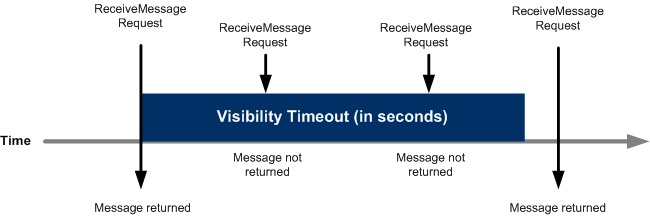
Immediately after a message is received, it remains in the queue. To prevent other consumers from processing the message again, Amazon SQS sets a visibility timeout, a period of time during which Amazon SQS prevents all consumers from receiving and processing the message. The default visibility timeout for a message is 30 seconds. The minimum is 0 seconds. The maximum is 12 hours. For information about configuring visibility timeout for a queue using the console, see Configuring queue parameters (console).
Note
For standard queues, the visibility timeout isn't a guarantee against receiving a message twice. For more information, see At-least-once delivery.
FIFO queues allow the producer or consumer to attempt multiple retries:
-
If the producer detects a failed
SendMessageaction, it can retry sending as many times as necessary, using the same message deduplication ID. Assuming that the producer receives at least one acknowledgement before the deduplication interval expires, multiple retries neither affect the ordering of messages nor introduce duplicates. -
If the consumer detects a failed
ReceiveMessageaction, it can retry as many times as necessary, using the same receive request attempt ID. Assuming that the consumer receives at least one acknowledgement before the visibility timeout expires, multiple retries don't affect the ordering of messages. -
When you receive a message with a message group ID, no more messages for the same message group ID are returned unless you delete the message or it becomes visible.
Topics
In flight messages
An Amazon SQS message has three basic states:
-
Sent to a queue by a producer.
-
Received from the queue by a consumer.
-
Deleted from the queue.
A message is considered to be stored after it is sent to a queue by a producer, but not yet received from the queue by a consumer (that is, between states 1 and 2). There is no quota to the number of stored messages. A message is considered to be in flight after it is received from a queue by a consumer, but not yet deleted from the queue (that is, between states 2 and 3). There is a quota to the number of in flight messages.
Important
Quotas that apply to in flight messages are unrelated to the unlimited number of stored messages.
For most standard queues (depending on queue traffic and message backlog), there can be a maximum of approximately 120,000 in flight messages (received from a queue by a consumer, but not yet deleted from the queue).
If you reach this quota while using short polling, Amazon SQS returns the OverLimit error message. If you use long polling, Amazon SQS returns no error messages.
To avoid reaching the quota, you should delete messages from the queue after they're processed. You can also increase the number of queues you use to process your messages.
To request a quota increase, submit a support request
For FIFO queues, there can be a maximum of 20,000 in flight messages (received from a queue by a consumer, but not yet deleted from the queue). If you reach this quota, Amazon SQS returns no error messages.
Important
When working with FIFO queues, DeleteMessage operations will fail if the request is received outside of the visibility timeout window.
If the visibility timeout is 0 seconds, the message must be deleted within the same millisecond it was sent, or it is considered abandoned.
This can cause Amazon SQS to include duplicate messages in the same response to a ReceiveMessage operation if the MaxNumberOfMessages
parameter is greater than 1. For additional details see How the Amazon SQS FIFO API Works
Setting the visibility timeout
The visibility timeout begins when Amazon SQS returns a message. During this time, the
consumer processes and deletes the message. However, if the consumer fails before
deleting the message and your system doesn't call the DeleteMessage
action for that message before the visibility timeout expires, the message becomes
visible to other consumers and the message is received again. If a message must be
received only once, your consumer should delete it within the duration of the
visibility timeout.
Every Amazon SQS queue has the default visibility timeout setting of 30 seconds. You can change this setting for the entire queue. Typically, you should set the visibility timeout to the maximum time that it takes your application to process and delete a message from the queue. When receiving messages, you can also set a special visibility timeout for the returned messages without changing the overall queue timeout. For more information, see the best practices in the Processing messages in a timely manner section.
If you don't know how long it takes to process a message, create a heartbeat for your consumer process: Specify the initial visibility timeout (for example, 2 minutes) and then—as long as your consumer still works on the message—keep extending the visibility timeout by 2 minutes every minute.
Important
The maximum visibility timeout is 12 hours from the time that Amazon SQS receives the ReceiveMessage request.
Extending the visibility timeout does not reset the 12 hour maximum.
Additionally, you may be unable to set the timeout on an individual message to the full 12 hours (e.g. 43,200 seconds) since the ReceiveMessage
request initiates the timer. For example, if you receive a message and immediately set the 12 hour maximum by sending a ChangeMessageVisibility call with VisibilityTimeout equal to 43,200 seconds, it will likely fail.
However, using a value of 43,195 seconds will work unless there is a significant delay between requesting the message via ReceiveMessage and updating the visibility timeout. If your consumer needs longer than 12 hours, consider using Step Functions.
Changing the visibility timeout for a message
When you receive a message from a queue and begin to process it, the visibility timeout for
the queue may be insufficient (for example, you might need to process and delete a
message). You can shorten or extend a message's visibility by specifying a new
timeout value using the ChangeMessageVisibility action.
For example, if the default timeout for a queue is 60 seconds, 15 seconds have elapsed
since you received the message, and you send a ChangeMessageVisibility
call with VisibilityTimeout set to 10 seconds, the 10 seconds begin to
count from the time that you make the ChangeMessageVisibility call.
Thus, any attempt to change the visibility timeout or to delete that message 10
seconds after you initially change the visibility timeout (a total of 25 seconds)
might result in an error.
Note
The new timeout period takes effect from the time you call the
ChangeMessageVisibility action. In addition, the new
timeout period applies only to the particular receipt of the message.
ChangeMessageVisibility doesn't affect the timeout of later
receipts of the message or later queues.
Terminating the visibility timeout for a message
When you receive a message from a queue, you might find that you actually don't want to process and delete that message. Amazon SQS allows you to terminate the visibility timeout for a specific message. This makes the message immediately visible to other components in the system and available for processing.
To terminate a message's visibility timeout after calling
ReceiveMessage, call ChangeMessageVisibility with
VisibilityTimeout set to 0 seconds.
