Amazon Elastic Compute Cloud
User Guide (API Version 2012-04-01)
Print this pageEmail this pageGo to the ForumsView the PDFShare this page on TwitterShare this page on FacebookBookmark this page on DeliciousSubmit this page to RedditSubmit this page to DiggDid this page help you?  Yes  No   Tell us about it...

View Spot Price History

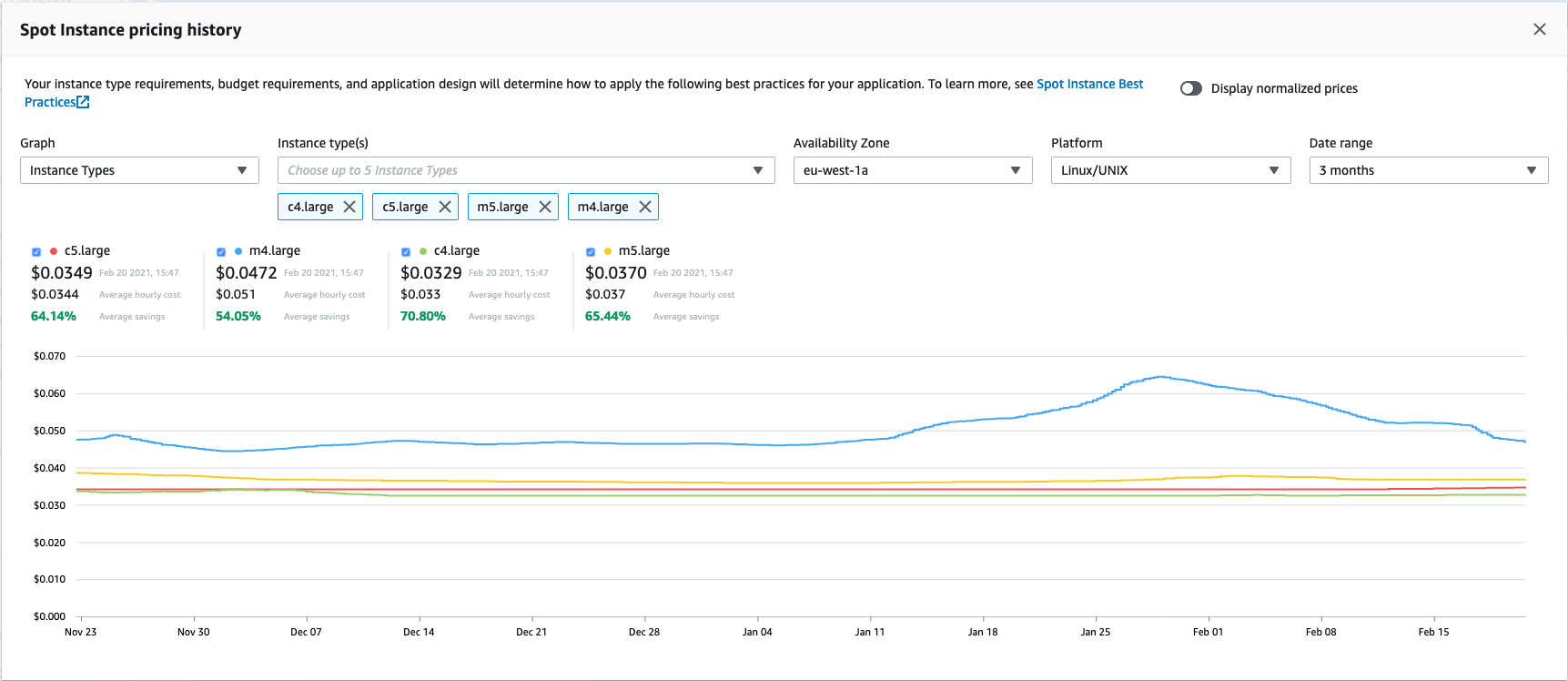
Before specifying a rate you want to bid for your Spot Instance, we recommend that you view the Spot Price history. You can view the Spot Price history over a period from one to 90 days based on the instance type, the operating system you want the instance to run on, the time period, and the Availability Zone in which it will be launched.

For example, let's say you want to bid for a Linux/UNIX micro instance to be launched in the us-east-1a Availability Zone. Specify these values in the API or select them in the Spot Price History page of the AWS Management Console. You will be able to view the price for the instance type and operating system in the Availability Zone you want during the period you specified. On the other hand, if you don't need to launch the instances in a specific Availability Zone and consequently you don't specify this option, Amazon EC2 returns the prices for all Availability Zones.

Keep in mind that if you use the DescribeSpotPriceHistory action or ec2-describe-spot-price-history command before the 2011-05-15 API version, you will get the lowest price across the Region for the given time period and the prices will be returned in chronological order.

[Note]Note

Make sure you have set up the prerequisites to working with Amazon EC2. If you haven't, go to Prerequisites for Using Spot Instances.

AWS Management Console

To view Spot Price history

  1. From the Amazon EC2 console, click Spot Requests in the navigation pane.

    The My Spot Instance Requests pane opens.

  2. At the top of the My Spot Instance Requests pane, click the Pricing History button.

    The console displays the Spot Instance pricing history.

    [Note]Note

    Using the historical pricing as a guide, select a price that you think would be likely to keep your instances running for the period of time you need.

  3. If you want to view the Spot Price history for specific Availability Zones, click the Zone drop-down list and select an Availability Zone.

    The Spot Instance Pricing History page displays the Spot Instance pricing history for the zone you selected.

    Spot Instance Pricing History Displays the pricing history for a specified Availability Zone.

Command Line Tools

To view Spot Price history

  1. Enter the following command:

    PROMPT> ec2-describe-spot-price-history -H --instance-type m1.xlarge

    Amazon EC2 returns output similar to the following:

    SPOTINSTANCEPRICE   0.384000    2011-05-25T11:37:48-0800    m1.xlarge   Windows us-east-1b
    SPOTINSTANCEPRICE   0.384000    2011-05-25T11:37:48-0800    m1.xlarge   Windows us-east-1d
    …
    SPOTINSTANCEPRICE   0.242000    2011-04-18T14:39:14-0800    m1.xlarge   SUSE Linux  us-east-1d
    SPOTINSTANCEPRICE   0.242000    2011-04-18T14:39:14-0800    m1.xlarge   SUSE Linux  us-east-1a

    In this example, the price for the m1.xlarge instance type ranges between $0.242 and $0.384.

  2. Based on the historical pricing, select a price that is likely to keep your instances running for the period of time that you need.

[Tip]Tip

You can filter the spot history data so it includes only instance types or dates of interest to you. For more information about how to filter the results, go to ec2-describe-spot-price-history in the Amazon Elastic Compute Cloud Command Line Reference.

API

To view Spot Price history

  • Construct the following Query request.

    https://ec2.amazonaws.com/
    ?Action=DescribeSpotPriceHistory
    &InstanceType=instance_type
    &...auth parameters...

    Following is an example response.

    <DescribeSpotPriceHistoryResponse xmlns="http://ec2.amazonaws.com/doc/2012-04-01/">
        <spotPriceHistorySet>
          <item>
            <instanceType>m1.small</instanceType>
            <productDescription>Linux/UNIX</productDescription>
            <spotPrice>.28</spotPrice>
            <timestamp>2009-12-01T11:51:50.000Z</timestamp>
            <availabilityZone>us-east-1a</availabilityZone>
          </item>
          <item>
            <instanceType>m1.small</instanceType>
            <productDescription>Linux/UNIX</productDescription>
            <spotPrice>.28</spotPrice>
            <timestamp>2009-12-01T11:51:50.000Z</timestamp>
            <availabilityZone>us-east-1a</availabilityZone>
          </item>
          <item>
            <instanceType>m1.small</instanceType>
            <productDescription>Linux/UNIX</productDescription>
            <spotPrice>.31</spotPrice>
            <timestamp>2009-12-01T11:51:50.000Z</timestamp>
            <availabilityZone>us-east-1b</availabilityZone>
          </item>
          <item>
            <instanceType>m1.small</instanceType>
            <productDescription>Linux/UNIX</productDescription>
            <spotPrice>.30</spotPrice>
            <timestamp>2009-12-01T11:51:50.000Z</timestamp>
            <availabilityZone>us-east-1b</availabilityZone>
          </item>
          <item>
            <instanceType>m1.small</instanceType>
            <productDescription>Linux/UNIX</productDescription>
            <spotPrice>.25</spotPrice>
            <timestamp>2009-12-01T11:51:50.000Z</timestamp>
            <availabilityZone>us-east-1c</availabilityZone>
          </item>
          <item>
            <instanceType>m1.small</instanceType>
            <productDescription>Linux/UNIX</productDescription>
            <spotPrice>.28</spotPrice>
            <timestamp>2009-12-01T11:51:50.000Z</timestamp>
            <availabilityZone>us-east-1c</availabilityZone>
          </item>
          <item>
            <instanceType>m1.small</instanceType>
            <productDescription>Linux/UNIX</productDescription>
            <spotPrice>.35</spotPrice>
            <timestamp>2009-12-01T11:51:50.000Z</timestamp>
            <availabilityZone>us-east-1c</availabilityZone>
          </item>
        </spotPriceHistorySet>
        <nextToken/>
    </DescribeSpotPriceHistoryResponse>
    [Note]Note

    Based on the historical pricing, select a price that is likely to keep your instances running for the period of time that you need.

[Tip]Tip

You can filter the spot history data so it includes only instance types or dates of interest to you. For more information about how to filter the results, go to DescribeSpotPriceHistory in the Amazon Elastic Compute Cloud API Reference.

What do you want to do next?