Reserved Instances
Important
We recommend Savings Plans over Reserved Instances. Saving Plans are the easiest and most flexible way to save money on your AWS compute costs and offer lower prices (up to 72% off On-Demand pricing), just like Reserved Instances. However, Savings Plans are different to Reserved Instances. With Reserved Instances, you make a commitment to a specific instance configuration, whereas with Savings Plans, you have the flexibility to use the instance configurations that best meet your needs. To use Savings Plans, you make a commitment to a consistent usage amount, measured in USD per hour. For more information, see the AWS Savings Plans User Guide.
Reserved Instances provide you with significant savings on your Amazon EC2 costs compared to On-Demand Instance pricing. Reserved Instances are not physical instances, but rather a billing discount applied to the use of On-Demand Instances in your account. These On-Demand Instances must match certain attributes, such as instance type and Region, in order to benefit from the billing discount.
Reserved Instances topics
- Reserved Instance overview
- Key variables that determine Reserved Instance pricing
- Regional and zonal Reserved Instances (scope)
- Types of Reserved Instances (offering classes)
- How Reserved Instances are applied
- Use your Reserved Instances
- How you are billed
- Buy Reserved Instances
- Sell in the Reserved Instance Marketplace
- Modify Reserved Instances
- Exchange Convertible Reserved Instances
- Reserved Instance quotas
Reserved Instance overview
The following diagram shows a basic overview of purchasing and using Reserved Instances.
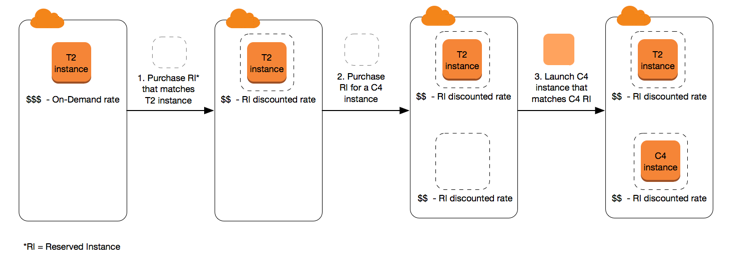
In this scenario, you have a running On-Demand Instance (T2) in your account, for which you're currently paying On-Demand rates. You purchase a Reserved Instance that matches the attributes of your running instance, and the billing benefit is immediately applied. Next, you purchase a Reserved Instance for a C4 instance. You do not have any running instances in your account that match the attributes of this Reserved Instance. In the final step, you launch an instance that matches the attributes of the C4 Reserved Instance, and the billing benefit is immediately applied.
Key variables that determine Reserved Instance pricing
The Reserved Instance pricing is determined by the following key variables.
Instance attributes
A Reserved Instance has four instance attributes that determine its price.
-
Instance type: For example,
m4.large. This is composed of the instance family (for example,m4) and the instance size (for example,large). -
Region: The Region in which the Reserved Instance is purchased.
-
Tenancy: Whether your instance runs on shared (default) or single-tenant (dedicated) hardware. For more information, see Dedicated Instances.
-
Platform: The operating system; for example, Windows or Linux/Unix. For more information, see Choosing a platform.
Term commitment
You can purchase a Reserved Instance for a one-year or three-year commitment, with the three-year commitment offering a bigger discount.
-
One-year: A year is defined as 31536000 seconds (365 days).
-
Three-year: Three years is defined as 94608000 seconds (1095 days).
Reserved Instances do not renew automatically; when they expire, you can continue using the EC2 instance without interruption, but you are charged On-Demand rates. In the above example, when the Reserved Instances that cover the T2 and C4 instances expire, you go back to paying the On-Demand rates until you terminate the instances or purchase new Reserved Instances that match the instance attributes.
Important
Payment options
The following payment options are available for Reserved Instances:
-
All Upfront: Full payment is made at the start of the term, with no other costs or additional hourly charges incurred for the remainder of the term, regardless of hours used.
-
Partial Upfront: A portion of the cost must be paid upfront and the remaining hours in the term are billed at a discounted hourly rate, regardless of whether the Reserved Instance is being used.
-
No Upfront: You are billed a discounted hourly rate for every hour within the term, regardless of whether the Reserved Instance is being used. No upfront payment is required.
Note
No Upfront Reserved Instances are based on a contractual obligation to pay monthly for the entire term of the reservation. For this reason, a successful billing history is required before you can purchase No Upfront Reserved Instances.
Generally speaking, you can save more money making a higher upfront payment for Reserved Instances. You can also find Reserved Instances offered by third-party sellers at lower prices and shorter term lengths on the Reserved Instance Marketplace. For more information, see Sell in the Reserved Instance Marketplace.
Offering class
If your computing needs change, you might be able to modify or exchange your Reserved Instance, depending on the offering class.
-
Standard: These provide the most significant discount, but can only be modified. Standard Reserved Instances can't be exchanged.
-
Convertible: These provide a lower discount than Standard Reserved Instances, but can be exchanged for another Convertible Reserved Instance with different instance attributes. Convertible Reserved Instances can also be modified.
For more information, see Types of Reserved Instances (offering classes).
Important
For more information, see the Amazon EC2 Reserved Instances Pricing page
